ZSM SaaS Server Handbook
Confidential - Not for distribution. All materials are intended to be used for informational purposes only and are the sole intellectual property of Ideem.
For questions and feedback, contact support@useideem.com.
The Ideem System
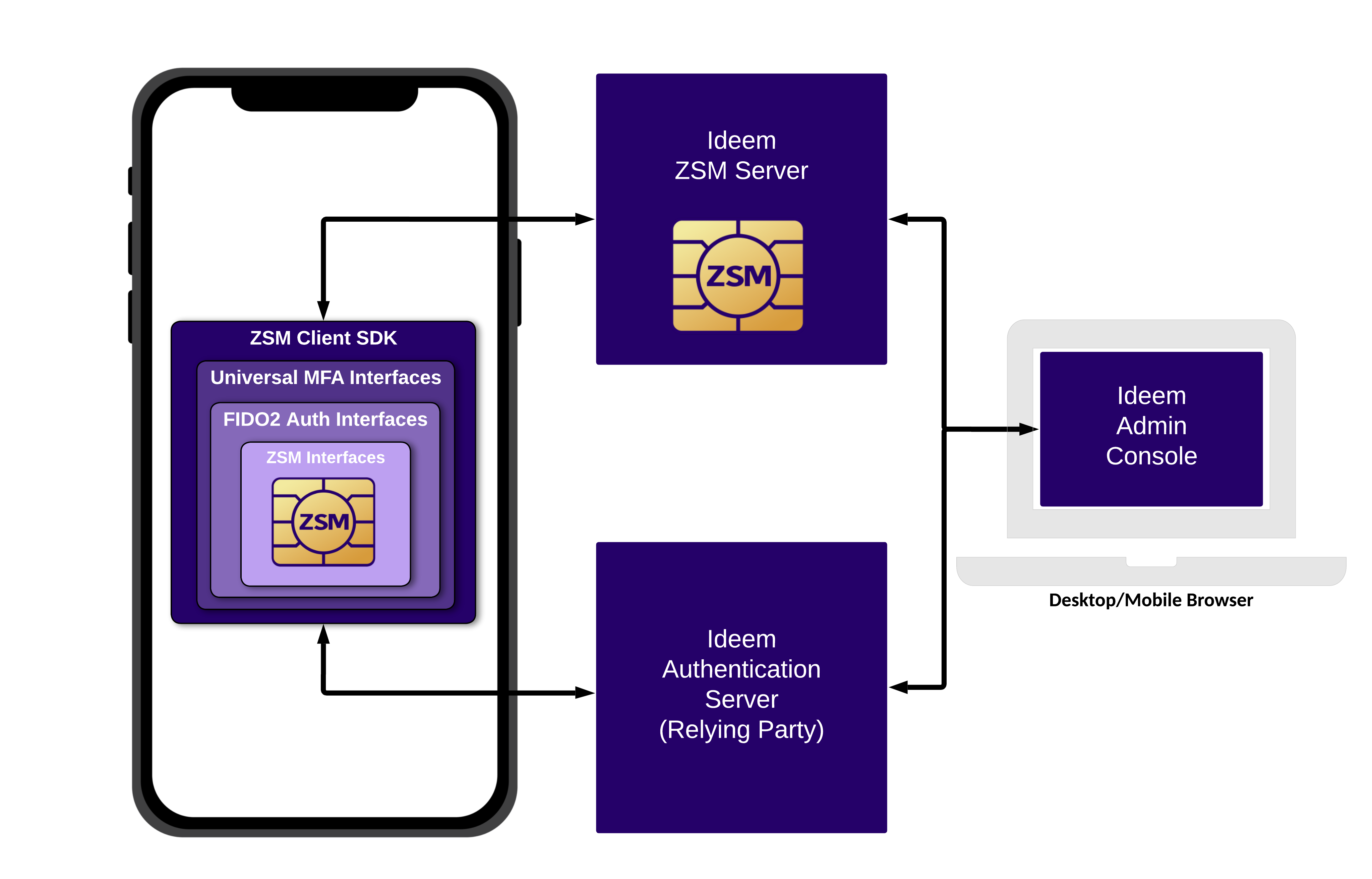
The Ideem system consists of the following components:
- ZSM Crypto Module: The ZSM Crypto Module provides the underlying MPC-based cryptography at the core of Ideem’s ZSM and is FIPS 140-3 certified.
- ZSM Client SDK: The Client SDK contains the ZSM Crypto Module and provides programmatic access to Ideem’s interfaces for FIDO2 Authentication and Universal MFA.
- ZSM Server: The Cryptographic Server contains the ZSM Crypto Module and participates with the ZSM Client SDK in all MPC-based operations.
- Authentication Server: The Authentication Server is responsible for managing idientity profiles and providing WebAuthn relying party capabilities.
- Admin Console: The Admin Console provides our customers with application management, end user management, and development resources.
Here is a high level view of how these system components work together:
Introduction
This documentation covers the Admin Console and programmatic interfaces into the ZSM server components to view and manage the system.
Ideem Admin Console
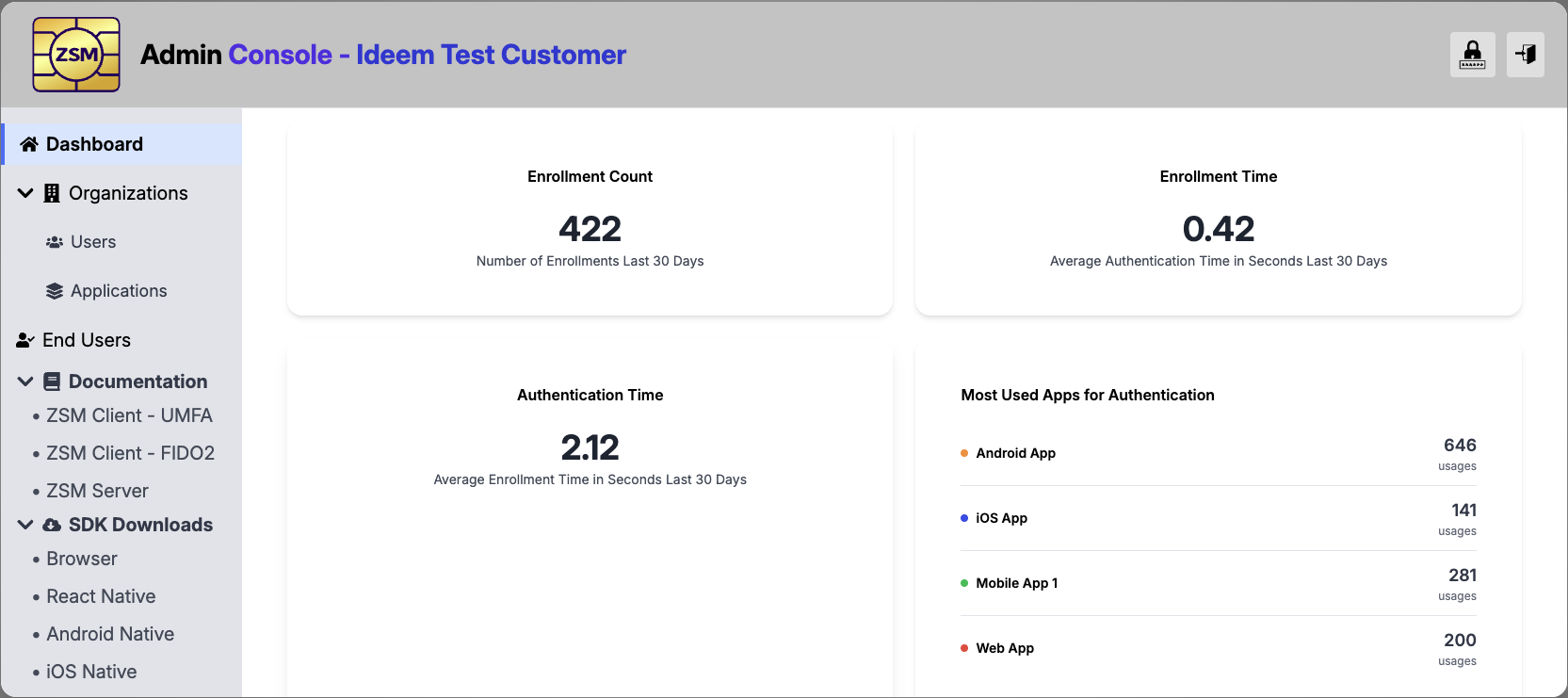
Ideem provides an Admin Console that is used by Customer Organizations user accounts to:
- Manage aspects of their Customer Organization
- Admin Console User Accounts
- Applications
- Manage End Users
- Access Usage Reporting
- Access Documentation and Client SDKs
Customer Organization Management
You will need to provide the following information to Ideem for your Customer Organization:
- Customer Organization Name
- Contact information (Name and Email Address)
Ideem will create a Customer Organization and assign the initial Admin User to the contact provided.
When the initial Admin user logs into the Admin Console, they will have the ability to add other Admin Console users and set their access levels.
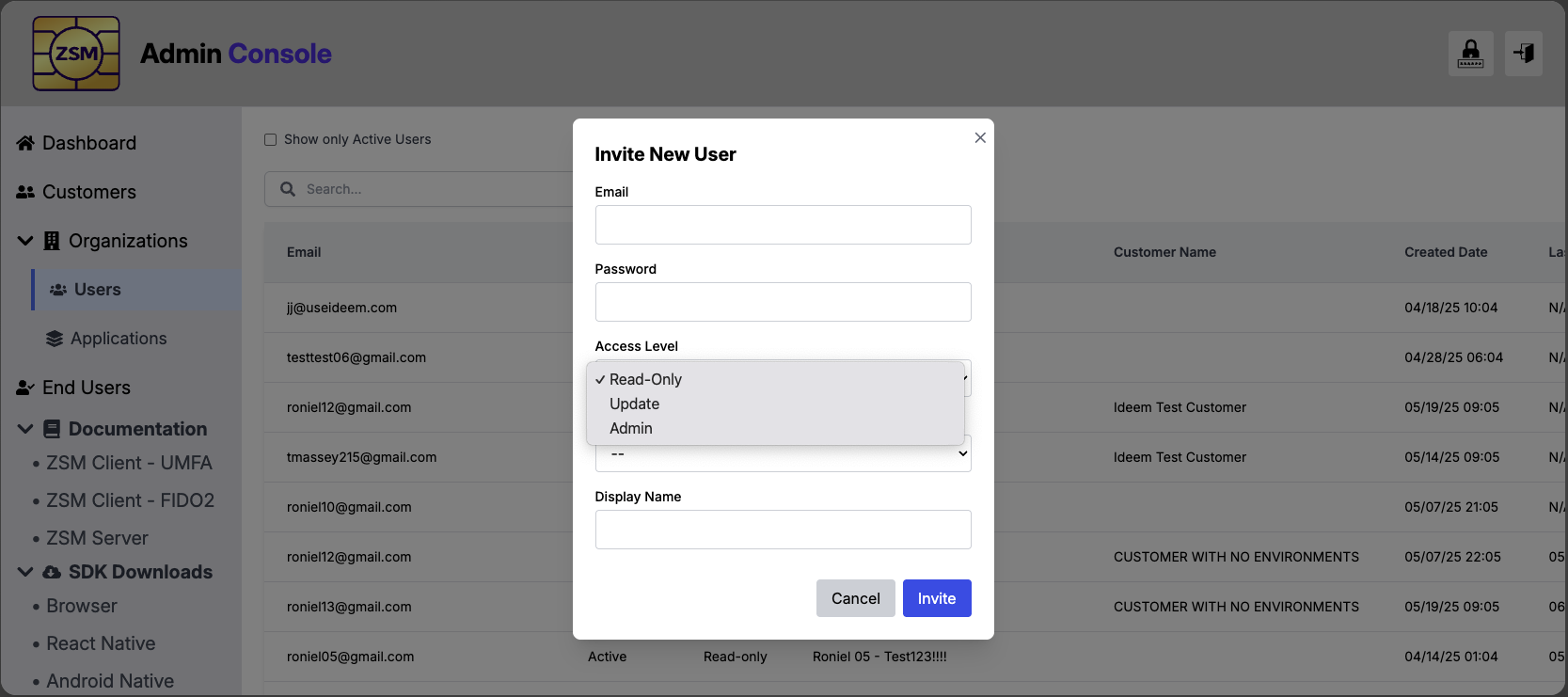
As a Customer Organization user, with the appropriate access levels, you will have the ability to manage Customer Organization users and Applications.
Application Management
From the Applications page, you will find a list of applications that have previously been created for your organization, and have the ability to manage those as well as setup new applications associated with your organziation
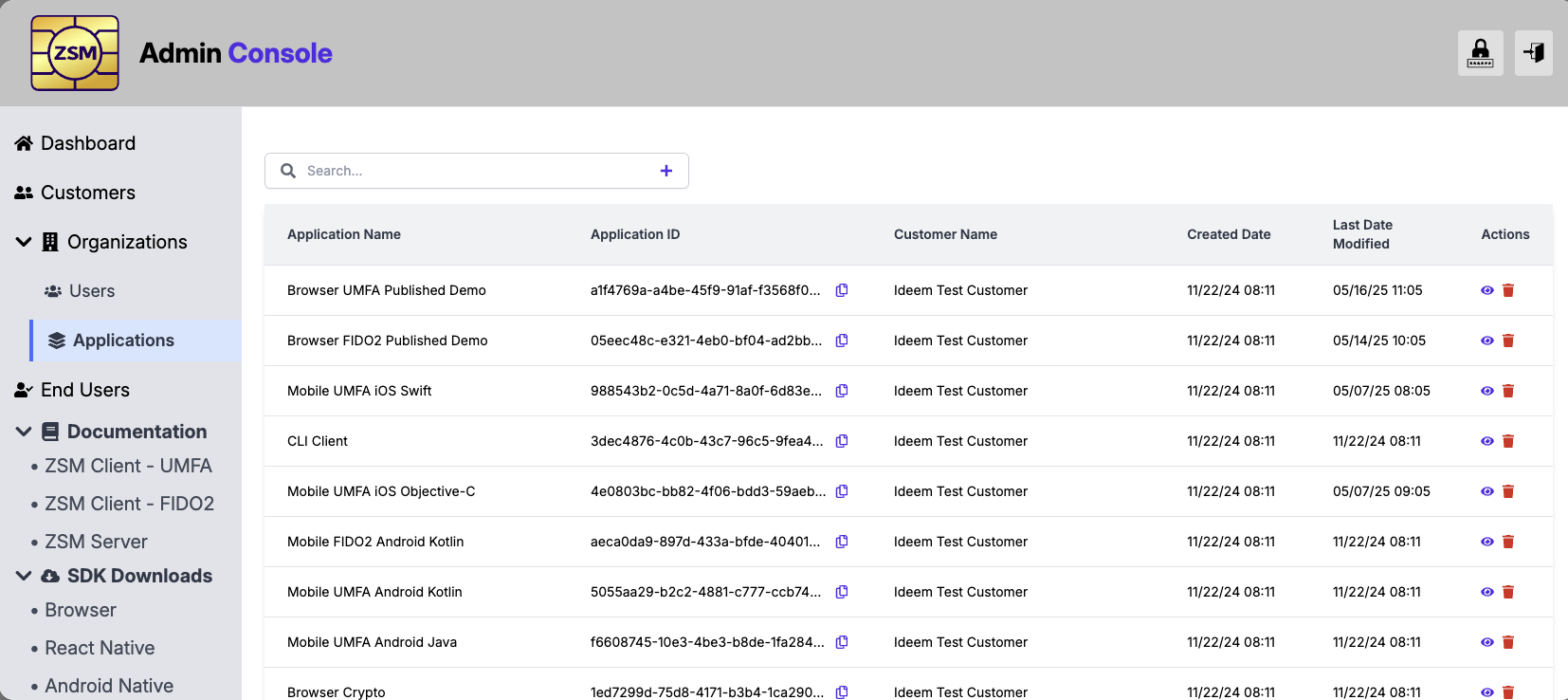
When creating a new application, you will initially just need to provide the Application Name.
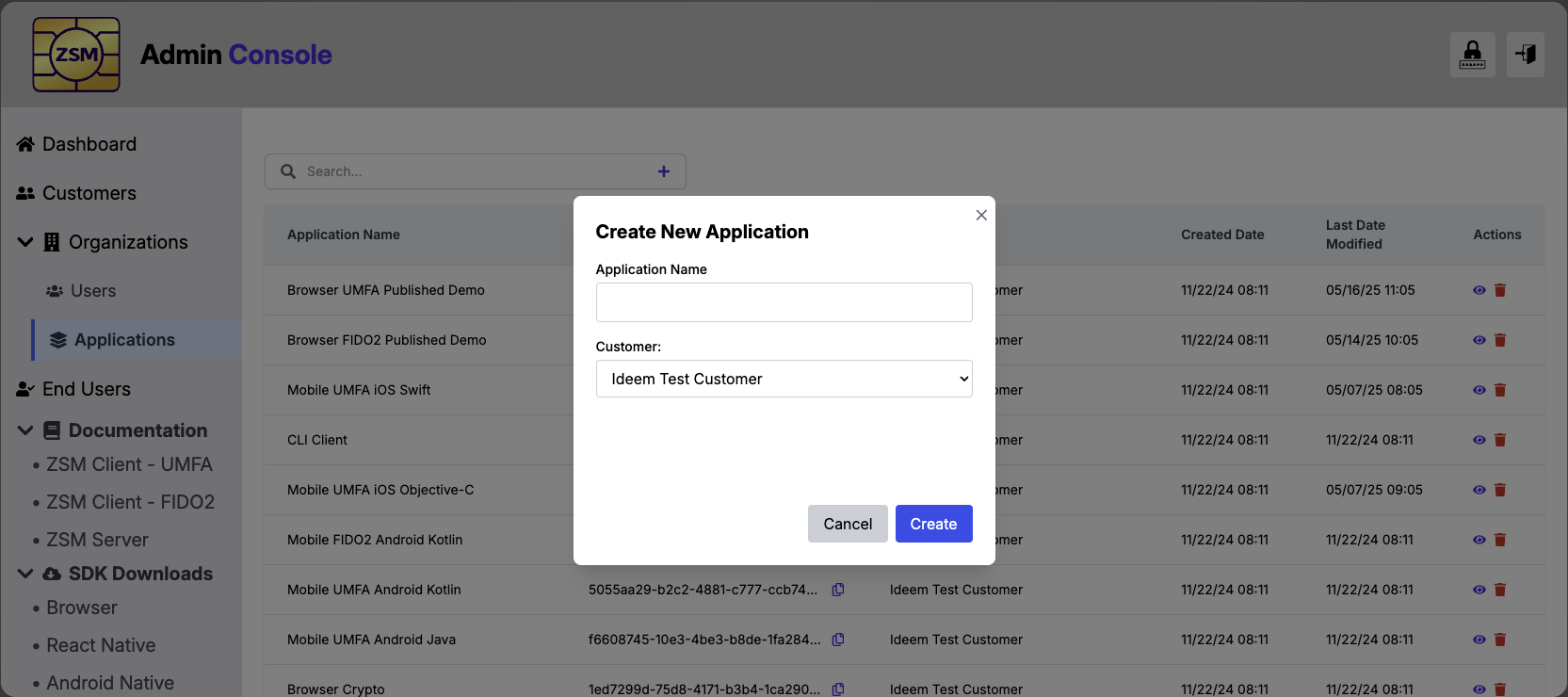
After creating the application, you will receive configuration information you will need when configurating the application that will use the Ideem software.
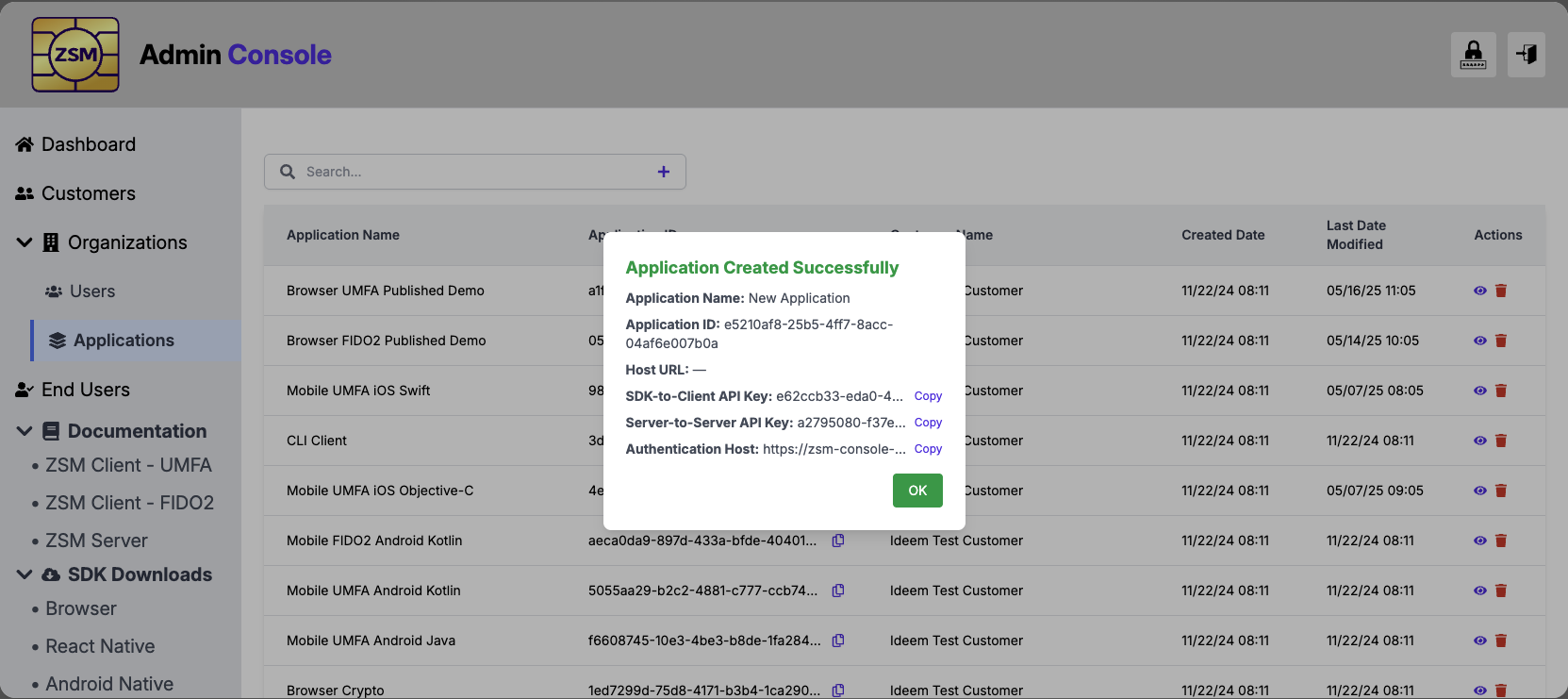
The following information will be provided as configuration information when integrating Ideem's ZSM Client SDK into your application.
application_id: This is a unique identifier for your application.host_url: This points to the SaaS server infrastructure your application will work with.api_key: This is used for access and monitoring of server interactions.
You will be asked to provide a list of origin domains for your browser applications, and bundle/package IDs for you mobile app, which will be used for whitelisting.
The following information will be provided for authenticating and configuring your interactions with the Ideem Authentication Server for your Universal MFA operations.
application_id: This is a unique identifier for your application.host_url: This points to the SaaS server infrastructure your application will work with.api_key: Authorization key tied to your Application for server interations.
From the Application page you can view your applications, update application details, suspend applications, and reactivate suspended applications.
Reference the Documentation and Client SDK sections of the Admin Console for more detail information and to start you application integration.
End Users
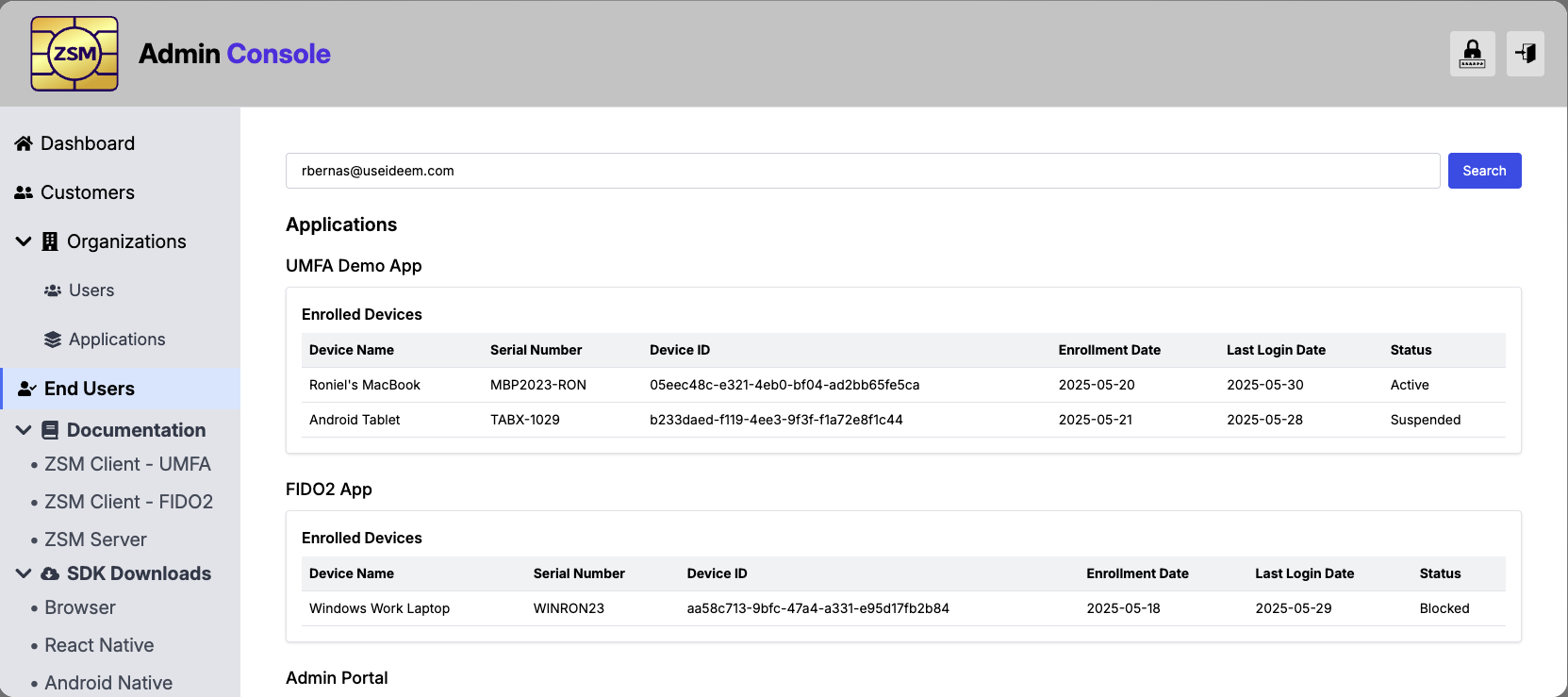
From the End User section of the Admin Console, you can search for an end user, using the identifier you providing for them during enrollment. After entering this identifier you will be shown the Applications they are using and the devies they are enrolled on.
From this page, you will have the ability to suspend/active their usage at the application and/or device levels.
Documentation and SDK Downloads
You can access online documentation for Ideem's FIDO2 Auth and Universal MFA feature sets from the Admin Console menu. You can also donwload the latest SDKs for your targeted platform.
Server Administration API
The ZSM Server supports a set of Management APIs used to manage the system, including organization management, application management, installation management, and consumer management. These are provided as REST APIs and secured through bearer tokens. They are available to customers for programmatic access.
Bearer Tokens
Server administration API endpoints are protected using bearer tokens. An "Authorization" request header with the "Bearer" authentication scheme along with the issued bearer token is added to the API request headers.
For example, assuming CURL is used and a valid bearer token is b8ad1fcc-9624-4c8c-a720-35294656964b, then the
following would return a list of organizations:
$ curl -s -H "Authorization: Bearer b8ad1fcc-9624-4c8c-a720-35294656964b" $ZSM_HOST/api/organizations
For the following examples, 50563d0c-e487-4822-96d8-4af26ef35d38 is used as an example bearer token.
Server API Families
The ZSM Server provides APIs to manage:
Organization API
REST API endpoints exist to list all organizations, view a single organization, add a new organization, update an organization's description, suspend an organization, and activate a suspended organization.
List All Organizations
The organization results are automatically filtered based upon the bearer token. If the token was issued to the vendor organization, all organizations will be included. But if the token was issued to a customer, then only that customer and any partner organizations associated with that customer will be listed.
$ curl -s \
-H "Authorization: Bearer 50563d0c-e487-4822-96d8-4af26ef35d38" \
$ZSM_HOST/api/organizations | jq
{
  "organizations": [
    {
      "organization_id": "bbc79d21-26d0-40c9-8334-2d95acdcbe1d",
      "description": "Ideem",
      "state": "active",
      "created": "2023-09-18 14:46:10.493234 +00:00",
      "modified": "2023-10-19 01:02:57.013323 +00:00"
    },
    {
      "organization_id": "f954b94a-8e3c-438f-95e4-d5f87c9eb570",
      "description": "Better Test Customer Name",
      "state": "active",
      "created": "2023-10-23 16:57:48.409535 +00:00",
      "modified": "2023-10-23 17:00:56.323171 +00:00"
    }
  ],
  "trace_id": "f2fcd04c-f469-4ee4-992a-b93bc0ad4804"
}
View an Organization
In the example below 'f954b94a-8e3c-438f-95e4-d5f87c9eb570' is an example organization identifier.
$ curl -s \
-H "Authorization: Bearer 50563d0c-e487-4822-96d8-4af26ef35d38" \
$ZSM_HOST/api/organizations/f954b94a-8e3c-438f-95e4-d5f87c9eb570 | jq
{
  "organization": {
    "organization_id": "f954b94a-8e3c-438f-95e4-d5f87c9eb570",
    "description": "Better Test Customer Name",
    "state": "active",
    "created": "2023-10-23 16:57:48.409535 +00:00",
    "modified": "2023-10-23 17:00:56.323171 +00:00"
  },
  "trace_id": "950da3ec-9ac7-4172-b032-80d0ce99275d"
}
Add a New Organization
Vendor organizations create new customer and partner organizations using the POST /api/organizations REST API.
Customer organizations also use this same endpoint to create their own partner organizations. Partners cannot create new
organizations of any kind.
The API must be called using a bearer token that has been issued to the organization using the ZSM Server CLI. The token
must be issued with the admin role. See Authentication Token Management for more information.
In all scenarios, the JSON request body must contain a "description" key whose value then becomes the description or name of the new organization.
Example of a vendor organization adding a new customer organization with supported environments:
A vendor organization creates a new customer by calling the POST /api/organizations API using a bearer token issued to
them with administrative rights and passing their own (the vendor's) organization_id as the value in a parent_id key
in the request body.
If the vendor wants to allow the customer to use virtual environments for the customer's applications, then a
supported_environments object which contains a list of supported environments and which environment is the default is
also added to the request body. If the vendor does not include a supported_environments object, the new customer will
be unable to use virtual application environments
NOTE: The ZSM server does not support enabling virtual application environments, nor does it support disabling them, once a customer organization has been created. The decision on whether to support virtual application environments must be made when the customer organization is first created.
In this following example, 401964e2-6ded-45fa-a233-cebdff44806a is a bearer token with the admin role issued to the
vendor whose organization_id is 2bdd119f-302c-4589-8026-90ab4f7171b0:
$ curl -s -X POST \
-H "Authorization: Bearer 401964e2-6ded-45fa-a233-cebdff44806a" \
-H "Content-Type: application/json" \
-d '{"parent_id":"2bdd119f-302c-4589-8026-90ab4f7171b0", "description":"Newer Customer With Environments", \
     "supported_environments":{"default":"TEST","supported":"DEMO,TEST,PROD"}}' \
https://localhost:3000/api/organizations | jq
{
  "organization": {
    "organization_id": "a504d11b-a2a4-40e6-a17c-2132028dff5a",
    "parent_id": "2bdd119f-302c-4589-8026-90ab4f7171b0",
    "organization_type": "customer",
    "description": "Newer Customer With Environments",
    "state": "active",
    "supported_environments": {
      "default": "TEST",
      "supported": "DEMO,PROD,TEST"
    },
    "created": "2025-04-21 19:14:27.653348 +00:00",
    "modified": "2025-04-21 19:14:27.653348 +00:00"
  },
  "trace_id": "ea3bb807-8596-4147-9dfd-9e6aa9df4c92"
}
Example of the vendor organization adding a new customer organization that does not use virtual application environments:
A vendor organization creates a new customer that does not use virtual application environments by calling the
POST /api/organizations API using a bearer token issued to them with administrative rights and passing their own (the
vendor's) organization_id as the value in a parent_id key in the request body.
If the vendor does not include a supported_environments object, the new customer will be unable to use virtual
application environments
NOTE: The ZSM server does not support enabling virtual application environments, nor does it support disabling them, once a customer organization has been created. The decision on whether to support virtual application environments must be made when the customer organization is first created.
In this following example, 401964e2-6ded-45fa-a233-cebdff44806a is a bearer token with the admin role issued to the
vendor whose organization_id is 2bdd119f-302c-4589-8026-90ab4f7171b0:
$ curl -s -X POST \
-H "Authorization: Bearer 401964e2-6ded-45fa-a233-cebdff44806a" \
-H "Content-Type: application/json" \
-d '{"parent_id":"2bdd119f-302c-4589-8026-90ab4f7171b0", "description":"Newer Customer With No Environments"}}' \
https://localhost:3000/api/organizations | jq
{
  "organization": {
    "organization_id": "50e11053-cd0d-4740-aa38-5a86123b4e7a",
    "parent_id": "2bdd119f-302c-4589-8026-90ab4f7171b0",
    "organization_type": "customer",
    "description": "Newer Customer With No Environments",
    "state": "active",
    "created": "2025-04-21 19:16:19.424540 +00:00",
    "modified": "2025-04-21 19:16:19.424540 +00:00"
  },
  "trace_id": "154c7ebf-dd6a-4f81-ba98-514ccc43683b"
}
Example of the vendor organization adding a new partner organization associated with a customer:
A vendor organization creates a new partner organization associated with an existing customer organization by calling
the POST /api/organizations API using a bearer token issued to them with administrative rights and passing the
organization_id of the customer organization with which the partner organization will be associated.
In this following example, 401964e2-6ded-45fa-a233-cebdff44806a is a bearer token with the admin role issued to the
vendor. And, 50e11053-cd0d-4740-aa38-5a86123b4e7 is the organization_id of the customer organization under whom the
new partner organization will be associated.
curl -s -X POST \
-H "Authorization: Bearer 401964e2-6ded-45fa-a233-cebdff44806a" \
-H "Content-Type: application/json" \
-d '{"parent_id":"50e11053-cd0d-4740-aa38-5a86123b4e7a", "description":"Newer Partner Organization"}' \
https://localhost:3000/api/organizations | jq
{
  "organization": {
    "organization_id": "0a1dacac-d599-4e60-a789-69da59735843",
    "parent_id": "50e11053-cd0d-4740-aa38-5a86123b4e7a",
    "organization_type": "partner",
    "description": "Newer Partner Organization",
    "state": "active",
    "created": "2025-04-21 19:18:44.344165 +00:00",
    "modified": "2025-04-21 19:18:44.344165 +00:00"
  },
  "trace_id": "3c946061-64a1-4acc-a8c4-173dbcd5ea9a"
}
A customer organization adding a new partner:
A customer organization creates an associated new partner organization by calling the POST /api/organizations API
using a bearer token issued to them with administrative rights. The caller does not pass a parent_id in this scenario
as the server knows the customer to which the bearer token was assigned and automatically associates the new partner
organization with that customer.
In this following example, 1b0bb6dd-f5df-4d51-99c2-99abca7d49dd is a bearer token with the admin role issued to the
customer organization under whom the new partner organization will be associated.
$ curl -s -X POST \
-H "Authorization: Bearer 1b0bb6dd-f5df-4d51-99c2-99abca7d49dd" \
-H "Content-Type: application/json" \
-d '{"description":"Newer Partner Organization"}' https://localhost:3000/api/organizations | jq
{
  "organization": {
    "organization_id": "82111898-e7eb-4ad8-b65d-b556fd56cb09",
    "parent_id": "50e11053-cd0d-4740-aa38-5a86123b4e7a",
    "organization_type": "partner",
    "description": "Newer Partner Organization",
    "state": "active",
    "created": "2025-04-21 19:20:40.690296 +00:00",
    "modified": "2025-04-21 19:20:40.690296 +00:00"
  },
  "trace_id": "51b11972-2122-44b3-97a4-6e6ed7a73146"
}
Update an Organization's Description
In the example below bbc79d21-26d0-40c9-8334-2d95acdcbe1d is an example organization identifier.
When using the API, pass a JSON header body to the API and include in it a "description" key which the ZSM server uses to update the organization's description.
$ curl -s -X PATCH \
-H "Authorization: Bearer 50563d0c-e487-4822-96d8-4af26ef35d38" \
-H "Content-Type: application/json" \
-d '{"description":"Revised Customer Name"}' \
$ZSM_HOST/api/organizations/bbc79d21-26d0-40c9-8334-2d95acdcbe1d | jq
{
  "organization": {
    "organization_id": "bbc79d21-26d0-40c9-8334-2d95acdcbe1d",
    "parent_id": "178588b1-8962-4b2c-b97a-e5371f353ae9",
    "organization_type": "customer",
    "description": "Revised Customer Name",
    "state": "active",
    "created": "2023-09-18 14:46:10.493234 +00:00",
    "modified": "2025-01-10 16:17:41.797793 +00:00"
  },
  "trace_id": "73d97714-2c9b-469b-9cf8-733721d6e297"
}
Suspend an Organization
In the example below bbc79d21-26d0-40c9-8334-2d95acdcbe1d is an example organization identifier.
No JSON request body is required, and the "/suspend" path at the end of the request URL determines the action taken on the organization.
$ curl -s -X PATCH \
-H "Authorization: Bearer 50563d0c-e487-4822-96d8-4af26ef35d38" \
$ZSM_HOST/api/organizations/2746c097-3e8a-4f46-80ba-be68c377b4e9/suspend | jq
{
  "organization": {
    "organization_id": "bbc79d21-26d0-40c9-8334-2d95acdcbe1d",
    "parent_id": "178588b1-8962-4b2c-b97a-e5371f353ae9",
    "organization_type": "customer",
    "description": "Revised Customer Name",
    "state": "suspended",
    "created": "2023-09-18 14:46:10.493234 +00:00",
    "modified": "2025-01-10 16:19:37.581064 +00:00"
  },
  "trace_id": "00cf6a34-ff97-421b-bb57-27513c86983c"
}
Activate a Suspended Organization
In the example below bbc79d21-26d0-40c9-8334-2d95acdcbe1d is an example organization identifier.
No JSON request body is required, and the "/activate" path at the end of the request URL determines the action taken on the organization.
$ curl -s -X PATCH \
-H "Authorization: Bearer 50563d0c-e487-4822-96d8-4af26ef35d38" \
$ZSM_HOST/api/organizations/2746c097-3e8a-4f46-80ba-be68c377b4e9/activate | jq
{
  "organization": {
    "organization_id": "bbc79d21-26d0-40c9-8334-2d95acdcbe1d",
    "parent_id": "178588b1-8962-4b2c-b97a-e5371f353ae9",
    "organization_type": "customer",
    "description": "Revised Customer Name",
    "state": "active",
    "created": "2023-09-18 14:46:10.493234 +00:00",
    "modified": "2025-01-10 16:19:48.375166 +00:00"
  },
  "trace_id": "052c3e54-0e52-4e37-a85f-e8457be33745"
}
View Supported Environments for an Organization
In the example below 'bbc79d21-26d0-40c9-8334-2d95acdcbe1d' is an example organization identifier.
$ curl -s \
-H "Authorization: Bearer 50563d0c-e487-4822-96d8-4af26ef35d38" \
$ZSM_HOST/api/organizations/bbc79d21-26d0-40c9-8334-2d95acdcbe1d/environments | jq
{
  "organization_id": "cf282be7-7c15-456c-8dee-3fb450da9216",
  "default": "TEST"
  "supported": "TEST",
  "trace_id": "2479c3a9-55b5-4120-afec-dcba9cb224e6"
}
Set the Default Environment for an Organization
In the example below 'bbc79d21-26d0-40c9-8334-2d95acdcbe1d' is an example organization identifier.
$ curl -s -X PATCH \
-H "Authorization: Bearer 50563d0c-e487-4822-96d8-4af26ef35d38" \
-H "Content-Type: application/json" \
-d '{"default":"DEMO"}' \
$ZSM_HOST/api/organizations/bbc79d21-26d0-40c9-8334-2d95acdcbe1d/environments | jq
{
  "organization_id": "cf282be7-7c15-456c-8dee-3fb450da9216",
  "default": "DEMO"
  "supported": "DEMO,TEST"
  "trace_id": "2479c3a9-55b5-4120-afec-dcba9cb224e6"
}
Add New Supported Environments to an Organization
In the example below, a JSON header body is passed to the API. It must contain an "environment" key whose value is the
name of the environment to be added to the environment list for the specified application. In this example, the
application identifier is 3dec4876-4c0b-43c7-96c5-9fea46ef0102.
$ curl -s -X PATCH \
-H "Authorization: Bearer 50563d0c-e487-4822-96d8-4af26ef35d38" \
-H "Content-Type: application/json" \
-d '{"environment":"PROD"}' \
$ZSM_HOST/api/organizations/bbc79d21-26d0-40c9-8334-2d95acdcbe1d/environments | jq
{
  "application_id": "3dec4876-4c0b-43c7-96c5-9fea46ef0102",
  "default": "DEMO"
  "supported": "DEMO,PROD,TEST"
  "trace_id": "3399ae5e-056b-43a0-b4be-0c1d1962e707"
}
Remove an Environment from an Organization
In the example below, a JSON header body is passed to the API. It must contain an "environment" key whose value is the
name of the environment to be removed from the environment list for the specified application. In this example the
application identifier is 3dec4876-4c0b-43c7-96c5-9fea46ef0102.
$ curl -s -X DELETE \
-H "Authorization: Bearer b59479e0-cd3b-4c00-9a7a-fde7e3e1cc3e" \
-H "Content-Type: application/json" \
-d '{"environment":"TEST"}' \
ZSM_HOST/api/organizations/bbc79d21-26d0-40c9-8334-2d95acdcbe1d/environments | jq
{
  "application_id": "3dec4876-4c0b-43c7-96c5-9fea46ef0102",
  "default": "DEMO"
  "supported": "DEMO,PROD"
  "trace_id": "55ad1d42-f226-4b38-9f9a-422863fe0eb4"
}
Application and Application Environments API
REST API endpoints exist to list all applications, view a single application, register a new application, update an existing application's description, suspend an application, and activate a suspended application.
If a customer is enabled to support virtual application environments, additional REST API endpoints exist to view the
environments associated with an application, add a new environment to the list, and to remove an environment from the
list. Whenever a new application is created, if no environments are specified, it is created with the default for the
customer. Each application must always have at least one environment defined. An environment cannot be removed once one
or more keysets have been generated for an enrollment for that application within the environment. Environment names are
not case-sensitive and are always stored and displayed in uppercase. If a customer is not enabled to support virtual
application environments, these endpoints are not available and the allowed_environments attribute is not returned for
applications associated with the customer.
List All Applications
The application results are automatically filtered based upon the bearer token. If the token was issued to the vendor organization, all applications will be included. But if the token was issued to a customer, only applications associated with that customer will be listed. If the token was issued to a partner, the partner's customer's applications will be listed.
The applications array will be empty if no applications exist for the vendor or customer.
In the example below, organization 352baf02-adc3-4aed-8254-73f8677fc5a2 has only registered a single organization, and the API call is being made using a bearer token associated with that organization.
$ curl -s \
-H "Authorization: Bearer b59479e0-cd3b-4c00-9a7a-fde7e3e1cc3e" \
$ZSM_HOST/api/applications | jq
{
  "applications": [
    {
      "application_id": "c8a75b96-c11f-4b44-a06d-6a638f3337e5",
      "organization_id": "352baf02-adc3-4aed-8254-73f8677fc5a2",
      "description": "Demo CLI Client",
      "allowed_environments": "TEST",
      "state": "active",
      "created": "2025-01-10 15:43:16.371796 +00:00",
      "modified": "2025-01-10 15:43:16.371796 +00:00"
    }
  ],
  "trace_id": "1d1ad8a2-8efa-4f71-ad9f-0f9a42e497b9"
}
View an Application
In the example below '3dec4876-4c0b-43c7-96c5-9fea46ef0102' is an example application identifier.
$ curl -s \
-H "Authorization: Bearer 50563d0c-e487-4822-96d8-4af26ef35d38" \
$ZSM_HOST/api/applications/3dec4876-4c0b-43c7-96c5-9fea46ef0102 | jq
{
  "application": {
    "application_id": "3dec4876-4c0b-43c7-96c5-9fea46ef0102",
    "organization_id": "bbc79d21-26d0-40c9-8334-2d95acdcbe1d",
    "description": "Demo CLI Client",
    "allowed_environments": "TEST",
    "state": "active",
    "created": "2023-09-18 14:46:10.493234 +00:00",
    "modified": "2023-10-18 00:36:50.876753 +00:00"
  },
  "trace_id": "1b9d2b0a-771f-4100-b1a7-c20cef924eaf"
}
Register a New Application
In the example below, a JSON body is passed to the API. It must contain a "description" key whose value then becomes the
description or name of the new application. It must also contain an "organization_id" key whose value is the customer
organization identifier to which the application will be registered. In this example, it is
bbc79d21-26d0-40c9-8334-2d95acdcbe1d.
The bearer token used to authenticate to this API must be issued to either the vendor or the customer and have either the administrator or application administrator role. Partner organizations cannot register new applications.
The JSON body may also optionally contain an "application_id" key. If provided and an application with that identifier is not already registered, the new application will be registered using the provided identifier. Otherwise, a random identifier will be assigned. ZSM uses UUIDs for application identifiers. If the developer has a non-UUID application identifier, they should hash what they have into a UUID (MD5 could be used for this purpose).
Example where only the organization identifier and a description are provided:
$ curl -s -X POST \
-H "Authorization: Bearer b59479e0-cd3b-4c00-9a7a-fde7e3e1cc3e" \
-H "Content-Type: application/json" \
-d '{"organization_id":"352baf02-adc3-4aed-8254-73f8677fc5a2", "description":"New Demo Application"}' \
$ZSM_HOST/api/applications | jq
{
  "application": {
    "application_id": "8e548083-f1bd-4b76-8d83-e8f03c1dec2a",
    "organization_id": "352baf02-adc3-4aed-8254-73f8677fc5a2",
    "description": "New Demo Application",
    "allowed_environments": "TEST",
    "state": "active",
    "created": "2025-01-10 16:47:03.277547 +00:00",
    "modified": "2025-01-10 16:47:03.277547 +00:00"
  },
  "trace_id": "6b7a4526-e862-4e72-8f64-1d32f4c65de0"
}
Example where an application identifier, specifically aacac7c4-7305-4372-88c4-62c1a9a3c285, is also provided:
$ curl -s -X POST \
-H "Authorization: Bearer b59479e0-cd3b-4c00-9a7a-fde7e3e1cc3e" \
-H "Content-Type: application/json" \
-d '{"organization_id":"352baf02-adc3-4aed-8254-73f8677fc5a2", "application_id":"aacac7c4-7305-4372-88c4-62c1a9a3c285", "description":"New Demo Application"}' \
$ZSM_HOST/api/applications | jq
{
  "application": {
    "application_id": "aacac7c4-7305-4372-88c4-62c1a9a3c285",
    "organization_id": "352baf02-adc3-4aed-8254-73f8677fc5a2",
    "description": "New Demo Application",
    "allowed_environments": "TEST",
    "state": "active",
    "created": "2025-01-10 16:49:36.188732 +00:00",
    "modified": "2025-01-10 16:49:36.188732 +00:00"
  },
  "trace_id": "96820f56-5fec-41c6-bd5a-c5ce3a15e495"
}
Update an Application Description
In the example below 'cf282be7-7c15-456c-8dee-3fb450da9216' is an example application identifier. And, a JSON header body is passed to the API. It must contain a "description" key whose value is then used to update the application's description.
$ curl -s -X PATCH \
-H "Authorization: Bearer b59479e0-cd3b-4c00-9a7a-fde7e3e1cc3e" \
-H "Content-Type: application/json" \
-d '{"description":"Revised Demo Application Name"}' \
$ZSM_HOST/api/applications/aacac7c4-7305-4372-88c4-62c1a9a3c285 | jq
{
  "application": {
    "application_id": "aacac7c4-7305-4372-88c4-62c1a9a3c285",
    "organization_id": "352baf02-adc3-4aed-8254-73f8677fc5a2",
    "description": "Revised Demo Application Name",
    "allowed_environments": "TEST",
    "state": "active",
    "created": "2025-01-10 16:49:36.188732 +00:00",
    "modified": "2025-01-10 16:54:40.395668 +00:00"
  },
  "trace_id": "7b7acdc6-bec2-4568-b5cf-b7ae0cf984ea"
}
Suspend an Application
In the example below cf282be7-7c15-456c-8dee-3fb450da9216 is an example application identifier.
No JSON request body is required, and the "/suspend" path at the end of the request URL determines the action taken on the application.
$ curl -s -X PATCH \
-H "Authorization: Bearer 50563d0c-e487-4822-96d8-4af26ef35d38" \
$ZSM_HOST/api/applications/cf282be7-7c15-456c-8dee-3fb450da9216/suspend | jq
{
  "application": {
    "application_id": "cf282be7-7c15-456c-8dee-3fb450da9216",
    "organization_id": "bbc79d21-26d0-40c9-8334-2d95acdcbe1d",
    "description": "Revised Demonstration Application",
    "allowed_environments": "TEST",
    "state": "suspended",
    "created": "2023-10-24 17:18:52.689740 +00:00",
    "modified": "2023-10-24 17:23:10.670876 +00:00"
  },
  "trace_id": "8f992467-2cbb-4b3f-a298-f7dea7bed158"
}
Activate a Suspended Application
In the example below 'cf282be7-7c15-456c-8dee-3fb450da9216' is an example application identifier. No JSON request body is required, and the "/activate" path at the end of the request URL determines the action taken on the application.
$ curl -s -X PATCH \
-H "Authorization: Bearer 50563d0c-e487-4822-96d8-4af26ef35d38" \
$ZSM_HOST/api/applications/cf282be7-7c15-456c-8dee-3fb450da9216/activate | jq
{
  "application": {
    "application_id": "cf282be7-7c15-456c-8dee-3fb450da9216",
    "organization_id": "bbc79d21-26d0-40c9-8334-2d95acdcbe1d",
    "description": "Revised Demonstration Application",
    "allowed_environments": "TEST",
    "state": "active",
    "created": "2023-10-24 17:18:52.689740 +00:00",
    "modified": "2023-10-24 17:23:41.302166 +00:00"
  },
  "trace_id": "7a626fe9-ce25-4b87-8eb2-b12a7ee20143"
}
View Application Environments
In the example below 'cf282be7-7c15-456c-8dee-3fb450da9216' is an example application identifier.
$ curl -s \
-H "Authorization: Bearer 50563d0c-e487-4822-96d8-4af26ef35d38" \
$ZSM_HOST/api/environments/cf282be7-7c15-456c-8dee-3fb450da9216 | jq
{
  "application_id": "cf282be7-7c15-456c-8dee-3fb450da9216",
  "environments": "TEST",
  "trace_id": "2479c3a9-55b5-4120-afec-dcba9cb224e6"
}
Add a New Environment to an Application
In the example below, a JSON header body is passed to the API. It must contain an "environment" key whose value is the
name of the environment to be added to the environment list for the specified application. In this example, the
application identifier is 3dec4876-4c0b-43c7-96c5-9fea46ef0102.
$ curl -s -X POST \
-H "Authorization: Bearer 50563d0c-e487-4822-96d8-4af26ef35d38" \
-H "Content-Type: application/json" \
-d '{"environment":"DEMO"}' \
$ZSM_HOST/api/environments/3dec4876-4c0b-43c7-96c5-9fea46ef0102 | jq
{
  "application_id": "3dec4876-4c0b-43c7-96c5-9fea46ef0102",
  "environments": "DEMO,TEST",
  "message": "DEMO environment added to application",
  "trace_id": "3399ae5e-056b-43a0-b4be-0c1d1962e707"
}
Remove an Environment from an Application
In the example below, a JSON header body is passed to the API. It must contain an "environment" key whose value is the
name of the environment to be removed from the environment list for the specified application. In this example the
application identifier is aacac7c4-7305-4372-88c4-62c1a9a3c285.
$ curl -s -X DELETE \
-H "Authorization: Bearer b59479e0-cd3b-4c00-9a7a-fde7e3e1cc3e" \
-H "Content-Type: application/json" \
-d '{"environment":"TEST"}' \
ZSM_HOST/api/environments/aacac7c4-7305-4372-88c4-62c1a9a3c285 | jq
{
  "application_id": "aacac7c4-7305-4372-88c4-62c1a9a3c285",
  "environments": "DEMO",
  "trace_id": "55ad1d42-f226-4b38-9f9a-422863fe0eb4"
}
Consumers
Add a Consumer
The /api/consumers endpoint supports adding a new consumer. The following JSON request body is required:
consumer_id- The unique identifier for the consumer. If a consumer already exists, the existing consumer will be returned.
$ curl -s -X POST \
-H "Authorization: Bearer b59479e0-cd3b-4c00-9a7a-fde7e3e1cc3e" \
-H "Content-Type: application/json" \
-d '{"consumer_id":"c87a9242-1afc-43b8-80e0-e4767c6f9c47"}' \
$ZSM_HOST/api/consumers | jq
{
  "consumer": {
    "consumer_id": "c87a9242-1afc-43b8-80e0-e4767c6f9c47",
    "state": "active",
    "created": "2025-01-10 19:54:19.212992 +00:00",
    "modified": "2025-01-10 19:54:19.212992 +00:00"
  },
  "trace_id": "bda80931-4dda-44e7-abd2-1df026b10539"
}
View a Consumer
In the example below c87a9242-1afc-43b8-80e0-e4767c6f9c47 is an example consumer identifier.
$ curl -s \
-H "Authorization: Bearer b59479e0-cd3b-4c00-9a7a-fde7e3e1cc3e" \
$ZSM_HOST/api/consumers/c87a9242-1afc-43b8-80e0-e4767c6f9c47 | jq
{
  "consumer": {
    "consumer_id": "c87a9242-1afc-43b8-80e0-e4767c6f9c47",
    "state": "active",
    "created": "2025-01-10 19:54:19.212992 +00:00",
    "modified": "2025-01-10 19:54:19.212992 +00:00"
  },
  "trace_id": "91ea1b4a-ebfb-4b91-b8be-8bca4ee17d61"
}
Activate Consumer
In the example below c87a9242-1afc-43b8-80e0-e4767c6f9c47 is an example consumer identifier.
No JSON request body is required, and the "/activate" path at the end of the request URL determines the action taken on the consumer.
$ curl -s -X PATCH \
-H "Authorization: Bearer b59479e0-cd3b-4c00-9a7a-fde7e3e1cc3e" \
$ZSM_HOST/api/consumers/c87a9242-1afc-43b8-80e0-e4767c6f9c47/activate | jq
{
  "consumer": {
    "consumer_id": "c87a9242-1afc-43b8-80e0-e4767c6f9c47",
    "state": "active",
    "created": "2025-01-10 19:54:19.212992 +00:00",
    "modified": "2025-01-10 20:05:41.678346 +00:00"
  },
  "trace_id": "1a9ea8e7-ecf1-4924-adcd-642c5df6144f"
}
Suspend Consumer
In the example below c87a9242-1afc-43b8-80e0-e4767c6f9c47 is an example consumer identifier.
No JSON request body is required, and the "/suspend" path at the end of the request URL determines the action taken on the consumer.
$ curl -s -X PATCH \
-H "Authorization: Bearer b59479e0-cd3b-4c00-9a7a-fde7e3e1cc3e" \
$ZSM_HOST/api/consumers/c87a9242-1afc-43b8-80e0-e4767c6f9c47/suspend | jq
{
  "consumer": {
    "consumer_id": "c87a9242-1afc-43b8-80e0-e4767c6f9c47",
    "state": "suspended",
    "created": "2025-01-10 19:54:19.212992 +00:00",
    "modified": "2025-01-10 20:05:51.330682 +00:00"
  },
  "trace_id": "de3760bb-7159-475f-b671-7e38f8e4f3d0"
}
Retrieve Consumers
The /api/consumers endpoint supports retrieving a paginated list of consumers filtered by various criteria. The
following optional query parameters are supported:
organization_ids- The organization identifier(s) to filter consumers by.consumer_ids- The consumer identifier(s) to filter consumers by.installation_ids- The installation identifier(s) to filter consumers by.application_ids- The application identifier(s) to filter consumers by.enrollment_ids- The enrollment identifier(s) to filter consumers by.state- The state of the consumer(s) to filter by. Valid values areactiveandsuspended.page- The page number to retrieve. If a page parameter is not provided, all consumers up to the default page_size will be returned. If paging is used, page indexing starts at 1.page_size- The number of consumers to retrieve per page. Default is 100.order- The order in which to sort the consumers. Valid values areascanddesc. Default isasc.
NOTE: With curl in some shells, be sure to quote the URL when using query parameters. Otherwise, the
&will be interpreted as a request to run the command as a background process.
Get All Consumers
The application results are automatically filtered based upon the bearer token. If the token was issued to the vendor organization, all consumers will be included. But if the token was issued to a customer, only consumers associated with that customer will be listed.
In the example below, the organization to which the bearer token was issued has only three consumers.
$ curl -s \
-H "Authorization: Bearer b59479e0-cd3b-4c00-9a7a-fde7e3e1cc3e" \
"$ZSM_HOST/api/consumers" | jq
{
  "consumers": [
    {
      "consumer_id": "00000000-0000-4000-b000-000000000002",
      "state": "active",
      "created": "2023-06-21 14:17:15.715498 +00:00",
      "modified": "2023-06-21 14:17:15.715498 +00:00"
    },
    {
      "consumer_id": "00000000-0000-4000-b000-00000000000c",
      "state": "active",
      "created": "2023-06-21 14:17:15.715498 +00:00",
      "modified": "2023-06-21 14:17:15.715498 +00:00"
    },
    {
      "consumer_id": "00000000-0000-4000-b000-00000000000d",
      "state": "active",
      "created": "2023-06-21 14:17:15.715498 +00:00",
      "modified": "2023-06-21 14:17:15.715498 +00:00"
    }
  ],
  "total": 3,
  "page_size": 100
}

$ curl -s \
-H "Authorization: Bearer b59479e0-cd3b-4c00-9a7a-fde7e3e1cc3e" \
"$ZSM_HOST/api/consumers?page=1&page_size=2" | jq
{
  "consumers": [
    {
      "consumer_id": "00000000-0000-4000-b000-000000000002",
      "state": "active",
      "created": "2023-06-21 14:17:15.715498 +00:00",
      "modified": "2023-06-21 14:17:15.715498 +00:00"
    },
    {
      "consumer_id": "00000000-0000-4000-b000-00000000000c",
      "state": "active",
      "created": "2023-06-21 14:17:15.715498 +00:00",
      "modified": "2023-06-21 14:17:15.715498 +00:00"
    }
  ],
  "total": 3,
  "page": 1,
  "page_size": 2
}

$ curl -s \
-H "Authorization: Bearer b59479e0-cd3b-4c00-9a7a-fde7e3e1cc3e" \
"$ZSM_HOST/api/consumers?page=2&page_size=2" | jq
{
  "consumers": [
    {
      "consumer_id": "00000000-0000-4000-b000-00000000000d",
      "state": "active",
      "created": "2023-06-21 14:17:15.715498 +00:00",
      "modified": "2023-06-21 14:17:15.715498 +00:00"
    }
  ],
  "total": 3,
  "page": 2,
  "page_size": 2
}
Get all Active Consumers Example
$ curl -s \
-H "Authorization: Bearer b59479e0-cd3b-4c00-9a7a-fde7e3e1cc3e" \
$ZSM_HOST/api/consumers?state="active" | jq
{
  "consumers": [
    {
      "consumer_id": "00000000-0000-4000-b000-000000000002",
      "state": "active",
      "created": "2023-06-21 14:17:15.715498 +00:00",
      "modified": "2023-06-21 14:17:15.715498 +00:00"
    },
    {
      "consumer_id": "00000000-0000-4000-b000-00000000000c",
      "state": "active",
      "created": "2023-06-21 14:17:15.715498 +00:00",
      "modified": "2023-06-21 14:17:15.715498 +00:00"
    },
    {
      "consumer_id": "00000000-0000-4000-b000-00000000000d",
      "state": "active",
      "created": "2023-06-21 14:17:15.715498 +00:00",
      "modified": "2023-06-21 14:17:15.715498 +00:00"
    }
  ],
  "total": 3,
  "page_size": 100
}
Installations
Installations uniquely represent either hardware devices or an app in an instance of a browser. A device could therefore have multiple installations: a native app on that device, an app running under Chrome, and another app running under Safari.
Add an Installation
The /api/installations endpoint supports adding a new installation. The following JSON request body is required:
installation_id- The unique identifier for the installation. If an installation already exists, the existing installation will be returned.description- A description of the installation.
The default state of an installation is unregistered. However, if the server has been built with the auto-verify
feature. Or, if verification is provided through a third-party integration or other
custom verification approach, devices may be automatically verified.
$ curl -s -X POST \
-H "Authorization: Bearer b59479e0-cd3b-4c00-9a7a-fde7e3e1cc3e" \
-H "Content-Type: application/json" \
-d '{"installation_id": "cf282be7-7c15-456c-8dee-3fb450da9216", "description": "Test Installation"}' \
$ZSM_HOST/api/installations | jq
{
  "installation": {
    "installation_id": "cf282be7-7c15-456c-8dee-3fb450da9216",
    "description": "Test Installation",
    "state": "verified",
    "created": "2025-01-10 21:13:01.689642 +00:00",
    "modified": "2025-01-10 21:13:01.689642 +00:00"
  },
  "trace_id": "3fbd139a-4ca5-4524-9b1a-d4363ffe0cbe"
}
View an Installation
In the example below cf282be7-7c15-456c-8dee-3fb450da9216 is an example installation identifier.
$ curl -s \
-H "Authorization: Bearer 50563d0c-e487-4822-96d8-4af26ef35d38" \
$ZSM_HOST/api/installations/cf282be7-7c15-456c-8dee-3fb450da9216 | jq
{
  "installation": {
    "installation_id": "cf282be7-7c15-456c-8dee-3fb450da9216",
    "description": "Test Installation",
    "state": "verified",
    "created": "2025-01-10 21:13:01.689642 +00:00",
    "modified": "2025-01-10 21:13:01.689642 +00:00"
  },
  "trace_id": "f6b11f77-e749-4f72-9f24-fd36cb83729e"
}
Update an Installation's Description
In the example below cf282be7-7c15-456c-8dee-3fb450da9216 is an example installation identifier.
When using the API, pass a JSON header body to the API and include in it a "description" key which the ZSM server uses to update the installation's description.
$ curl -s -X PATCH \
-H "Authorization: Bearer b59479e0-cd3b-4c00-9a7a-fde7e3e1cc3e" \
-H "Content-Type: application/json" \
-d '{"description":"Revised Test Installation"}' \
$ZSM_HOST/api/installations/cf282be7-7c15-456c-8dee-3fb450da9216 | jq
{
  "installation": {
    "installation_id": "cf282be7-7c15-456c-8dee-3fb450da9216",
    "description": "Revised Test Installation",
    "state": "verified",
    "created": "2025-01-10 21:13:01.689642 +00:00",
    "modified": "2025-01-10 21:19:40.477453 +00:00"
  },
  "trace_id": "d5938f3f-c581-4c8f-8eab-1d10db5e3fb1"
}
Suspend an Installation
In the example below cf282be7-7c15-456c-8dee-3fb450da9216 is an example installation identifier.
No JSON request body is required, and the "/suspend" path at the end of the request URL determines the action taken on the installation.
$ curl -s -X PATCH \
-H "Authorization: Bearer b59479e0-cd3b-4c00-9a7a-fde7e3e1cc3e" \
$ZSM_HOST/api/installations/cf282be7-7c15-456c-8dee-3fb450da9216/suspend | jq
{
  "installation": {
    "installation_id": "cf282be7-7c15-456c-8dee-3fb450da9216",
    "description": "Revised Test Installation",
    "state": "suspended",
    "created": "2025-01-10 21:13:01.689642 +00:00",
    "modified": "2025-01-10 21:21:18.367543 +00:00"
  },
  "trace_id": "dce727d3-693d-449b-b299-239131d5692c"
}
Re-verify a Suspended Installation
In the example below cf282be7-7c15-456c-8dee-3fb450da9216 is an example installation identifier.
No JSON request body is required, and the "/verify" path at the end of the request URL determines the action taken on the installation.
$ curl -s -X PATCH \
-H "Authorization: Bearer b59479e0-cd3b-4c00-9a7a-fde7e3e1cc3e" \
$ZSM_HOST/api/installations/cf282be7-7c15-456c-8dee-3fb450da9216/verify | jq
{
  "installation": {
    "installation_id": "cf282be7-7c15-456c-8dee-3fb450da9216",
    "description": "Revised Test Installation",
    "state": "verified",
    "created": "2025-01-10 21:13:01.689642 +00:00",
    "modified": "2025-01-10 21:26:11.444351 +00:00"
  },
  "trace_id": "d010ba99-2724-4ca8-94ae-299a2b2c1b62"
}
Retrieve Installations
The /api/installations endpoint supports retrieving a paginated list of installations filtered by various criteria.
The following optional query parameters are supported:
organization_ids- The organization identifier(s) to filter installations by.consumer_ids- The consumer identifier(s) to filter installations by.installation_ids- The installation identifier(s) to filter installations by.installation_description- The description of the installations(s) to filter by.installation_desc_search_mode- The search mode for the installation description. Valid values areexact,contains, orstartswith. Default isexact.application_ids- The application identifier(s) to filter installations by.enrollment_ids- The enrollment identifier(s) to filter installations by.state- The state of the installations(s) to filter by. Valid values areactiveandsuspended.page- The page number to retrieve. If a page parameter is not provided, all consumers up to the default page_size will be returned. If paging is used, page indexing starts at 1.page_size- The number of consumers to retrieve per page. Default is 100.order- The order in which to sort the consumers. Valid values areascanddesc. Default isasc.
NOTE: With curl in some shells, be sure to quote the URL when using query parameters. Otherwise, the
&will be interpreted as a request to run the command as a background process.
Retrieve installations by organization
In the example below bbc79d21-26d0-40c9-8334-2d95acdcbe1d is an example organization identifier. Also, pagination is
demonstrated.
$ curl -s \
-H "Authorization: Bearer d4674d81-041c-497f-885a-f75aeeb3a491" \
"$ZSM_HOST/api/installations?organization_ids=bbc79d21-26d0-40c9-8334-2d95acdcbe1d&page=1&page_size=3" | jq
{
  "installations": [
    {
      "installation_id": "00000000-0000-4000-b000-000000000000",
      "description": "Test Installation One",
      "state": "verified",
      "created": "2023-06-21 14:17:15.715498 +00:00",
      "modified": "2023-06-21 14:17:15.715498 +00:00"
    },
    {
      "installation_id": "00000000-0000-4000-b000-000000000003",
      "description": "Test Installation Two",
      "state": "verified",
      "created": "2023-06-21 14:17:15.715498 +00:00",
      "modified": "2023-06-21 14:17:15.715498 +00:00"
    },
    {
      "installation_id": "00000000-0000-4000-b000-000000000004",
      "description": "Test Installation Three",
      "state": "verified",
      "created": "2023-06-21 14:17:15.715498 +00:00",
      "modified": "2023-06-21 14:17:15.715498 +00:00"
    }
  ],
  "total": 6,
  "page": 1,
  "page_size": 3
}
Retrieve Installations by Consumers
In the example below, cf282be7-7c15-456c-8dee-3fb450da9216 and a52cf983-1da1-405f-8e02-18096252030a are example
consumer identifiers.
$ curl -s - X GET -H "Authorization: Bearer 50563d0c-e487-4822-96d8-4af26ef35d38" $ZSM_HOST/api/installations?consumer_ids=cf282be7-7c15-456c-8dee-3fb450da9216&consumer_ids=a52cf983-1da1-405f-8e02-18096252030a | jq
{
  "installations": [
    {
      "installation_id": "cf282be7-7c15-456c-8dee-3fb450da9216",
      "description": "Revised Demo Installation Name",
      "state": "verified",
      "created": "2023-10-24 17:18:52.689740 +00:00",
      "modified": "2023-10-24 17:23:41.302166 +00:00"
    },
    {
      "installation_id": "a52cf983-1da1-405f-8e02-18096252030a",
      "description": "Demo Installation",
      "state": "verified",
      "created": "2023-10-24 17:18:52.689740 +00:00",
      "modified": "2023-10-24 17:18:52.689740 +00:00"
    }
  ],
  "trace_id": "7a626fe9-ce25-4b87-8eb2-b12a7ee20143"
}
Enrollments
An enrollment represents a relationship between a consumer, installation, application, and application environment. Enrollments are used to authenticate a consumer to a unique installation of a ZSM client installed on a device. The ZSM API provides endpoints to manage enrollments.
Add an Enrollment
The /api/enrollments endpoint supports adding a new enrollment. The following JSON request body is required:
enrollment_id- A unique identifier for the enrollment.consumer_id- A unique identifier for the consumer.installation_id- A unique identifier for the installation on the device.application_id- A unique identifier for the application.environment- The environment for the enrollment. The environment must match one of the environment names configured for the correspondingapplication_id.installation_description- A description of the installation.
$ curl -s -X POST \
-H "Authorization: Bearer b59479e0-cd3b-4c00-9a7a-fde7e3e1cc3e" \
-H "Content-Type: application/json" \
-d '{"enrollment_id": "3d6f55b0-25c6-47b0-bcd6-283670c503fa", "consumer_id": "c87a9242-1afc-43b8-80e0-e4767c6f9c47", "installation_id": "cf282be7-7c15-456c-8dee-3fb450da9216", "application_id": "c8a75b96-c11f-4b44-a06d-6a638f3337e5", "environment": "TEST", "nickname": "Demo Enrollment"}' \
$ZSM_HOST/api/enrollments | jq
{
  "enrollment": {
    "enrollment_id": "3d6f55b0-25c6-47b0-bcd6-283670c503fa",
    "installation_id": "cf282be7-7c15-456c-8dee-3fb450da9216",
    "consumer_id": "c87a9242-1afc-43b8-80e0-e4767c6f9c47",
    "application_id": "c8a75b96-c11f-4b44-a06d-6a638f3337e5",
    "environment": "TEST",
    "nickname": "Installation cf282be7-7c15-456c-8dee-3fb450da9216 Consumer c87a9242-1afc-43b8-80e0-e4767c6f9c47 using app c8a75b96-c11f-4b44-a06d-6a638f3337e5 in environment TEST",
    "active_keyset_id": null,
    "client_enclave_key": null,
    "client_storage_key_shares": null,
    "state": "active",
    "created": "2025-01-13 17:30:32.685855 +00:00",
    "modified": "2025-01-13 17:30:32.685855 +00:00"
  },
  "trace_id": "e7d95f5f-5141-40c5-9a49-7ca8687f8487"
}
Suspend an Enrollment
In the example below 00000000-0000-4000-b000-e00000000005 is an example enrollment identifier.
No JSON request body is required, and the "/suspend" path at the end of the request URL determines the action taken on the enrollment.
$ curl -s -X PATCH \
-H "Authorization: Bearer d4674d81-041c-497f-885a-f75aeeb3a491" \
"$ZSM_HOST/api/enrollments/00000000-0000-4000-b000-e00000000005"/suspend | jq
{
  "enrollment": {
    "enrollment_id": "00000000-0000-4000-b000-e00000000005",
    "installation_id": "00000000-0000-4000-b000-000000000006",
    "consumer_id": "00000000-0000-4000-b000-00000000000d",
    "application_id": "3dec4876-4c0b-43c7-96c5-9fea46ef0102",
    "environment": "TEST",
    "nickname": "Installation Five, Consumer 00000000000d",
    "active_keyset_id": null,
    "client_enclave_key": "MFkwEwYHKoZIzj0CAQYIKoZIzj0DAQcDQgAEK4W77tb99mOE9GJhTpgow6C6b4Z8zkcCtppSaBzpZzJjheN9fmwGZUmxVC2msXO9lntDxBQ4pqJxnZF8sUjHxw==",
    "client_storage_key_shares": null,
    "state": "suspended",
    "created": "2023-06-21 14:17:15.715498 +00:00",
    "modified": "2025-01-13 16:53:14.074104 +00:00"
  },
  "trace_id": "e1a9884c-af3e-4ea7-aef6-ee67592e9dea"
}
Activate a Suspended Enrollment
In the example below 00000000-0000-4000-b000-e00000000005 is an example enrollment identifier.
No JSON request body is required, and the "/activate" path at the end of the request URL determines the action taken on the enrollment.
$ curl -s -X PATCH \
-H "Authorization: Bearer d4674d81-041c-497f-885a-f75aeeb3a491" \
"$ZSM_HOST/api/enrollments/00000000-0000-4000-b000-e00000000005"/activate | jq
{
  "enrollment": {
    "enrollment_id": "00000000-0000-4000-b000-e00000000005",
    "installation_id": "00000000-0000-4000-b000-000000000006",
    "consumer_id": "00000000-0000-4000-b000-00000000000d",
    "application_id": "3dec4876-4c0b-43c7-96c5-9fea46ef0102",
    "environment": "TEST",
    "nickname": "Installation Five, Consumer 00000000000d",
    "active_keyset_id": null,
    "client_enclave_key": "MFkwEwYHKoZIzj0CAQYIKoZIzj0DAQcDQgAEK4W77tb99mOE9GJhTpgow6C6b4Z8zkcCtppSaBzpZzJjheN9fmwGZUmxVC2msXO9lntDxBQ4pqJxnZF8sUjHxw==",
    "client_storage_key_shares": null,
    "state": "active",
    "created": "2023-06-21 14:17:15.715498 +00:00",
    "modified": "2025-01-13 16:53:44.959256 +00:00"
  },
  "trace_id": "332825ad-3f9c-43f9-9925-ba54835f7c79"
}
View a single Enrollment
$ curl -s \
-H "Authorization: Bearer d4674d81-041c-497f-885a-f75aeeb3a491" \
"$ZSM_HOST/api/enrollments/00000000-0000-4000-b000-e00000000005" | jq
{
  "enrollment": {
    "enrollment_id": "00000000-0000-4000-b000-e00000000005",
    "installation_id": "00000000-0000-4000-b000-000000000006",
    "consumer_id": "00000000-0000-4000-b000-00000000000d",
    "application_id": "3dec4876-4c0b-43c7-96c5-9fea46ef0102",
    "environment": "TEST",
    "nickname": "Installation Five, Consumer 00000000000d",
    "active_keyset_id": null,
    "client_enclave_key": "MFkwEwYHKoZIzj0CAQYIKoZIzj0DAQcDQgAEK4W77tb99mOE9GJhTpgow6C6b4Z8zkcCtppSaBzpZzJjheN9fmwGZUmxVC2msXO9lntDxBQ4pqJxnZF8sUjHxw==",
    "client_storage_key_shares": null,
    "state": "active",
    "created": "2023-06-21 14:17:15.715498 +00:00",
    "modified": "2023-06-21 14:17:15.715498 +00:00"
  },
  "trace_id": "32efb41a-278d-438b-b301-1b0abf65fef9"
}
Retrieve All Enrollments
$ curl -s \
-H "Authorization: Bearer 50563d0c-e487-4822-96d8-4af26ef35d38" \
$ZSM_HOST/api/enrollments | jq
{
  "enrollments": [
    {
      "enrollment_id": "00000000-0000-4000-b000-e00000000000",
      "installation_id": "00000000-0000-4000-b000-000000000000",
      "consumer_id": "00000000-0000-4000-b000-000000000002",
      "application_id": "3dec4876-4c0b-43c7-96c5-9fea46ef0102",
      "environment": "TEST",
      "nickname": "Installation One, Consumer 000000000002",
      "active_keyset_id": "6414d4579973d2e0c4754784f697da19600d6530fc047f00b6f9079a310ad5c5",
      "client_enclave_key": "MFkwEwYHKoZIzj0CAQYIKoZIzj0DAQcDQgAEK4W77tb99mOE9GJhTpgow6C6b4Z8zkcCtppSaBzpZzJjheN9fmwGZUmxVC2msXO9lntDxBQ4pqJxnZF8sUjHxw==",
      "client_storage_key_shares": null,
      "state": "active",
      "created": "2023-06-21 14:17:15.715498 +00:00",
      "modified": "2025-01-09 20:32:26.664820 +00:00"
    },
    ...
    [truncated],
    ...
    {
      "enrollment_id": "00000000-0000-4000-b000-e00000000005",
      "installation_id": "00000000-0000-4000-b000-000000000006",
      "consumer_id": "00000000-0000-4000-b000-00000000000d",
      "application_id": "3dec4876-4c0b-43c7-96c5-9fea46ef0102",
      "environment": "TEST",
      "nickname": "Installation Five, Consumer 00000000000d",
      "active_keyset_id": null,
      "client_enclave_key": "MFkwEwYHKoZIzj0CAQYIKoZIzj0DAQcDQgAEK4W77tb99mOE9GJhTpgow6C6b4Z8zkcCtppSaBzpZzJjheN9fmwGZUmxVC2msXO9lntDxBQ4pqJxnZF8sUjHxw==",
      "client_storage_key_shares": null,
      "state": "active",
      "created": "2023-06-21 14:17:15.715498 +00:00",
      "modified": "2023-06-21 14:17:15.715498 +00:00"
    }
  ],
  "total": 6,
  "page_size": 100
}
API Error Handling
The following scenarios could happen and the error responses are provided below:
400: Bad request
- A compromised client is trying to pretend that the same instance of the same application is on a different installation on a device.
- A compromised client has changed the previously assigned installation identifier for the installation on a device.
- A compromised installation on a device is trying to spoof that it already has an installation_id.
401: Unauthorized
- The application has been deactivated, perhaps retired, by the customer.
- The customer has been suspended by the ZSM Server root admin.
404: Not found
- An installation on a device is trying to get a new installation ID for an unregistered application.
Glossary
Consumer
A consumer is the customer of a customer organization. Consumers are end users who directly interact with applications that incorporate the ZSM Client SDK. For example, "Jamie" is a consumer of "Bob's Pharmacy," which is a customer organization of ZSM.
Customer Client Application
A client application (iOS, Android, or Web) belonging to a customer organization that integrates the ZSM Cryptographic Module via the ZSM Client SDK.
Customer Host Server (aka Relying Party Server)
A server maintained by a customer organization that verifies challenges signed by ZSM during consumer enrollments and verifications.
Customer Organization
An organization that integrates the ZSM Client SDK into its applications and manages the use of ZSM services via ZSM Management APIs and, for SaaS customers, the Web Administration Console. A customer organization is distinct from a consumer or end user. For example, "Bob's Pharmacy" is a customer organization.
Device
A physical client device, such as a mobile phone, laptop, or desktop computer. Each device may support multiple installations of ZSM client applications. For instance, a ZSM-enabled browser running in Chrome represents a different installation from the same browser running in Safari on the same device.
Enrollment
A unique combination of a consumer, application, installation, and application environment. Each distinct combination is considered one enrollment, which has associated cryptographic keysets.
Installation
A specific instance of a client application using the ZSM client on a particular device. Multiple installations can exist on a single device, such as separate instances of the client application running in Chrome and Safari.
Organization
Within ZSM, organizations are categorized into three types: consumers, customer organizations, and a single vendor organization.

Partner Organization
An API consumer is a trusted third-party authorized by Ideem and customer organizations to access specific ZSM APIs. ZSM supports optional integrations for selected trusted third-party functionalities.
Server Client APIs
REST APIs that enable interactions between the ZSM Server and Client applications, including consumer registration, keyset generation, signing operations, and signature verification.
Server Management APIs
REST APIs used for administrating the ZSM system, covering the management of organizations, applications, installations, and consumers.
User
An individual who interacts directly with the services provided by a customer organization through applications that incorporate the ZSM Client SDK. "Users" are synonymous with "consumers." For instance, "Sam" is a user (end user) of "Bob's Pharmacy." Sometimes the term "end user" also is used when referring to a "user."
Vendor
A vendor is an organization that provides the ZSM system to customer organizations. For example, Ideem is a vendor organization.