Ideem Universal MFA
Confidential - All materials are intended to be used for informational purposes only and are the sole intellectual property of Ideem, Inc.
For questions and feedback, contact support@useideem.com.
Introduction
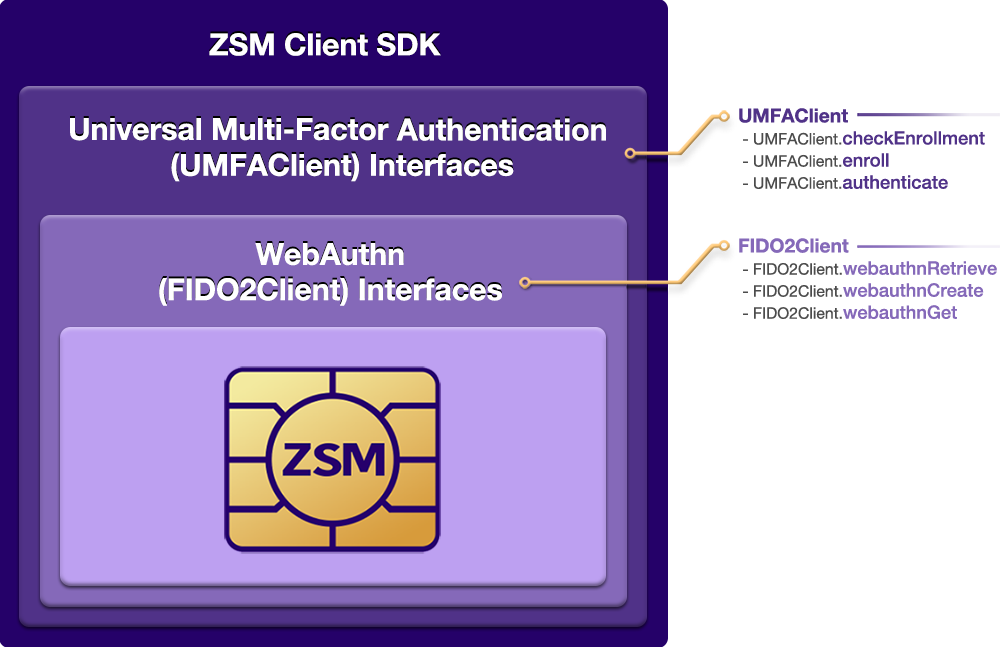
Ideem provides this client software development kit (ZSM Client SDK) for your use in integrating Universal Multi-Factor Authentication (UMFA) into your application.
Here is a high level view of the interfaces exposed by the ZSM Client SDK:
The Ideem System
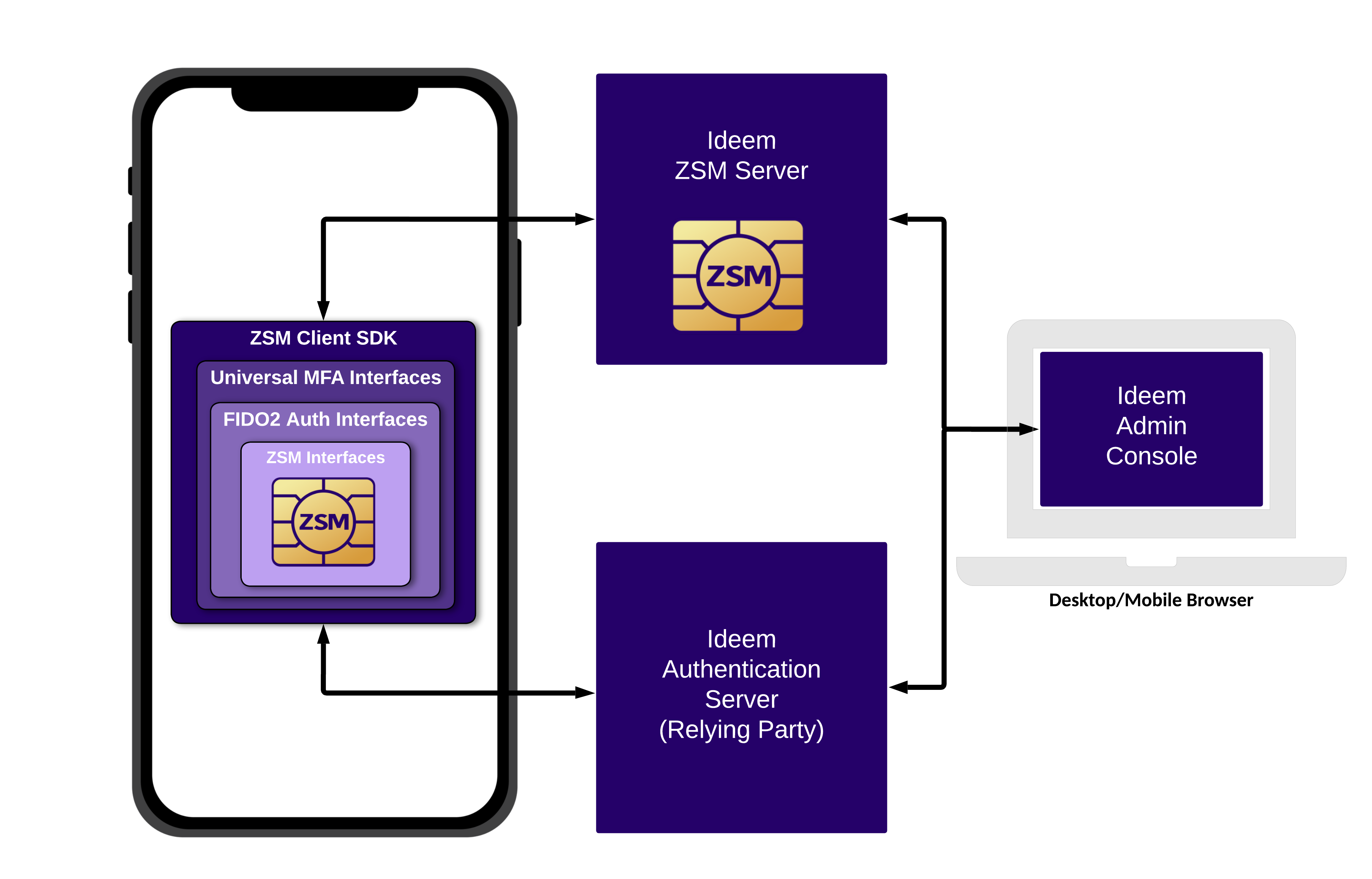
The ZSM Client SDK works along with other Ideem system components to perform the available operations. Those components are:
- ZSM Crypto Module: The ZSM Crypto Module provides the underlying MPC-based cryptography at the core of Ideem’s ZSM and is FIPS 140-3 validated.
- ZSM Client SDK: The Client SDK contains the ZSM Crypto Module and provides programmatic access to Ideem’s interfaces for Universal MFA.
- ZSM Server: The Cryptographic Server contains the ZSM Crypto Module and participates with the Client SDK in all MPC-based operations.
- Authentication Server: The Authentication Server is responsible for managing consumer profiles, integrating with authentication services, and providing WebAuthn relying party capabilities.
- Admin Console: The Admin Console provides our customers application management, consumer management, usage monitoring, and troubleshooting capabilities.
Here is a high level view of how these system components work together:
ZSM Client SDK Overview
This document covers the installation and use of the ZSM Client SDK to integrate Universal Multi-Factor Authentication into your application.
Universal Multi-Factor Authentication (UMFA)
Universal Multi-Factor Authentication (UMFA) provides a secure silent second factor using ZSM cryptographic device binding via a simple implementation model requiring two steps:
- Make an authentication call following your normal login process
- Verify the token that is returned from the authentication call.
Ideem handles all of the server infrastructure for Universal Multi-Factor Authentication (UMFA), which is architected to serve high transaction volumes on a global scale.
The UMFAClient class exposes these interfaces:
checkEnrollment()
checkEnrollment() checks if an end user already has a ZSM credential registered on the device to facilitate silent re-authentication. This affords developers the ability to ascertain if the user needs to be enrolled in the UMFA process, or if they can initiate a silent re-authentication of the active user without requiring them to re-enter their credentials.
enroll()
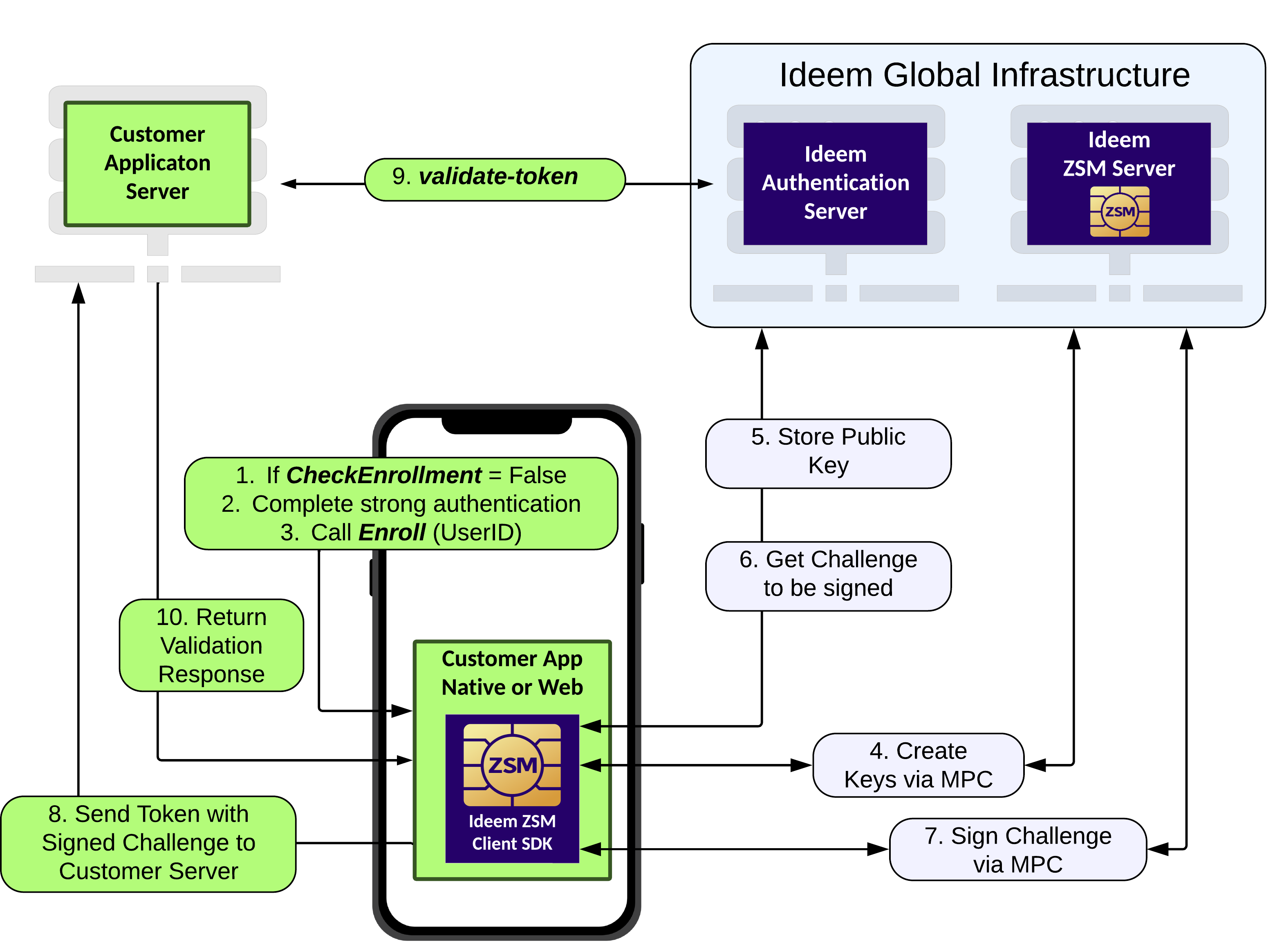
enroll() the consumer in the UMFA process. This process binds the consumer to their device using ZSM cryptographic device binding. The enrollment process should be initiated only after the consumer has successfully authenticated using their primary authentication method.
authenticate
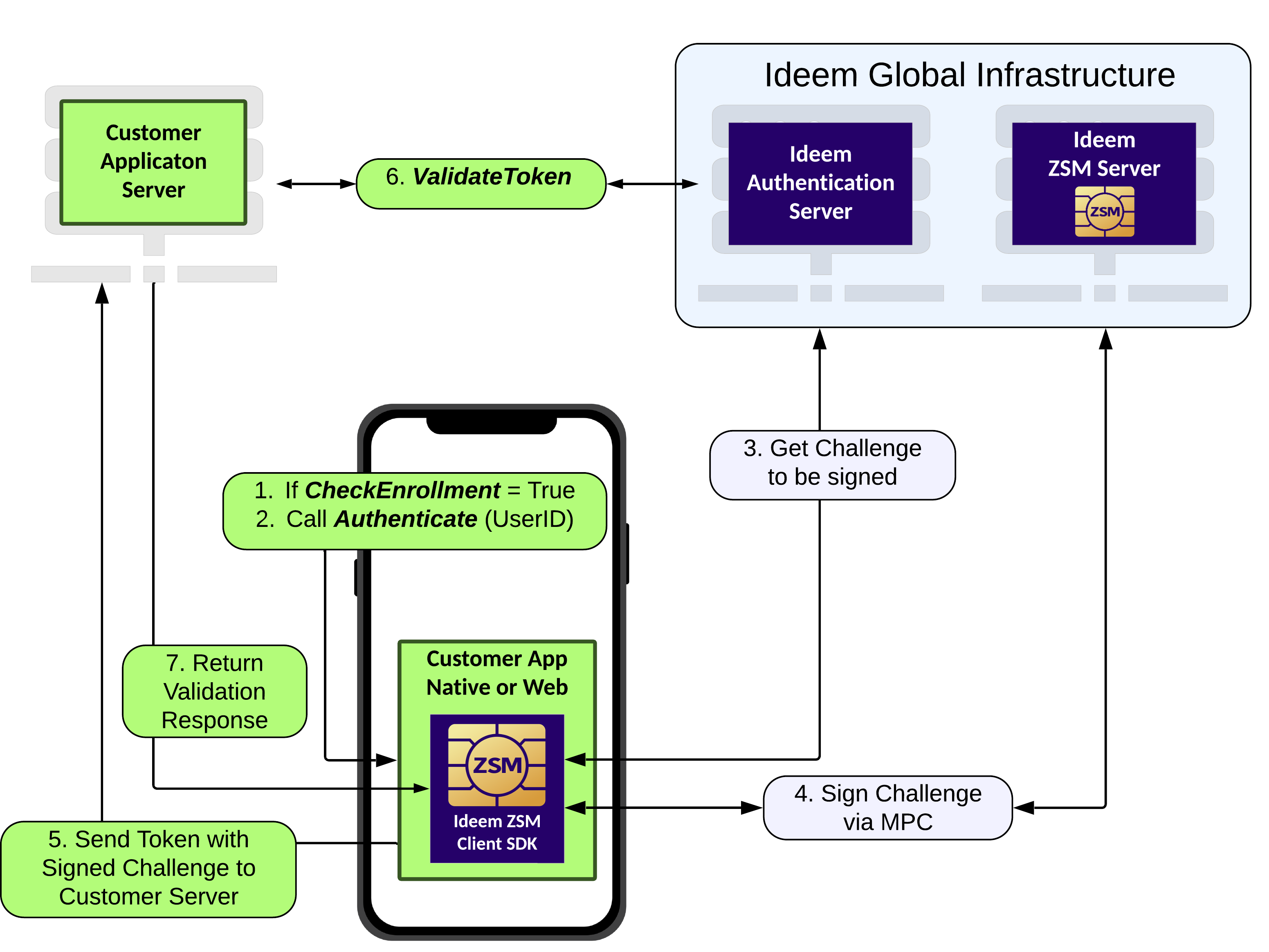
authenticate() executes the UMFA process, dynamically loading and executing the ZSM authentication module, and obtaining an token upon successful completion. This token should be retained at the session level on the server, enabling a server-to-server API call to the Ideem Authentication Server for out-of-band validation.
Validation of the token returned from enroll() and authenticate()
The validation process confirms the validity of the token returned from the UMFAClient.enroll() and UMFAClient.authenticate() methods, providing confidence in its authenticity and to guarantee it has not been tampered with. Validation takes place by means of a server-to-server call to Ideem's Authentication Server, during which the token is passed as input to the endpoint. Note that this validation can be initiated only server-to-server, to ensure no client-side tampering is possible, and to guarantee a secure and reliable verification of the token.
Here is a high level view of the call flow for UMFA Enroll, with out-of-band token validation:
Here is a high level view of the call flow for UMFA Authentication, with out-of-band token validation:
API Versioning and Backward Compatibility
Ideem uses semantic versioning of its APIs. Semantic versioning is an industry standard approach around how API versions are named. It defines a version number in the format of X.Y.Z where X, Y, and Z are the major, minor, and patch versions.
In practicality, Semantic Versioning is implemented on a spectrum of strictness. We take a flexible approach in the following way:
- We only increase the major version for changes of a significant breaking nature. If this version number changes, significant changes must be made by all users of our API.
- We may increase the minor version for minor breaking changes instead of increasing the major version. We would only take such action when that change has a very limited scope and the impact has been discussed and agreed upon by the impacted parties. A concrete example of this is if we change a special feature used by one or two of our customers in a breaking way in conjunction with agreement from these impacted customers. But the change otherwise does not impact our overall customer base.
- In a strict interpretation, the patch version would only be increased for bug fixes. We may increase our patch version for minor new features or enhancements to existing features so long as these changes do not represent a breaking change.
Ideem will support the current and one prior major version of each API for a 24-month period, including all minor, and patch updates to those major versions.
Let's Get Started
In the following pages, you will learn how to:
- Add the ZSM Client SDK to your application project
- Use the interfaces for Universal Multi-Factor Authentication (UMFA).
Working with Browser Applications
This section will focus on integration of the ZSM Client SDK into browser-based applications.
Languages Supported
- JavaScript
- TypeScript
Supported Web Frameworks
- React: 16.8 and later
- VueJS: 2.5.4 and later
- Angular: 6 and later
- Svelte: 3 and later
Supported Browsers
- Google Chrome: 57 and later
- Mozilla Firefox: 52 and later
- Safari: 11 and later
- Microsoft Edge: 16 and later
- Opera: 44 and later
Example Browser Project Files
Example implementations are included in the ZSM Client SDK in the folder examples.
Installation & Setup for Browser Applications
Adding the ZSM Client SDK into your Browser project
The ZSM Client SDK is a package that provides programmatic access to Ideem’s interfaces used to integrate Universal Multi-Factor Authentication (UMFA) into your application. This document will guide you through the process of adding the ZSM Client SDK to your Browser app project.
Step #1: Install the NPM Package
From within your project directory, run the following command to install the ZSM Client SDK:
npm install @ideem/zsm-client-sdk --save
After installation, you should see the following in your package.json file (#.#.## will depend on the version installed):
"dependencies": {
    "@ideem/zsm-client-sdk": "^#.#.##"
}
IMPORTANT: You can ensure that, during the development process, the ZSM Client SDK is always up to date by using the npm update command.
OPTIONAL: You can also change the "^#.#.##" in your package.json to "latest" to always get the latest version (although it is recommended that you specify a specific version, or version range when rolling to production to avoid breaking changes as future releases are published):
"dependencies": {
    "@ideem/zsm-client-sdk": "latest"
}
Step #2: Import the ZSM Client SDK
The ZSM Client SDK can be imported into your application in one of three ways:
1. ES Modules/Frameworks/Modern Universal ("import" syntax)
The SDK can be included in ES module applications using the import statement.
(This includes virtually all modern browsers and Node.js versions that support ES modules (which includes almost every JS framework).
(This also includes the use of the type="module" attribute in the <script> tag, as well as the use of the --experimental-modules flag in Node.js.)
Frameworks (and Node.js with ES modules/--experimental-modules flag)
import { UMFAClient } from './zsm-client-sdk.js';
(or, using the type="module" attribute in the <script> tag of vanilla HTML)
<script type="module">
    import { UMFAClient } from "./node_modules/@ideem/zsm-client-sdk/zsm-client-sdk.js";
</script>
2. Node.js/CommonJS ("require" syntax):
The SDK can be included in Node.js and CommonJS applications using the require function.
const { UMFAClient } = require('./zsm-client-sdk.js');
3. Browser/HTML:
The SDK can be included in HTML files using a <script> tag. The SDK will be available as a global object named ZSMClientSDK.
<script src="./node_modules/@ideem/zsm-client-sdk/zsm-client-sdk.js">
    const {UMFAClient} = ZSMClientSDK;
</script>
Step #3: Set up the ZSM Configuration File
Within your application, create a .json file or JSON object to store the ZSM application configuration. It should contain the following properties:
{
    "application_id"           : "XXXXXXXX-XXXX-XXXX-XXXX-XXXXXXXXXXXX",
    "host_url"                 : "https://zsm-authenticator-demo.useideem.com/",
    "application_environment"  : "TEST",
    "api_key"                  : "XXXXXXXX-XXXX-XXXX-XXXX-XXXXXXXXXXXX"
}
These values are provided by Ideem and are unique to your application, although testing versions are pre-populated in the Sample Apps specific to the language you are using.
Configuration Properties
| Property Name | Data Typ | Description | Default Value |
|---|---|---|---|
application_id | string | The application ID to be used during the U2FA process | provided by Ideem; test value available in sample config |
host_url | Boolean | The URL to your region-specific ZSM server | provided by Ideem; demo server specified in sample config |
api_key | string | The API key to be used during the U2FA process | provided by Ideem; test value available in sample config |
application_environment | string | The application environment to be used during the U2FA process | TEST |
Step #4: Initialize the ZSM Client SDK
After importing the ZSM Client SDK and setting up the configuration file, you can initialize the client SDK - being sure to pass it the configuration object you created in the previous step - as follows:
UMFA Client:
const umfaClient = new UMFAClient(config);
UMFA APIs for Browser Applications
The Universal Multi-Factor Authentication (UMFA) module provides a flexible solution for handling multi-factor authentication processes. It allows the configuration to be provided either as a JSON string or via a URL pointing to a configuration file. The authentication steps are executed using dynamically loaded modules.
Interface Definitions
Note that the following interface definitions presuppose that you have already imported the UMFAClient class from the ZSM Client SDK (@ideem/zsm-client-sdk). If you have not yet done so, please refer to the Web Framework Setup documentation for instructions on how to import the ZSM Client SDK.
Check Enrollment UMFAClient.checkEnrollment() (Check For Existing Credentials)
The checkEnrollment method of the UMFAClient class examines the user's enrollment status for the Universal Multi-Factor Authentication (UMFA) process on the current device. This allows the application to determine whether the user has already enrolled in the UMFA process, allowing the developer to skip the enrollment process, should the user already be enrolled, or perform additional authentication prior to enrollment.
Parameters
| Parameter Name | Data Type | Description |
|---|---|---|
userIdentifier | String | The unique identifier for the user. This is typically the user's email address or a UUID. |
Returns
| Parameter Name | Data Type | Description |
|---|---|---|
response | Promise | Returns a promise containing the results of the checkEnrollment query. This can include any one of the following: |
credentialID (String): The local credential set's credential ID (user HAS enrolled) | ||
false (Boolean): Indicating user does not have a local ZSM UMFA credential set | ||
error ( Error ): An Error occurred while attempting to check the enrollment status |
Usage
JavaScript
const enrollmentStatus = await umfaClient.checkEnrollment(userIdentifier);
if(enrollmentStatus instanceof Error) throw(enrollmentStatus);                   // Error Condition
if(enrollmentStatus !== false) {
    console.log(`${user} is enrolled with credential_ID: ${enrollmentStatus}`);  // Credentials Present
} else {
    console.log(`${user} is not enrolled`);                                      // Credentials Absent
}
TypeScript
const enrollmentStatus:string|boolean|Error = await umfaClient.checkEnrollment(userIdentifier);
if (enrollmentStatus instanceof Error) throw(enrollmentStatus);                  // Error Condition
if (typeof enrollmentStatus === 'string') {
    console.log(`${user} is enrolled with credential_ID: ${enrollmentStatus}`);  // Credentials Present
} else {
    console.log(`${user} is not enrolled`);                                      // Credentials Absent
}
Enroll UMFAClient.enroll() (Enroll in UMFA Process)
The enroll method of the UMFAClient class initiates the enrollment process for the Universal Multi-Factor Authentication (UMFA) module. This process allows the user to enroll in the UMFA process, which is required for subsequent authentication operations.
Parameters
| Parameter Name | Data Type | Description |
|---|---|---|
userIdentifier | String | The unique identifier for the user. This is typically the user's email address or a UUID. |
Returns
| Parameter Name | Data Type | Description |
|---|---|---|
response | Promise | Returns a promise containing the results of the checkEnrollment query. This can include any one of the following: |
credential (Object) : The credential object containing the user's authentication information*. | ||
false (Boolean) : Indicating user is already enrolled and has a valid local credential set | ||
error ( Error ) : An Error occurred while attempting to enroll the user |
(to be stored for use in verification later. Note this is a JSON object, and may need to be JSON.stringify'd depending on your storage mechanism.)
Usage
JavaScript
const userAuthenticationJWT = await UMFAClient.enroll(userIdentifier);
if (userAuthenticationJWT instanceof Error) throw(userAuthenticationJWT);                            // Error Condition
if(userAuthenticationJWT !== false) {
    console.log(`Enrollment of ${userIdentifier} successful! JWT Token: ${userAuthenticationJWT}`);  // Successful Enrollment
} else {
    console.error('Enrollment failed.');                                                             // Enrollment Failed
}
TypeScript
const userAuthenticationJWT:string|boolean|Error = await UMFAClient.enroll(userIdentifier);
if (userAuthenticationJWT instanceof Error) throw(userAuthenticationJWT);                            // Error Condition
if (typeof userAuthenticationJWT === 'string') {
    console.log(`Enrollment of ${userIdentifier} successful! JWT Token: ${userAuthenticationJWT}`);  // Successful Enrollment
} else {
    console.error('Enrollment failed.');                                                             // Enrollment Failed
}
Authenticate UMFAClient.authenticate() (Execute UMFA Process)
Performs an authentication operation using the Universal Multi-Factor Authentication (UMFA) module, using the credential currently stored on the device for the specified user. If the specified user's credential is not present on the device, authentication will fail.
Parameters
| Parameter Name | Data Type | Description |
|---|---|---|
userIdentifier | String | The unique identifier for the user. This is typically the user's email address or a UUID. |
Returns
| Parameter Name | Data Type | Description |
|---|---|---|
response | Promise | Returns a promise containing the results of the checkEnrollment query. This can include any one of the following: |
credential (Object) : The credential object containing the user's authentication information*. | ||
error ( Error ): "${userIdentifier} is not enrolled." (if the user is not enrolled) | ||
error ( Error ): An Error occurred while attempting to enroll the user |
(to be stored for use in verification later. Note this is a JSON object, and may need to be JSON.stringify'd depending on your storage mechanism.)
Usage
JavaScript
const userAuthenticationJWT = await UMFAClient.authenticate(userIdentifier);
if (userAuthenticationJWT instanceof Error) throw(userAuthenticationJWT);                            // Error Condition
console.log(`${userIdentifier} successfully authorized! JWT Token: ${userAuthenticationJWT}`);       // Successful Authorization
TypeScript
const userAuthenticationJWT:string|Error = await UMFAClient.authenticate(userIdentifier);
if (userAuthenticationJWT instanceof Error) throw(userAuthenticationJWT);                            // Error Condition
console.log(`${userIdentifier} successfully authorized! JWT Token: ${userAuthenticationJWT}`);       // Successful Authorization
Unenroll UMFAClient.unenroll() (Remove user's enrollment from the device)
The unenroll method of the UMFAClient class removes the specified, enrolled user's credentials from the device the user is actively logged in with. This effectively deletes any credentials associated with the user, preventing future authentication using those credentials, until the user re-enrolls on said device.
Parameters
| Parameter Name | Data Type | Description |
|---|---|---|
userIdentifier | String | The unique identifier for the user. This is typically the user's email address or a UUID. |
Returns
| Parameter Name | Data Type | Description |
|---|---|---|
response | Promise | Returns a promise containing the results of the unenrollment. This can include any one of the following: |
true (boolean) : The user's credentials were successfully removed from the device | ||
false (boolean): The user was not enrolled and/or had no valid local credential set | ||
error ( Error ): Unable to unenroll |
Usage
JavaScript
const unenrollResult = await UMFAClient.unenroll(userIdentifier);
if (unenrollResult instanceof Error) throw(unenrollResult);                // Error Condition
console.log(`${userIdentifier} successfully unenrolled!`);                 // Successful Unenrollment
TypeScript
const unenrollResult:string|Error = await UMFAClient.unenroll(userIdentifier);
if (unenrollResult instanceof Error) throw(unenrollResult);                // Error Condition
console.log(`${userIdentifier} successfully unenrolled!`);                 // Successful Unenrollment
Event: UMFAClientReady
The UMFAClientReady event is dispatched when the UMFAClient is ready to be used. This event is emitted from the worker thread to the main thread's window object. This event can be listened for - to ensure that the client is fully initialized before attempting to call methods contained within it - and the listener can, upon its firing, be used to trigger any necessary actions or UI updates in your application.
Details
In some implementations, the UMFAClient may take a short time (typically measured in tens of milliseconds, depending on client system specifications) to initialize, especially if it is being loaded from a remote source or if it is being loaded JIT (Just-In-Time) immediately preceding its use.
As such, a listener for this event can be added to the window object to ensure that the UMFAClient is fully initialized before attempting to call methods contained within it.
Payload
| Parameter | Type | Description |
|---|---|---|
detail | Boolean (true) | The detail object inside the event will always contain the value true, indicating that the UMFAClient is ready to be used, but since the event is only emitted once it's already ready, this is a formality and can be ignored. |
Usage
JavaScript
window.addEventListener('UMFAClientReady', function (event) {
    console.info("UMFAClientReady event received!");

    // Perform any additional actions that involve the UMFAClient, assured that it is ready to be used
});
TypeScript
window.addEventListener('UMFAClientReady', function (event: CustomEvent) {
    console.info("UMFAClientReady event received!");

    // Perform any additional actions that involve the UMFAClient, assured that it is ready to be used
});
Note...
The UMFAClientReady event is a custom event and is not part of the standard DOM events. It is specific to the UMFAClient implementation and should be handled accordingly. In most implementations, this event listener should not be necessary, as the UMFAClient is typically initialized during the page load and will be long-since ready prior to its use. However, in some specific cases, this event may be useful to ensure that the client is fully initialized before attempting to call methods contained within it.
Out-of-Band Token Validation
For out-of-band validation of the JWT returned by enroll and authenticate, use the /api/umfa/validate-token endpoint.
HTTP Method
POST
URL
$ZSM_AUTHENTICATOR_HOST/api/umfa/validate-token
Request Headers
| Header | Value | Description |
|---|---|---|
Content-Type | application/json | Indicates the payload format |
Authorization | Bearer XXXXXXXX-XXXX-XXXX-XXXX-XXXXXXXXXXXX | Authorizes the API (API Key expected) |
Request Body
| Field | Type | Required | Description |
|---|---|---|---|
application_id | string | Yes | The unique identifier for the request's (server-to-server) application, parsed as a UUID. |
user_id | string | Yes | The unique identifier for the user. |
token | string | Yes | The token received from a previous UMFA authentication operation. |
token_type | string | No | An optional token type specifying the type of validation. Can be "credential" to validate a get() PublicKeyCredential. |
trace_id | string | No | An optional identifier for the validate-token operation. If a trace_id is not provided, then a random trace_id will be generated. |
Successful Response (HTTP 200)
{
  "user_id": "janedoe@gmail.com",
  "trace_id": "7a626fe9-ce25-4b87-8eb2-b12a7ee20143"
}
| Field | Type | Description |
|---|---|---|
user_id | string | The unique identifier for the user that was validated. |
trace_id | string | The trace identifier for the validate-token operation. |
Error Responses
{
  "status": 400,
  "trace_id": "7a626fe9-ce25-4b87-8eb2-b12a7ee20143",
  "message": "Validate token failed with: MFA login JWT was invalid: Invalid JWT: There is no user_id claim"
}
| Field | Type | Description |
|---|---|---|
status | integer | The HTTP response code. |
trace_id | string | The trace identifier for the verification operation. |
message | string | Additional information about the validation failure. |
| Status Code | Description | Example Response |
|---|---|---|
400 Bad Request | Incorrectly formed request | { ... "message": "No data provided." } |
401 Unauthorized | Invalid or expired token | { ... "message": "Validate token failed with: MFA login JWT was invalid: Invalid JWT: There is no webauthn_time claim" } |
500 Internal Server Error | Server encountered an issue | { ... "message": "Server encountered an internal error" } |
Example cURL Commands
HTTP Success (200) JWT Validation
$ curl -s - X POST -H "Content-Type: application/json"
-H "Authorization: Bearer XXXXXXXX-XXXX-XXXX-XXXX-XXXXXXXXXXXX"
-d '{"application_id": "bf468b21-308f-49d2-9031-83556e0781d2",
"user_id": "janedoe@gmail.com", "token": "eyJ0eX ... Nk9uWg"}'
$ZSM_AUTHENTICATOR_HOST/api/umfa/validate-token | jq
{
  "user_id": "c7d7d44b-385e-4e83-bdd5-37e4fb3c8b7d",
  "trace_id": "7a626fe9-ce25-4b87-8eb2-b12a7ee20143"
}
HTTP Success (200) Credential Validation
$ curl -s - X POST -H "Content-Type: application/json"
-H "Authorization: Bearer XXXXXXXX-XXXX-XXXX-XXXX-XXXXXXXXXXXX"
-d '{"application_id": "bf468b21-308f-49d2-9031-83556e0781d2",
"user_id": "janedoe@gmail.com",
"token":
{
  "id":"",
  "rawId":"rF2kHiKUQCO0d0Y4Wek9kA",
  "response":
  {
    "clientDataJSON":"eyJ0eXBlIjoid2ViYXV0aG4uZ2V0IiwiY2hhbGxlbmdlIjoiNWtMb2tjOXpkZzhuU2RFT2hzV1o5MUwzZTNGdjlqbERlRU9KcF93SnRkayIsIm9yaWdpbiI6Imh0dHBzOi8venNtLmFwcCJ9","authenticatorData":"ZxcNEwlh6TBKTTC5FMSFPTOboOZWzGeOSiYY7rm67WUFAAAAAQ","signature":"UOOoSBAwemLSPvqLVG2MDw41cqKLcHEUp4LAFGuvrVPsR1GWBYTWtmpqG_Jtjn-DXq5tGGAE58SYvu7uvcw7oHqquoNG4VEdm4Tz7UNe5kdSoc3RFpEGGDLCIz28iKXaBPbv3jdHi4xGoCIJKIIeHyh0-g7LUb4ZjYFIZHyXds7cdH9ozXRt5ERWUVvH1axDnPDKpntGQXG8FC4VXd0Rc01-4bBklNSGHOVgbO-Rpm8HgeFj3J4uOZDJ0xP7pnIkwOo5Uw_0ZO9xI66S8NQEtVzXVUKXs98f38LpLiLGEPlWtr_RIdf9xgsmHx-oVRJxC37gzV2ydSGKJaV6bNsXOw"},
    "type":"public-key"
  }
},
"token-type": "credential"}'
$ZSM_AUTHENTICATOR_HOST/api/umfa/validate-token | jq
{
  "user_id": "c7d7d44b-385e-4e83-bdd5-37e4fb3c8b7d",
  "trace_id": "7a626fe9-ce25-4b87-8eb2-b12a7ee20143"
}
Bad Request (400)
$ curl -s - X POST -H "Content-Type: application/json"
-H "Authorization: Bearer XXXXXXXX-XXXX-XXXX-XXXX-XXXXXXXXXXXX"
-d '{"application_id": "bf468b21-308f-49d2-9031-83556e0781d2",
"user_id": "janedoe@gmail.com"}'
$ZSM_AUTHENTICATOR_HOST/api/umfa/validate-token | jq
{
  "status": 400,
  "trace_id": "7a626fe9-ce25-4b87-8eb2-b12a7ee20143",
  "message": "Invalid data provided"
}
Unauthorized (401)
$ curl -s - X POST -H "Content-Type: application/json"
-H "Authorization: Bearer XXXXXXXX-XXXX-XXXX-XXXX-XXXXXXXXXXXX"
-d '{"application_id": "bf468b21-308f-49d2-9031-83556e0781d2",
"user_id": "janedoe@gmail.com", "token": "eyJ0eX ... Nk9uWg"}'
$ZSM_AUTHENTICATOR_HOST/api/umfa/validate-token | jq
{
  "status": 401,
  "trace_id": "7a626fe9-ce25-4b87-8eb2-b12a7ee20143",
  "message": "Validate token failed with: MFA login JWT was invalid: Invalid JWT: Invalid claim: The token has expired: 2024-12-10 18:41:03.0 +00:00:00"
}
Validate Token Failures
The server's token validation can fail for two general reasons:
- HTTP 400 Response: The request was malformed (i.e.,
tokenwas not included) - HTTP 401 Response: The token was invalid, which could have various causes
- Token's
user_iddid not match the supplieduser_id - Token has expired (the token's "exp" claim has passed)
- Token was missing required claims ("iss", "sub", "iat", "exp", "user_id", "webauthn_time")
- Token was not signed by the expected ZSM server's certificate
- Token was not a valid PublicKeyCredential when supplied
"token_type" = "credential"
- Token's
Decoded JWT
Below, we illustrate an example of a decoded UMFA JWT (Header and Payload).
The validation performs standard JWT validation like signature, liveness,
and structure. The validation also ensures that the payload claim user_id
matches that of the supplied user_id.
{
  "typ": "JWT",
  "alg": "RS256",
  "iss": "Ideem::Authenticator"
}
{
  "sub": "UMFA_login",
  "iss": "Ideem::Authenticator",
  "aud": [
    "Ideem::Authenticator",
    "Ideem::ZSM",
    "Ideem::ZSM_CLI"
  ],
  "iat": 1729280408,
  "exp": 1729366808,
  "jti": "042142c1-40c8-4d9b-bf5e-1fa84e0f3f03",
  "user_id": "c7d7d44b-385e-4e83-bdd5-37e4fb3c8b7d",
  "userpw_time": "2024-10-18T19:40:07.053364351+00:00",
  "webauthn_time": "2024-10-18T19:40:08.053364351+00:00"
}
Working with React Native Applications
This section will focus on integration of the ZSM Client SDK into React Native-based applications.
Requirements
ZSM's React Native support extends to version 0.76 and later. This is required to support both the latest versions of iOS v.18 and Android v.7.0 (minSdk 24).
React Native apps may target iOS 15.1+ and Android 6.0+ (API 23+) or newer.
Note: that if you need to support older versions of iOS or Android, the ZSM Client SDK very well may support it as well, though we are no longer engaging in active development for these versions.
You may use Windows, macOS, or Linux as your development operating system, though building and running iOS apps is limited to macOS (note: tools like Expo SDK v49+ can be used to work around this).
Example React Native Project Files
Example implementations are included in the ZSM Client SDK in the folder examples.
Installation & Setup for React Native Applications
The ZSM Client SDK provides programmatic access to Ideem's Universal Multi-Factor Authentication (UMFA) functionality. This guide walks you through installing and configuring the SDK in a React Native project.
Step 1: Install the NPM Package
Run the following command from your project directory to install the ZSM Client SDK:
npm install @ideem/zsm-react-native --save
After installation, verify that your package.json includes (#.#.## will depend on the version installed):
"dependencies": {
    "@ideem/zsm-react-native": "^#.#.##"
}
Step 2: Import the ZSM Client SDK
Import the required client from the ZSM Client SDK into your React Native application:
UMFA Client:
import { UMFAClient } from '@ideem/zsm-react-native';
Step 3: Set Up the Configuration File
Create a JSON configuration file or define a configuration object within your application. It should contain the following properties:
{
    "application_id": "XXXXXXXX-XXXX-XXXX-XXXX-XXXXXXXXXXXX",
    "host_url": "https://zsm-authenticator-demo.useideem.com/",
    "application_environment": "TEST",
    "api_key": "XXXXXXXX-XXXX-XXXX-XXXX-XXXXXXXXXXXX"
}
Configuration Properties
| Property Name | Data Type | Description | Example Value |
|---|---|---|---|
application_id | string | Unique application identifier provided by Ideem. | 123e4567-e89b-12d3-a456-426614174000 |
host_url | string | URL of the region-specific ZSM server provided by Ideem. | https://zsm-authenticator-demo.useideem.com/ |
application_environment | string | Environment setting (TEST or PRODUCTION). | TEST |
api_key | string | API key for authentication, provided by Ideem. | 33214443-c760-4f8e-924e-9a2ad5cb0bf6 |
These values will be provided by Ideem. Sample configurations for testing environments are included in the SDK's examples.
Step 4: Initialize the SDK
After importing the SDK and setting up the configuration file, initialize the client with the configuration object:
UMFA Client Initialization:
const umfaClient = new UMFAClient(config);
Pass the config object defined in Step 3 into the initialization. This connects your application to the ZSM services using your credentials.
UMFA APIs for React Native Applications
The UMFAClient enables secure, multi-factor authentication in React Native applications by managing user enrollment, authentication, and device management workflows. It abstracts the complexity of FIDO2 standards and provides flexible integration options for developers.
Key features include:
- Check Enrollment: Checks current enrollment status on the device.
- Enrollment: Associate a user’s identity with their device.
- Authentication: Validate the user using cryptographically secure challenges.
- Device Unbind: Unbind credentials for re-enrollment for this device and user.
Interface Definitions
Before proceeding, ensure you have imported the UMFAClient from the ZSM React Native SDK:
import { UMFAClient } from '@ideem/zsm-react-native';
Check Enrollment: UMFAClient.checkEnrollment()
This method verifies whether a user is already enrolled in the system.
Parameters
| Parameter Name | Data Type | Description |
|---|---|---|
userIdentifier | string | The username or unique user ID. |
Returns
- Boolean:
trueif the user is enrolled. false: If the user is not enrolled.- Error: Returns an error object if the operation fails.
Usage Example
client.checkEnrollment('exampleUser')
  .then(isEnrolled => {
    console.log(`Enrollment status: ${isEnrolled}`);
  })
  .catch(error => {
    console.error('Error checking enrollment:', error.message);
  });
Enroll: UMFAClient.enroll()
Enrolls a user by creating a credential and associating it with their device.
Parameters
| Parameter Name | Data Type | Description |
|---|---|---|
userIdentifier | string | The username or unique user ID. |
Returns
- String: The authentication token.
- Error: Returns an error object if enrollment fails.
Usage Example
client.enroll('exampleUser')
  .then(token => {
    console.log('Enrollment successful, token:', token);
  })
  .catch(error => {
    console.error('Error during enrollment:', error.message);
  });
Authenticate: UMFAClient.authenticate()
Authenticates a user by requesting a cryptographic challenge to be signed by the authenticator.
Parameters
| Parameter Name | Data Type | Description |
|---|---|---|
userIdentifier | string | The username or unique user ID. |
Returns
- Object: Authentication result, including a signed challenge.
- Error: Returns an error object if authentication fails.
Usage Example
client.authenticate('exampleUser')
  .then(result => {
    console.log('Authentication successful:', result);
  })
  .catch(error => {
    console.error('Error during authentication:', error.message);
  });
Unenroll UMFAClient.unenroll() (Remove user's enrollment from the device)
The unenroll method of the UMFAClient class removes the specified, enrolled user's credentials from the device the user is actively logged in with. This effectively deletes any credentials associated with the user, preventing future authentication using those credentials, until the user re-enrolls on said device.
Parameters
| Parameter Name | Data Type | Description |
|---|---|---|
userIdentifier | String | The unique identifier for the user. This is typically the user's email address or a UUID. |
Returns
| Parameter Name | Data Type | Description |
|---|---|---|
response | Promise | Returns a promise containing the results of the unenrollment. This can include any one of the following: |
true (boolean) : The user's credentials were successfully removed from the device | ||
false (boolean): The user was not enrolled and/or had no valid local credential set | ||
error ( Error ): Unable to unenroll |
Usage
JavaScript
const unenrollResult = await UMFAClient.unenroll(userIdentifier);
if (unenrollResult instanceof Error) throw(unenrollResult);                // Error Condition
console.log(`${userIdentifier} successfully unenrolled!`);                 // Successful Unenrollment
Out-of-Band Token Validation
For out-of-band validation of the JWT returned by enroll and authenticate, use the /api/umfa/validate-token endpoint.
HTTP Method
POST
URL
$ZSM_AUTHENTICATOR_HOST/api/umfa/validate-token
Request Headers
| Header | Value | Description |
|---|---|---|
Content-Type | application/json | Indicates the payload format |
Authorization | Bearer XXXXXXXX-XXXX-XXXX-XXXX-XXXXXXXXXXXX | Authorizes the API (API Key expected) |
Request Body
| Field | Type | Required | Description |
|---|---|---|---|
application_id | string | Yes | The unique identifier for the request's (server-to-server) application, parsed as a UUID. |
user_id | string | Yes | The unique identifier for the user. |
token | string | Yes | The token received from a previous UMFA authentication operation. |
token_type | string | No | An optional token type specifying the type of validation. Can be "credential" to validate a get() PublicKeyCredential. |
trace_id | string | No | An optional identifier for the validate-token operation. If a trace_id is not provided, then a random trace_id will be generated. |
Successful Response (HTTP 200)
{
  "user_id": "janedoe@gmail.com",
  "trace_id": "7a626fe9-ce25-4b87-8eb2-b12a7ee20143"
}
| Field | Type | Description |
|---|---|---|
user_id | string | The unique identifier for the user that was validated. |
trace_id | string | The trace identifier for the validate-token operation. |
Error Responses
{
  "status": 400,
  "trace_id": "7a626fe9-ce25-4b87-8eb2-b12a7ee20143",
  "message": "Validate token failed with: MFA login JWT was invalid: Invalid JWT: There is no user_id claim"
}
| Field | Type | Description |
|---|---|---|
status | integer | The HTTP response code. |
trace_id | string | The trace identifier for the verification operation. |
message | string | Additional information about the validation failure. |
| Status Code | Description | Example Response |
|---|---|---|
400 Bad Request | Incorrectly formed request | { ... "message": "No data provided." } |
401 Unauthorized | Invalid or expired token | { ... "message": "Validate token failed with: MFA login JWT was invalid: Invalid JWT: There is no webauthn_time claim" } |
500 Internal Server Error | Server encountered an issue | { ... "message": "Server encountered an internal error" } |
Example cURL Commands
HTTP Success (200) JWT Validation
$ curl -s - X POST -H "Content-Type: application/json"
-H "Authorization: Bearer XXXXXXXX-XXXX-XXXX-XXXX-XXXXXXXXXXXX"
-d '{"application_id": "bf468b21-308f-49d2-9031-83556e0781d2",
"user_id": "janedoe@gmail.com", "token": "eyJ0eX ... Nk9uWg"}'
$ZSM_AUTHENTICATOR_HOST/api/umfa/validate-token | jq
{
  "user_id": "c7d7d44b-385e-4e83-bdd5-37e4fb3c8b7d",
  "trace_id": "7a626fe9-ce25-4b87-8eb2-b12a7ee20143"
}
HTTP Success (200) Credential Validation
$ curl -s - X POST -H "Content-Type: application/json"
-H "Authorization: Bearer XXXXXXXX-XXXX-XXXX-XXXX-XXXXXXXXXXXX"
-d '{"application_id": "bf468b21-308f-49d2-9031-83556e0781d2",
"user_id": "janedoe@gmail.com",
"token":
{
  "id":"",
  "rawId":"rF2kHiKUQCO0d0Y4Wek9kA",
  "response":
  {
    "clientDataJSON":"eyJ0eXBlIjoid2ViYXV0aG4uZ2V0IiwiY2hhbGxlbmdlIjoiNWtMb2tjOXpkZzhuU2RFT2hzV1o5MUwzZTNGdjlqbERlRU9KcF93SnRkayIsIm9yaWdpbiI6Imh0dHBzOi8venNtLmFwcCJ9","authenticatorData":"ZxcNEwlh6TBKTTC5FMSFPTOboOZWzGeOSiYY7rm67WUFAAAAAQ","signature":"UOOoSBAwemLSPvqLVG2MDw41cqKLcHEUp4LAFGuvrVPsR1GWBYTWtmpqG_Jtjn-DXq5tGGAE58SYvu7uvcw7oHqquoNG4VEdm4Tz7UNe5kdSoc3RFpEGGDLCIz28iKXaBPbv3jdHi4xGoCIJKIIeHyh0-g7LUb4ZjYFIZHyXds7cdH9ozXRt5ERWUVvH1axDnPDKpntGQXG8FC4VXd0Rc01-4bBklNSGHOVgbO-Rpm8HgeFj3J4uOZDJ0xP7pnIkwOo5Uw_0ZO9xI66S8NQEtVzXVUKXs98f38LpLiLGEPlWtr_RIdf9xgsmHx-oVRJxC37gzV2ydSGKJaV6bNsXOw"},
    "type":"public-key"
  }
},
"token-type": "credential"}'
$ZSM_AUTHENTICATOR_HOST/api/umfa/validate-token | jq
{
  "user_id": "c7d7d44b-385e-4e83-bdd5-37e4fb3c8b7d",
  "trace_id": "7a626fe9-ce25-4b87-8eb2-b12a7ee20143"
}
Bad Request (400)
$ curl -s - X POST -H "Content-Type: application/json"
-H "Authorization: Bearer XXXXXXXX-XXXX-XXXX-XXXX-XXXXXXXXXXXX"
-d '{"application_id": "bf468b21-308f-49d2-9031-83556e0781d2",
"user_id": "janedoe@gmail.com"}'
$ZSM_AUTHENTICATOR_HOST/api/umfa/validate-token | jq
{
  "status": 400,
  "trace_id": "7a626fe9-ce25-4b87-8eb2-b12a7ee20143",
  "message": "Invalid data provided"
}
Unauthorized (401)
$ curl -s - X POST -H "Content-Type: application/json"
-H "Authorization: Bearer XXXXXXXX-XXXX-XXXX-XXXX-XXXXXXXXXXXX"
-d '{"application_id": "bf468b21-308f-49d2-9031-83556e0781d2",
"user_id": "janedoe@gmail.com", "token": "eyJ0eX ... Nk9uWg"}'
$ZSM_AUTHENTICATOR_HOST/api/umfa/validate-token | jq
{
  "status": 401,
  "trace_id": "7a626fe9-ce25-4b87-8eb2-b12a7ee20143",
  "message": "Validate token failed with: MFA login JWT was invalid: Invalid JWT: Invalid claim: The token has expired: 2024-12-10 18:41:03.0 +00:00:00"
}
Validate Token Failures
The server's token validation can fail for two general reasons:
- HTTP 400 Response: The request was malformed (i.e.,
tokenwas not included) - HTTP 401 Response: The token was invalid, which could have various causes
- Token's
user_iddid not match the supplieduser_id - Token has expired (the token's "exp" claim has passed)
- Token was missing required claims ("iss", "sub", "iat", "exp", "user_id", "webauthn_time")
- Token was not signed by the expected ZSM server's certificate
- Token was not a valid PublicKeyCredential when supplied
"token_type" = "credential"
- Token's
Decoded JWT
Below, we illustrate an example of a decoded UMFA JWT (Header and Payload).
The validation performs standard JWT validation like signature, liveness,
and structure. The validation also ensures that the payload claim user_id
matches that of the supplied user_id.
{
  "typ": "JWT",
  "alg": "RS256",
  "iss": "Ideem::Authenticator"
}
{
  "sub": "UMFA_login",
  "iss": "Ideem::Authenticator",
  "aud": [
    "Ideem::Authenticator",
    "Ideem::ZSM",
    "Ideem::ZSM_CLI"
  ],
  "iat": 1729280408,
  "exp": 1729366808,
  "jti": "042142c1-40c8-4d9b-bf5e-1fa84e0f3f03",
  "user_id": "c7d7d44b-385e-4e83-bdd5-37e4fb3c8b7d",
  "userpw_time": "2024-10-18T19:40:07.053364351+00:00",
  "webauthn_time": "2024-10-18T19:40:08.053364351+00:00"
}
Example Code
Default Flow: Enrollment and Authentication
Below is an example implementation of the default UMFA flow for user enrollment and authentication:
import { UMFAClient } from 'zsm-react-native';

const config = {
  application_id: 'a1f4769a-a4be-45f9-91af-f3568f054be9',
  host_url: 'https://zsm-authenticator-demo.useideem.com/',
  application_environment: 'TEST',
  api_key: '33214443-c760-4f8e-924e-9a2ad5cb0bf6',
};

const client = new UMFAClient(config);

const username = 'exampleUser';

// Enrollment and Authentication Flow
async function loginFlow() {
  try {
    const isEnrolled = await client.checkEnrollment(username);
    if (!isEnrolled) {
      console.log('User not enrolled. Enrolling...');
      const token = await client.enroll(username);
      console.log('Enrollment successful. Token:', token);
    }

    const authResult = await client.authenticate(username);
    console.log('Authentication successful:', authResult);
  } catch (error) {
    console.error('Error in login flow:', error.message);
  }
}

loginFlow();
Explanation
The UMFAClient simplifies the integration of multi-factor authentication by abstracting the complexities of enrollment, authentication, and device management:
- Check Enrollment: The
checkEnrollment()method checks to see if the user is already enrolled on their device. - Enrollment: The
enroll()method registers a user’s identity and associates it with their device. - Authentication: The
authenticate()method validates the user with cryptographically signed challenges. - Enrollment Management: The
unenroll()method clears credentials, allowing re-enrollment in specific scenarios. - Flexibility: Developers can use the default setup or extend it with a custom Relying Party to manage backend workflows.
Summary
The UMFAClient provides a robust and flexible API for integrating multi-factor authentication into React Native applications. Whether using the default configuration or implementing custom workflows, developers can ensure secure and reliable authentication with minimal effort.
Working with Android Applications
Adding the ZSM Client SDK to your Android project using Android Studio
System Requirements
- Android Phone
- AndroidOS 8 (API Level 26) and newer
Languages Supported
The following languages are supported by the ZSM Client SDK for Android development:
- Kotlin build 1.9.0 and newer
- Java 8 and newer
Tool Support
- Android Studio 3.1 and newer
Example Android Project Files
Example client app project files are included with the SDK along with sample code. They can be found in the examples folder of the SDK package:
-
UMFA Kotlin:
examples/umfa_kotlin
This is an example Universal MFA Android application written in Kotlin. It provides example use of the UMFAClient APIs: checkEnrollment, enroll, and authenticate. -
UMFA Java:
examples/umfa_java
This is an example Universal MFA Android application written in Java. It provides example use of the UMFAClient APIs: checkEnrollment, enroll, and authenticate. -
FIDO2 Kotlin:
examples/fido2_kotlin
This is an example FIDO2 Auth Android application written in Kotlin. It provides example use of the FIDO2Client APIs: webauthnRetrieve, webauthnCreate, and webauthnGet. -
FIDO2 Java:
examples/fido2_java
This is an example FIDO2 Auth Android application written in Java. It provides example use of the FIDO2Client APIs: webauthnRetrieve, webauthnCreate, and webauthnGet.
Setup for Native Android Applications
Adding the ZSM Client SDK to your Android project
Note: The sample applications can be built to either a physical Android phone or to a virtual device using the Android Studio Emulator. In either case, you must set up biometric authentication on the device. The Emulator provides a way to simulate biometric authentication.
Integration Steps
Step #1: Open Android Studio
Step #2: Create a new Project
Select from the available templates, or choose “Blank” to start an empty project from scratch.
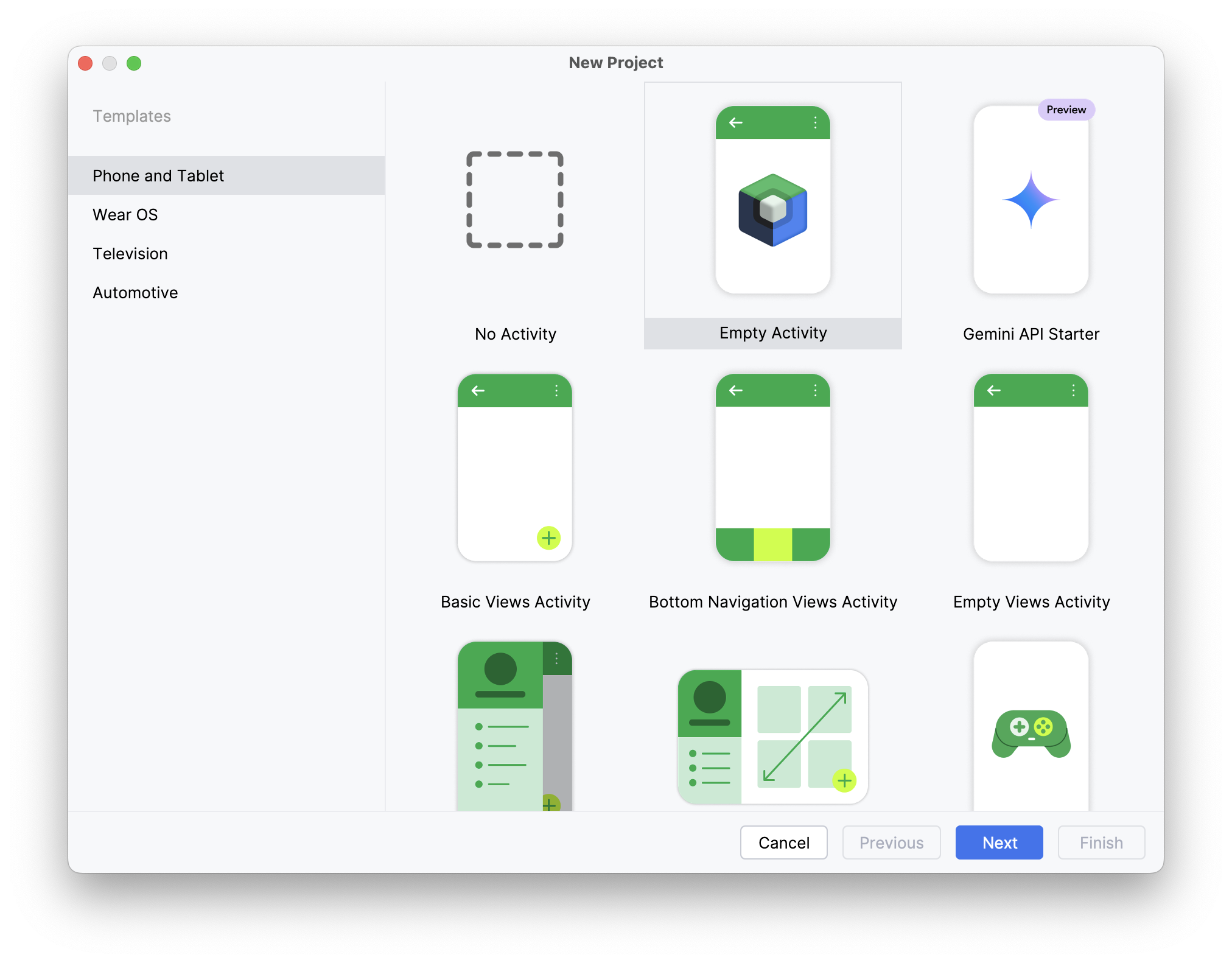
(NOTE: If working from an existing project, skip ahead to step 5.)
Step #3: Name the Project
Choose any name you would like and pick a folder you wish to save the project to. In this case, we will be calling it "Sample ZSM Integration" and scoping it to the “com.useideem.zsmclient.sample” namespace.
Step #4: Select the Programming Language You Wish to Use
Either Java or Kotlin.
Step #5: Select a Minimum Target Architecture
Choose the minimum target architecture and then click the Finish button. Keep in mind, the device architectures you intend to target will impact the set of features available to you (including biometrics). Be sure to be aware of your project's specific needs.
The ZSM Client SDK leverages CMake to produce a shared object (.so) to communicate with the ZSM Module and is designed to be universally compatible with the most number of platforms and devices as possible.
Although, selecting an API version below 23 could result in device limitations in functionality.
Step #6: Add the Library to the Project
Open the Import Module dialog, accessed by clicking File > New > Import Module.
The Import Module From Source dialog box will open.
Step #7: Select the Source Directory of the SDK
Ensure the Import checkbox is selected. Provide a name for the module (or leave the default suggestion in place). Then, click the Finish button.
Step #8: Specify the necessary plugins and dependencies in your Gradle file
Java Projects
For Java projects, the following plugins and depdencencies are required:
plugins {
    id 'com.android.application'
}

dependencies {
    implementation(files("../libs/ZSM.aar"))
}
Where the path to the ZSM.aar file is appropriate for your specific project structure. For an example, reference the build.gradle file provided in the example Java applications included with the SDK.
Kotlin Projects
For Kotlin projects, the following plugins and depdendencies are required:
plugins {
    id("com.android.application")
    id("org.jetbrains.kotlin.android")
}

dependencies {
    implementation(files("../libs/ZSM.aar"))
}
Where the path to the ZSM.aar file is appropriate for your specific project structure. For an example, reference the build.gradle.kts file provided in the example Kotlin applications included with the SDK.
Debugging & API Documentation
Debug Library
This SDK distribution also includes a debug version of the ZSM library (ZSM-debug.aar). This can be a valuable tool for local development and testing, as it includes helpful logs and debug symbols. The debug library SHOULD NOT but be used in a production deployment. An approach like the following can be setup in gradle for alternating between debug and release builds of the AAR:
- debugImplementation files('libs/ZSM-debug.aar')
- releaseImplementation files('libs/ZSM.aar')
IDE API Documentation
This SDK distribution also includes a zsm-javadoc.jar file that contains inline documentation for the SDK. This can be used to allow your IDE to show API descriptions and usage hints during development. It's optional and does not affect runtime behavior.
Here are the steps to use zsm-javadoc.jar in debug mode within Android Studio:
- Open Project Structure (
File > Project StructureorCmd/Ctrl + ;) - Go to the
Modules > Dependenciestab - Find the
ZSM-debug.aarentry - Click the pencil/edit icon ✏️ to edit the library
- In the dialog, click the “+” button next to “JavaDoc” and choose the
zsm-javadoc.jarfile
Android Initialization
Initialize a UMFAClient instance from the ZSM module by creating an instance of the ZSMConfig class with the necessary configuration parameters such as host_url, application_id, and consumer_id. Then, use the UMFAClient constructor to create the instance, which is required for performing all Universal MFA operations.
Custom logging can be defined when initializing the UMFAClient object. If a custom logging function is not provided, a default logging method is used. This method uses Android's built-in logging methods and maps to the LogLevel enum defined within the API.
Kotlin
Usage
 private fun initializeZSM() {
        val config = ZSMConfig(JSONObject().apply {
            put("host_url", hostUrl.value)
            put("application_id", applicationId.value)
            put("consumer_id", consumerId.value)
            put("authentication_host", authenticationHost.value)
            put("api_key", apiKey.value)

            logLevel = LogLevel.TRACE // Set the lowest level of logging
            logging = { _, message ->
                Log.d("Custom log", message)
            }
        })

        val client = UMFAClient(context, config)
    }
Returns
The initialized UMFAClient instance.
Configuration Parameters
Initialize the ZSMConfig object with the required configuration.
Parameters
| Parameter Name | Data Type | Description | Default Value |
|---|---|---|---|
host_url | String | The URL of the ZSM server. | Required |
application_id | String | The unique application identifier. | Required |
application_environment | String | The environment name (e.g., "TEST", "PROD"). | Required, "TEST" |
consumer_id | String | The consumer identifier. | Required |
authentication_host | String | Authentication service host URL (if different from host_url). | Same as host_url |
headers | JSONObject? | Headers used while performing remote transactions. | null |
metadata | JSONObject? | Metadata provided with the request. | null |
request_timeout_ms | UInt | Network timeout while performing remote transactions (in milliseconds). | 30000u |
retry_count | UInt | Number of retries for network transactions. | 0u |
perform_network_health_check | Boolean | Whether to perform a health check prior to instantiation. | false |
log_level | LogLevel | The logging level for the API. | .DEBUG |
mpc_algorithm | MPCAlgorithm | The encryption algorithm for transactions. | .ECDSAP256 |
requires_biometrics | Boolean | Whether to require biometrics (assumes implementation outside the API). | true |
logging | (LogLevel, String) -> Unit)? | A callback function for custom log handling. | null |
Configuring Logging
The ZSM SDK provides flexible logging configuration options. You can set the log level and provide a custom logging implementation to route log messages to your application's logging infrastructure.
Setting Log Level
You can set the log level either during initial configuration or after creating the ZSMConfig object:
// Option 1: During initialization
val config = ZSMConfig(JSONObject().apply {
    put("host_url", hostUrl)
    put("application_id", applicationId)
    put("consumer_id", consumerId)
    // Set log level directly in the config
    put("log_level", "TRACE")
})

// Option 2: After initialization
config.logLevel = LogLevel.TRACE
Custom Logging Implementation
You can provide a custom logging function that receives both the log level and message. This allows you to integrate with your application's logging infrastructure:
// Set custom logging function
config.logging = { level, message ->
    // Format the log message as needed
    val formattedMessage = "$level - $message"

    // Route to your logging system
    when (level) {
        LogLevel.TRACE -> Log.v("ZSM", formattedMessage)
        LogLevel.DEBUG -> Log.d("ZSM", formattedMessage)
        LogLevel.INFO -> Log.i("ZSM", formattedMessage)
        LogLevel.WARN -> Log.w("ZSM", formattedMessage)
        LogLevel.ERROR, LogLevel.FATAL -> Log.e("ZSM", formattedMessage)
    }
}
The logging function is called with two parameters:
level: A LogLevel enum value indicating the severitymessage: The log message as a String
Log Levels
enum class LogLevel(val value: Int) {
    TRACE(-1),
    DEBUG(0),
    INFO(1),
    WARN(2),
    ERROR(3),
    FATAL(4)
}
| Level | Description |
|---|---|
| TRACE | Used for debugging purposes. This level of logging provides the most granular information at the lowest detailed level and includes network round trips. |
| DEBUG | Used for debugging purposes. This reveals timing information at a general level. |
| INFO | Used to record informational messages that highlight the progress of the application at a high level. |
| WARN | Indicates potentially harmful situations. |
| ERROR | Used to record error events that might still allow the application to continue running. |
| FATAL | Records very severe error events that will presumably lead the application to abort. |
Returns
The initialized ZSMConfig object.
Java
The Java-friendly API allows the methods to be called using lambdas for seamless integration.
Usage
ZSMConfig config = new ZSMConfig(new JSONObject()
                    .put("host_url", this.getHostUrl())
                    .put("application_id", "########-####-####-####-############")
                    .put("consumer_id", this.getConsumerId())
                    .put("api_key", this.getApiKey())
                    .put("authentication_host", this.getApplicationHost())
            );

config.setLogLevel(LogLevel.TRACE); // Set the lowest level of logging
config.setLogging((level, message) -> {
    Log.d("Custom log", message);
});
UMFAClient client = new UMFAClient(context, config);
Returns
The initialized UMFAClient instance.
ZSMConfig Properties
| Property | Type | Description | Default Value |
|---|---|---|---|
host_url | String | The URL of the ZSM server. | Required |
application_id | String | Unique application identifier | Required |
application_environment | String | The environment name (e.g., "TEST", "PROD"). | Required, "TEST" |
consumer_id | String | The consumer identifier. | Required |
authentication_host | String | Authentication service host URL (if different from host_url). | Same as host_url |
headers | JSONObject? | Headers used while performing remote transactions. | null |
metadata | JSONObject? | Metadata provided with the request. | null |
request_timeout_ms | int | Network timeout while performing remote transactions (in milliseconds). | 30000 |
retry_count | int | Number of retries for network transactions. | 0 |
perform_network_health_check | boolean | Whether to perform a health check prior to instantiation. | false |
log_level | LogLevel | The logging level for the API. | LogLevel.DEBUG |
mpc_algorithm | MPCAlgorithm | The encryption algorithm for transactions. | MPCAlgorithm.ECDSAP256 |
requires_biometrics | boolean | Whether to require biometrics (assumes implementation outside the API). | true |
logging | BiConsumer<LogLevel, String> | A callback function for custom log handling. | null |
Configuring Logging
The ZSM SDK provides flexible logging configuration options. You can set the log level and provide a custom logging implementation to route log messages to your application's logging infrastructure.
Setting Log Level
You can set the log level either during initial configuration or after creating the ZSMConfig object:
// Option 1: During initialization
JSONObject configJson = new JSONObject()
    .put("host_url", hostUrl)
    .put("application_id", applicationId)
    .put("consumer_id", consumerId)
    // Set log level directly in the config
    .put("log_level", "TRACE");

ZSMConfig config = new ZSMConfig(configJson);

// Option 2: After initialization
config.setLogLevel(LogLevel.TRACE);
Custom Logging Implementation
You can provide a custom logging function that receives both the log level and message. This allows you to integrate with your application's logging infrastructure:
// Set custom logging function
config.setLogging((level, message) -> {
    // Format the log message as needed
    String formattedMessage = level + " - " + message;

    // Route to your logging system
    switch (level) {
        case TRACE:
            Log.v("ZSM", formattedMessage);
            break;
        case DEBUG:
            Log.d("ZSM", formattedMessage);
            break;
        case INFO:
            Log.i("ZSM", formattedMessage);
            break;
        case WARN:
            Log.w("ZSM", formattedMessage);
            break;
        case ERROR:
        case FATAL:
            Log.e("ZSM", formattedMessage);
            break;
    }
});
The logging function is called with two parameters:
level: A LogLevel enum value indicating the severitymessage: The log message as a String
Log Levels
enum LogLevel {
    TRACE(-1),
    DEBUG(0),
    INFO(1),
    WARN(2),
    ERROR(3),
    FATAL(4);
}
| Level | Description |
|---|---|
| TRACE | Used for debugging purposes. This level of logging provides the most granular information at the lowest detailed level and includes network round trips. |
| DEBUG | Used for debugging purposes. This reveals timing information at a general level. |
| INFO | Used to record informational messages that highlight the progress of the application at a high level. |
| WARN | Indicates potentially harmful situations. |
| ERROR | Used to record error events that might still allow the application to continue running. |
| FATAL | Records very severe error events that will presumably lead the application to abort. |
Returns
The initialized ZSMConfig object.
UMFA APIs for Native Android Applications
Ideem's Universal MFA interfaces are used to integrate secure mutli-factor authentication into your application. The provided interfaces allow you to determine if a user has already been enrolled (cryptographically bound) to a device, create an enrollment if they have not, or authenticate them if they have. Enroll and authenticate operations provide a token upon successful completion, and that token must be passed back to customer's application server, and validated through a server-to-server API call to Ideem's infrastructure.
UMFA functions are used to provide a silent second factor after strong authentication, as well as reverification when needed for transactions requiring step up authentication.
Interface Definitions
Jump to: Kotlin, Java, Token Validation
Getting the version number of the SDK library: UMFAClient.versionString
To retrieve the version number of the SDK library use the class property UMFAClient.versionString. It will return the version number in semantic versioning format, major.minor.patch.
Kotlin
Check Enrollment: UMFAClient.checkEnrollment()
The checkEnrollment method checks if a user has previously enrolled in the Universal Multi-Factor Authentication (UMFA) process on the current device. This allows the application to determine whether to proceed with enrollment or authentication flows.
Usage
client.checkEnrollment(userId) { response, error ->
    if (response != null) {
        val rawId = response.getString("rawId")
        // Handle retrieved enrollment data
    } else {
        Log.e("UMFAClient", "Error retrieving enrollment data: ${error?.localizedMessage}")
    }
}
Parameters
| Parameter Name | Data Type | Description |
|---|---|---|
userId | String | The user ID to check enrollment for. |
completion | (JSONObject?, ZSMError?) -> Unit | A callback function that handles the response. |
Returns
The callback function returns the following parameters:
| Parameter Name | Data Type | Description |
|---|---|---|
response | JSONObject? | The retrieved enrollment data, if the user is enrolled. |
error | ZSMError? | Error details if enrollment retrieval fails. |
Enroll: UMFAClient.enroll()
The enroll method initiates the enrollment process for the Universal Multi-Factor Authentication (UMFA). This process binds the user's identity to the device, which is required for subsequent authentication operations.
Usage
client.enroll(userId) { response, error ->
    if (response != null) {
        // Handle successful enrollment, store or use the token
    } else {
        Log.e("UMFAClient", "Error during enrollment: ${error?.localizedMessage}")
    }
}
Parameters
| Parameter Name | Data Type | Description |
|---|---|---|
userId | String | The user ID to enroll. |
completion | (JSONObject?, ZSMError?) -> Unit | A callback function that handles the response. |
Returns
The callback function returns the following parameters:
| Parameter Name | Data Type | Description |
|---|---|---|
response | JSONObject? | The enrollment response containing the authentication token. |
error | ZSMError? | Error details if enrollment fails. |
Authenticate: UMFAClient.authenticate()
The authenticate method performs an authentication operation using the credentials stored on the device. If the credentials are not present, authentication will fail.
Usage
client.authenticate(userId) { response, error ->
    if (response != null) {
        // Handle successful authentication
    } else {
        Log.e("UMFAClient", "Error during authentication: ${error?.localizedMessage}")
    }
}
Parameters
| Parameter Name | Data Type | Description |
|---|---|---|
userId | String | The user ID to authenticate. |
completion | (JSONObject?, ZSMError?) -> Unit | A callback function that handles the response. |
Returns
The callback function returns the following parameters:
| Parameter Name | Data Type | Description |
|---|---|---|
response | JSONObject? | The authentication response containing the verified token. |
error | ZSMError? | Error details if authentication fails. |
Unenroll: UMFAClient.unenroll()
The unenroll method removes a specific user's UMFA credentials from the device.
Usage
client.unenroll(userId) { error ->
    if (error == null) {
        Log.d("UMFAClient", "Successfully unenrolled user")
    } else {
        Log.e("UMFAClient", "Error during unenrollment: ${error.localizedMessage}")
    }
}
Parameters
| Parameter Name | Data Type | Description |
|---|---|---|
userId | String | The user ID to unenroll. |
completion | (ZSMError?) -> Unit | A callback function that handles the response. |
Returns
The callback function returns the following parameter:
| Parameter Name | Data Type | Description |
|---|---|---|
error | ZSMError? | Error details if unenrollment fails; null on success. |
Java
Check Enrollment: UMFAClient.checkEnrollment()
The checkEnrollment method checks if a user has previously enrolled in the Universal Multi-Factor Authentication (UMFA) process on the current device. This allows the application to determine whether to proceed with enrollment or authentication flows.
Usage
client.checkEnrollment(userId, (response, error) -> {
    if (response != null) {
        try {
            String rawId = response.getString("rawId");
            // Handle retrieved enrollment data
        } catch (JSONException e) {
            Log.e("UMFAClient", "Error parsing JSON response: " + e.getMessage());
        }
    } else {
        Log.e("UMFAClient", "Error retrieving enrollment data: " + (error != null ? error.getLocalizedMessage() : "Unknown"));
    }
});
Parameters
| Parameter Name | Data Type | Description |
|---|---|---|
userId | String | The user ID to check enrollment for. |
completion | JSONObjectCompletionHandler | A callback interface that handles the response. |
The JSONObjectCompletionHandler interface has a single method:
void onComplete(JSONObject result, ZSMError error);
Returns
The callback function returns the following parameters:
| Parameter Name | Data Type | Description |
|---|---|---|
result | JSONObject? | The retrieved enrollment data, if the user is enrolled. |
error | ZSMError? | Error details if enrollment retrieval fails. |
Enroll: UMFAClient.enroll()
The enroll method initiates the enrollment process for the Universal Multi-Factor Authentication (UMFA). This process binds the user's identity to the device, which is required for subsequent authentication operations.
Usage
client.enroll(userId, (response, error) -> {
    if (response != null) {
        // Handle successful enrollment, store or use the token
    } else {
        Log.e("UMFAClient", "Error during enrollment: " + (error != null ? error.getLocalizedMessage() : "Unknown"));
    }
});
Parameters
| Parameter Name | Data Type | Description |
|---|---|---|
userId | String | The user ID to enroll. |
completion | JSONObjectCompletionHandler | A callback interface that handles the response. |
Returns
The callback function returns the following parameters:
| Parameter Name | Data Type | Description |
|---|---|---|
result | JSONObject? | The enrollment response containing the authentication token. |
error | ZSMError? | Error details if enrollment fails. |
Authenticate: UMFAClient.authenticate()
The authenticate method performs an authentication operation using the credentials stored on the device. If the credentials are not present, authentication will fail.
Usage
client.authenticate(userId, (response, error) -> {
    if (response != null) {
        // Handle successful authentication
    } else {
        Log.e("UMFAClient", "Error during authentication: " + (error != null ? error.getLocalizedMessage() : "Unknown"));
    }
});
Parameters
| Parameter Name | Data Type | Description |
|---|---|---|
userId | String | The user ID to authenticate. |
completion | JSONObjectCompletionHandler | A callback interface that handles the response. |
Returns
The callback function returns the following parameters:
| Parameter Name | Data Type | Description |
|---|---|---|
result | JSONObject? | The authentication response containing the verified token. |
error | ZSMError? | Error details if authentication fails. |
Unenroll: UMFAClient.unenroll()
The unenroll method removes a specific user's UMFA credentials from the device.
Usage
client.unenroll(userId, error -> {
    if (error == null) {
        Log.d("UMFAClient", "Successfully unenrolled user");
    } else {
        Log.e("UMFAClient", "Error during unenrollment: " + error.getLocalizedMessage());
    }
});
Parameters
| Parameter Name | Data Type | Description |
|---|---|---|
userId | String | The user ID to unenroll. |
completion | Function interface taking a ZSMError? | A callback function that handles the response. |
Returns
The callback function returns the following parameter:
| Parameter Name | Data Type | Description |
|---|---|---|
error | ZSMError? | Error details if unenrollment fails; null on success. |
Out-of-Band Token Validation
For out-of-band validation of the token returned by enroll() and authenticate(), use the /api/umfa/validate-token endpoint.
HTTP Method
POST
URL
$ZSM_AUTHENTICATOR_HOST/api/umfa/validate-token
Request Headers
| Header | Value | Description |
|---|---|---|
Content-Type | application/json | Indicates the payload format |
Authorization | Bearer XXXXXXXX-XXXX-XXXX-XXXX-XXXXXXXXXXXX | Authorizes the API (API Key expected) |
Request Body
| Field | Type | Required | Description |
|---|---|---|---|
application_id | string | Yes | The unique identifier for the request's (server-to-server) application, parsed as a UUID. |
user_id | string | Yes | The unique identifier for the user. |
token | string | Yes | The token received from a previous UMFA authentication operation. |
token_type | string | No | An optional token type specifying the type of validation. Can be "credential" to validate a get() PublicKeyCredential. |
trace_id | string | No | An optional identifier for the validate-token operation. If a trace_id is not provided, then a random trace_id will be generated. |
Successful Response (HTTP 200)
{
  "user_id": "janedoe@gmail.com",
  "trace_id": "7a626fe9-ce25-4b87-8eb2-b12a7ee20143"
}
| Field | Type | Description |
|---|---|---|
user_id | string | The unique identifier for the user that was validated. |
trace_id | string | The trace identifier for the validate-token operation. |
Error Responses
{
  "status": 400,
  "trace_id": "7a626fe9-ce25-4b87-8eb2-b12a7ee20143",
  "message": "Validate token failed with: MFA login JWT was invalid: Invalid JWT: There is no user_id claim"
}
| Field | Type | Description |
|---|---|---|
status | integer | The HTTP response code. |
trace_id | string | The trace identifier for the verification operation. |
message | string | Additional information about the validation failure. |
| Status Code | Description | Example Response |
|---|---|---|
400 Bad Request | Incorrectly formed request | { ... "message": "No data provided." } |
401 Unauthorized | Invalid or expired token | { ... "message": "Validate token failed with: MFA login JWT was invalid: Invalid JWT: There is no webauthn_time claim" } |
500 Internal Server Error | Server encountered an issue | { ... "message": "Server encountered an internal error" } |
Example cURL Commands
HTTP Success (200) JWT Validation
$ curl -s - X POST -H "Content-Type: application/json"
-H "Authorization: Bearer XXXXXXXX-XXXX-XXXX-XXXX-XXXXXXXXXXXX"
-d '{"application_id": "bf468b21-308f-49d2-9031-83556e0781d2",
"user_id": "janedoe@gmail.com", "token": "eyJ0eX ... Nk9uWg"}'
$ZSM_AUTHENTICATOR_HOST/api/umfa/validate-token | jq
{
  "user_id": "c7d7d44b-385e-4e83-bdd5-37e4fb3c8b7d",
  "trace_id": "7a626fe9-ce25-4b87-8eb2-b12a7ee20143"
}
HTTP Success (200) Credential Validation
$ curl -s - X POST -H "Content-Type: application/json"
-H "Authorization: Bearer XXXXXXXX-XXXX-XXXX-XXXX-XXXXXXXXXXXX"
-d '{"application_id": "bf468b21-308f-49d2-9031-83556e0781d2",
"user_id": "janedoe@gmail.com",
"token":
{
  "id":"",
  "rawId":"rF2kHiKUQCO0d0Y4Wek9kA",
  "response":
  {
    "clientDataJSON":"eyJ0eXBlIjoid2ViYXV0aG4uZ2V0IiwiY2hhbGxlbmdlIjoiNWtMb2tjOXpkZzhuU2RFT2hzV1o5MUwzZTNGdjlqbERlRU9KcF93SnRkayIsIm9yaWdpbiI6Imh0dHBzOi8venNtLmFwcCJ9","authenticatorData":"ZxcNEwlh6TBKTTC5FMSFPTOboOZWzGeOSiYY7rm67WUFAAAAAQ","signature":"UOOoSBAwemLSPvqLVG2MDw41cqKLcHEUp4LAFGuvrVPsR1GWBYTWtmpqG_Jtjn-DXq5tGGAE58SYvu7uvcw7oHqquoNG4VEdm4Tz7UNe5kdSoc3RFpEGGDLCIz28iKXaBPbv3jdHi4xGoCIJKIIeHyh0-g7LUb4ZjYFIZHyXds7cdH9ozXRt5ERWUVvH1axDnPDKpntGQXG8FC4VXd0Rc01-4bBklNSGHOVgbO-Rpm8HgeFj3J4uOZDJ0xP7pnIkwOo5Uw_0ZO9xI66S8NQEtVzXVUKXs98f38LpLiLGEPlWtr_RIdf9xgsmHx-oVRJxC37gzV2ydSGKJaV6bNsXOw"},
    "type":"public-key"
  }
},
"token-type": "credential"}'
$ZSM_AUTHENTICATOR_HOST/api/umfa/validate-token | jq
{
  "user_id": "c7d7d44b-385e-4e83-bdd5-37e4fb3c8b7d",
  "trace_id": "7a626fe9-ce25-4b87-8eb2-b12a7ee20143"
}
Bad Request (400)
$ curl -s - X POST -H "Content-Type: application/json"
-H "Authorization: Bearer XXXXXXXX-XXXX-XXXX-XXXX-XXXXXXXXXXXX"
-d '{"application_id": "bf468b21-308f-49d2-9031-83556e0781d2",
"user_id": "janedoe@gmail.com"}'
$ZSM_AUTHENTICATOR_HOST/api/umfa/validate-token | jq
{
  "status": 400,
  "trace_id": "7a626fe9-ce25-4b87-8eb2-b12a7ee20143",
  "message": "Invalid data provided"
}
Unauthorized (401)
$ curl -s - X POST -H "Content-Type: application/json"
-H "Authorization: Bearer XXXXXXXX-XXXX-XXXX-XXXX-XXXXXXXXXXXX"
-d '{"application_id": "bf468b21-308f-49d2-9031-83556e0781d2",
"user_id": "janedoe@gmail.com", "token": "eyJ0eX ... Nk9uWg"}'
$ZSM_AUTHENTICATOR_HOST/api/umfa/validate-token | jq
{
  "status": 401,
  "trace_id": "7a626fe9-ce25-4b87-8eb2-b12a7ee20143",
  "message": "Validate token failed with: MFA login JWT was invalid: Invalid JWT: Invalid claim: The token has expired: 2024-12-10 18:41:03.0 +00:00:00"
}
Validate Token Failures
The server's token validation can fail for two general reasons:
- HTTP 400 Response: The request was malformed (i.e.,
tokenwas not included) - HTTP 401 Response: The token was invalid, which could have various causes
- Token's
user_iddid not match the supplieduser_id - Token has expired (the token's "exp" claim has passed)
- Token was missing required claims ("iss", "sub", "iat", "exp", "user_id", "webauthn_time")
- Token was not signed by the expected ZSM server's certificate
- Token was not a valid PublicKeyCredential when supplied
"token_type" = "credential"
- Token's
Decoded JWT
Below, we illustrate an example of a decoded UMFA JWT (Header and Payload).
The validation performs standard JWT validation like signature, liveness,
and structure. The validation also ensures that the payload claim user_id
matches that of the supplied user_id.
{
  "typ": "JWT",
  "alg": "RS256",
  "iss": "Ideem::Authenticator"
}
{
  "sub": "UMFA_login",
  "iss": "Ideem::Authenticator",
  "aud": [
    "Ideem::Authenticator",
    "Ideem::ZSM",
    "Ideem::ZSM_CLI"
  ],
  "iat": 1729280408,
  "exp": 1729366808,
  "jti": "042142c1-40c8-4d9b-bf5e-1fa84e0f3f03",
  "user_id": "c7d7d44b-385e-4e83-bdd5-37e4fb3c8b7d",
  "userpw_time": "2024-10-18T19:40:07.053364351+00:00",
  "webauthn_time": "2024-10-18T19:40:08.053364351+00:00"
}
Working with iOS Applications
Adding the ZSM Client SDK to your iOS project using Xcode
System Requirements
- Apple iPhone 5s and newer
- Apple iOS 11 and newer
Languages Supported
The following languages are supported by the Client SDK for iOS development:
- Swift 4 and newer
- Objective-C (set by the version of CLANG supported by Xcode 9)
Tool Support
- Xcode 9 and newer
Example iOS Project Files
Example client app project files are included with the SDK along with sample code. They can be found in the examples folder of the SDK package:
-
UMFA Swift:
examples/umfa_swift
This is an example Universal MFA iOS application written in Swift. It provides example use of the UMFAClient APIs: checkEnrollment, enroll, and authenticate. -
UMFA Objective-C:
examples/umfa_objc
This is an example Universal MFA iOS application written in Objective-C. It provides example use of the UMFAClient APIs: checkEnrollment, enroll, and authenticate. -
FIDO2 Swift:
examples/fido2_swift
This is an example FIDO2 Auth iOS application written in Swift. It includes provides example use of the FIDO2Client APIs: webauthnRetrieve, webauthnCreate, and webauthnGet. -
FIDO2 Objective-C:
examples/fido2_objc
This is an example FIDO2 Auth iOS application written in Objective-C. It includes provides example use of the FIDO2Client APIs: webauthnRetrieve, webauthnCreate, and webauthnGet.
Setup for Native iOS Applications
Adding the ZSM Client SDK to your iOS project
Note: The sample application must be built to a physical iPhone due to limitations of the Xcode Simulator.
Step #1: Open Xcode
Step #2: Create a new Project
Select the topmost option from the quick launch menu. (NOTE: If working from an existing project, skip ahead to step 6.)
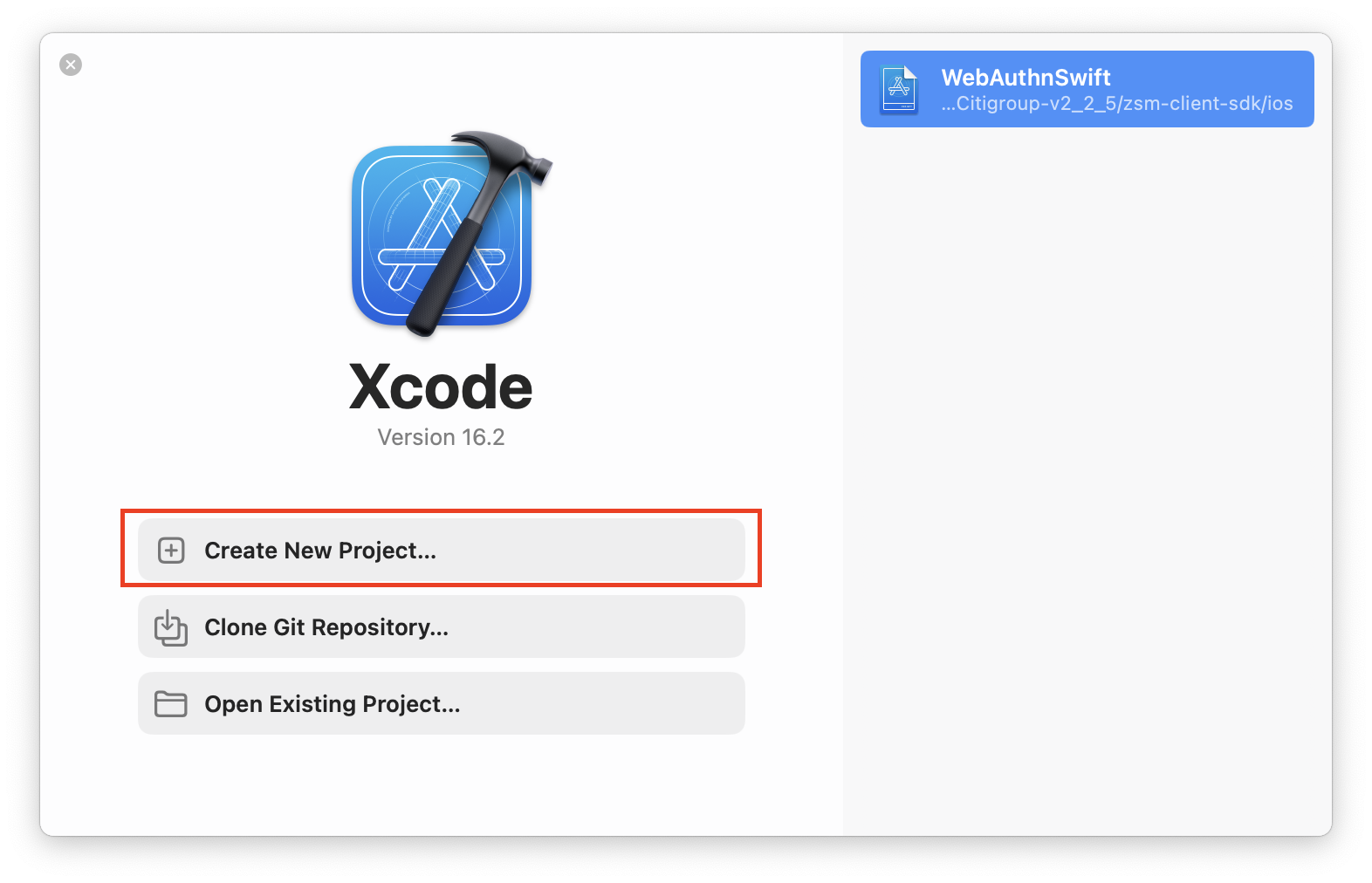
Step #3: Select a Platform and Template
In this case, we will prepare the project as an App intended to be run on the iOS platform. After making your selections, click the Next button to proceed.
Step #4: Name the Project
Choose any name you would like. Then, select your team (note that this is needed to perform a full build after adding the ZSM Client SDK to the project for it to function for testing purposes. Add your organization's name, and finally select the language you wish to employ. We'll be using Swift for the purposes of this example). Click the Next button.
Step #5: Decide Where You Would Like to Save the Project
Once you navigate to your desired save location in the Finder dialog, click Finish.
Step #6: Add the Framework to the Project
Right-click on the side panel, and select Add Files to “<YOUR_PROJECT>”
Browse to the folder location into which you saved the ZSM Client SDK and select the Framework directory contained therein.
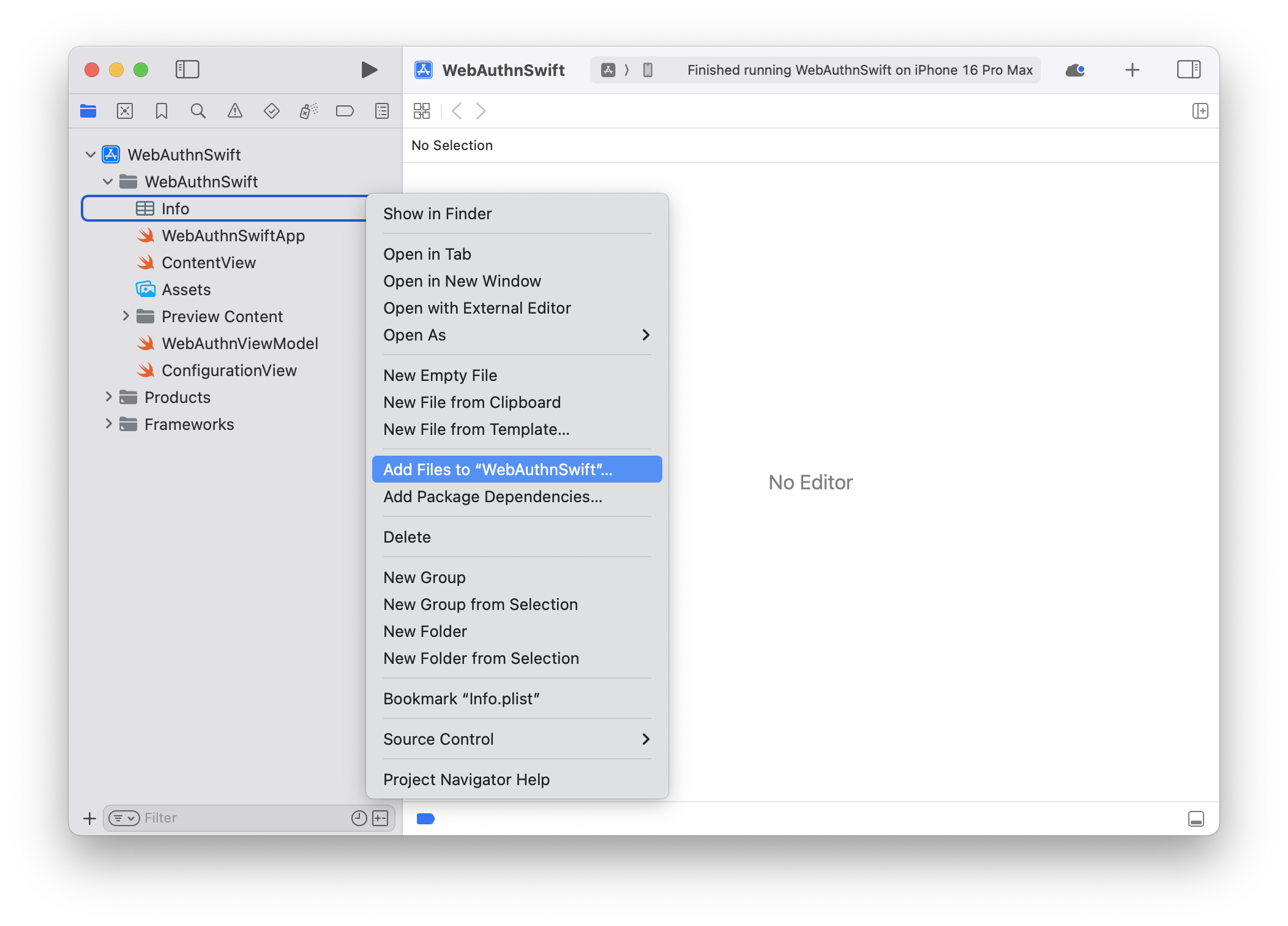
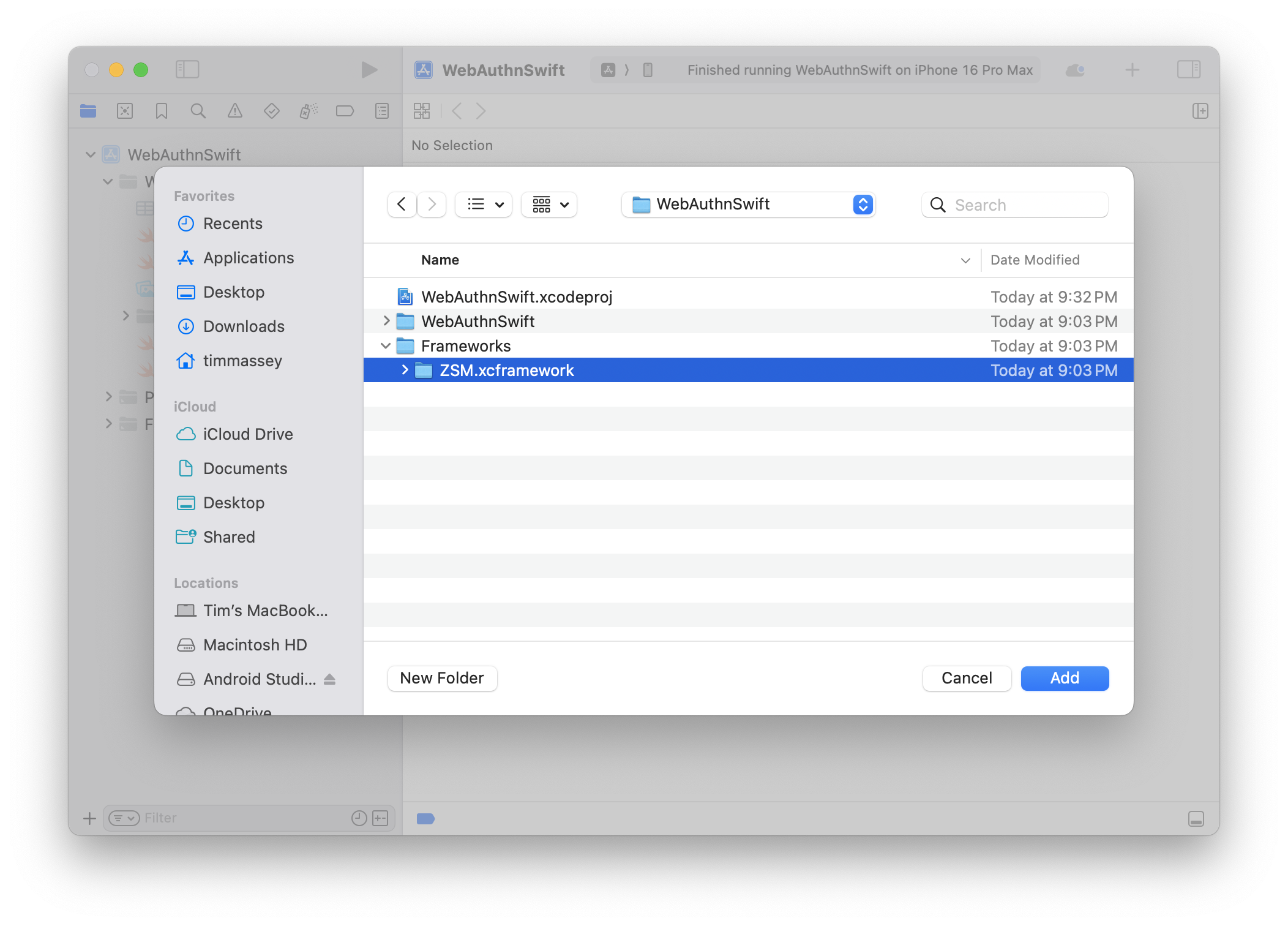
Step #7: Ensure the Add to Targets Checkbox is Selected
Optionally select Copy Items (if you're creating the project in a different location, or intend to create more than one using the framework).
Step #8: Finally, Click the Add button.
Your project structure should now resemble the following:
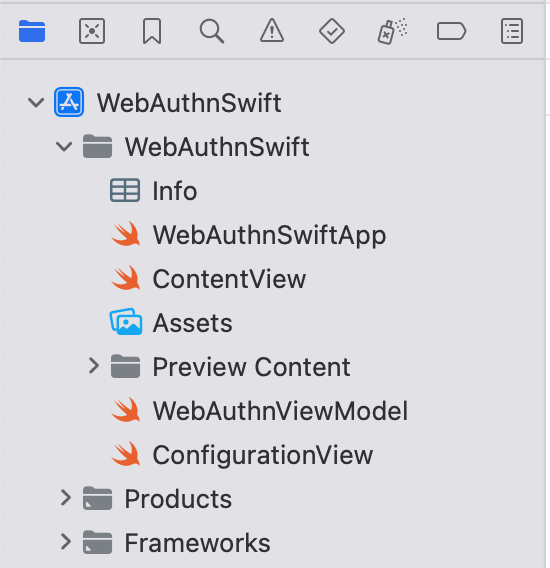
iOS Initialization
Jump to: Swift, Objective-C
Initialize a UMFAClient instance from the ZSM module by creating an instance of the ZSMConfig class with the necessary configuration parameters such as host_url, application_id, and consumer_id. Then, use the UMFAClient constructor to initialize the instance, which is required for performing all Universal MFA operations.
Swift
Initialization
Usage
func initializeZSM() {
        let config = ZSMConfig(json: [
            "host_url": hostUrl,
            "application_id": applicationId,
            "application_environment": "TEST",
            "consumer_id": consumerId
        ])

        config.logLevel = .Debug
        config.logFunction = { level, message in
            print("[\(level)] \(message)")
        }

        let client = UMFAClient(config)
    }
Returns
The initialized UMFAClient instance.
Configuration Parameters
Initialize the ZSMConfig object with the required configuration.
Parameters
| Parameter Name | Data Type | Description | Default Value |
|---|---|---|---|
host_url | NSURL | The URL of the ZSM server. | Required |
application_id | NSString | The environment name (e.g., "TEST", "PROD"). | Required |
consumer_id | NSString | The consumer identifier. | Required |
application_environment | NSString | The environment name (e.g., "TEST", "PROD"). | Required, "TEST" |
request_timeout_ms | NSUInteger | Network timeout while performing remote transactions (in milliseconds). | 30000 |
retry_count | NSUInteger | Number of retries for network transactions. | 0 |
perform_network_health_check | BOOL | Whether to perform a health check prior to instantiation. | YES |
headers | NSDictionary | Headers used while performing remote transactions. | nil |
metadata | NSDictionary | Metadata used while performing remote transactions. | nil |
keychain_group | NSString? | Shared keychain group ID for multiple applications of the same vendor. | nil |
mpc_algorithm | MPCAlgorithm | The encryption algorithm for transactions. | .ECDSAP256 |
requires_biometrics | BOOL | Whether to bypass biometrics (assuming implementation outside the API). | NO |
logLevel | LogLevel | The logging level for the API. | .Info |
log_function | (LogLevel, NSString) -> Void | A callback function for custom log handling. | nil |
Configuring Logging
The ZSM SDK provides flexible logging configuration options. You can set the log level and provide a custom logging implementation to route log messages to your application's logging infrastructure.
Setting Log Level
You can set the log level either during initialization or after creating the ZSMConfig object:
// Option 1: During initialization via JSON
let config = ZSMConfig(json: [
    "host_url": hostUrl,
    "application_id": applicationId,
    "consumer_id": consumerId,
    "log_level": LogLevel.trace.rawValue // Set log level in the configuration
])

// Option 2: After initialization
config.logLevel = .trace
Custom Logging Implementation
You can provide a custom logging function to capture and process log messages in your application:
// Set custom logging function
config.logFunction = { level, message in
    // Format and route logs as needed
    let formattedMessage = "[\(level)] \(message)"

    switch level {
    case .trace:
        os_log("%{public}@", log: .default, type: .debug, formattedMessage)
    case .debug:
        os_log("%{public}@", log: .default, type: .debug, formattedMessage)
    case .info:
        os_log("%{public}@", log: .default, type: .info, formattedMessage)
    case .warn:
        os_log("%{public}@", log: .default, type: .error, formattedMessage)
    case .error, .fatal:
        os_log("%{public}@", log: .default, type: .fault, formattedMessage)
    @unknown default:
        os_log("%{public}@", log: .default, type: .default, formattedMessage)
    }
}
The logging function is called with two parameters:
level: A LogLevel enum value indicating the severitymessage: The log message as a String
You can use this callback to integrate with various logging frameworks such as:
- Apple's unified logging system (os_log)
- CocoaLumberjack
- Custom logging solutions
LogLevel Enum
enum LogLevel: Int {
    case trace = -1
    case debug = 0
    case info = 1
    case warn = 2
    case error = 3
    case fatal = 4
}
LogLevel Descriptions
| Level | Description |
|---|---|
| LogLevelTrace | Used for debugging purposes. Provides the most granular information at the lowest detailed level, including network round trips. |
| LogLevelDebug | Provides general timing information for debugging purposes. |
| LogLevelInfo | Used for recording informational messages that highlight the application's progress at a high level. |
| LogLevelWarn | Indicates potentially harmful situations. |
| LogLevelError | Used for recording error events that might still allow the application to continue running. |
| LogLevelFatal | Used for recording severe error events that will presumably lead the application to abort. |
Returns
The initialized ZSMConfig object.
Objective-C
Initialization
Usage
NSURL *hostUrl = [NSURL URLWithString:@"https://zsm-host-server-address"];
NSString *applicationId = @"########-####-####-####-############"
NSString *consumerId = @"consumer123";

ZSMConfig *config = [[ZSMConfig alloc] initWithJSON:@{@"host_url": hostUrl, @"application_id":applicationId,
@"consumer_id":consumerId}];

config.logLevel = LogLevelDebug;
config.logFunction = ^(LogLevel level, NSString *message) {
    NSLog(@"[%ld] %@", (long)level, message);
};

UMFAClient *client = [[UMFAClient alloc] initWithConfig:config];
Returns
The initialized UMFAClient instance.
Configuration Parameters
Initialize the ZSMConfig object with the required configuration.
Parameters
| Parameter Name | Data Type | Description | Default Value |
|---|---|---|---|
host_url | NSURL * | The URL of the ZSM server. | Required |
application_id | NSString * | Unique application identifier. | Required |
consumer_id | NSString * | The consumer identifier. | Required |
application_environment | NSString * | The environment name (e.g., "TEST", "PROD"). | Required, "TEST" |
request_timeout_ms | NSUInteger | Network timeout while performing remote transactions (in milliseconds). | 30000 (30s) |
retry_count | NSUInteger | Number of retries for network transactions. | 0 |
perform_network_health_check | BOOL | Whether to perform a health check prior to instantiation. | YES |
headers | NSDictionary * | Headers used while performing remote transactions. | nil |
metadata | NSDictionary * | Metadata used while performing remote transactions. | nil |
keychain_group | NSString * | Shared keychain group ID for multiple applications of the same vendor. | nil |
mpc_algorithm | MPCAlgorithm | The encryption algorithm for transactions. | .MPCAlgorithmECDSAP256 |
requires_biometrics | BOOL | Whether to bypass biometrics (assuming implementation outside the API). | NO |
log_level | LogLevel | The logging level for the API. | .LogLevelInfo |
log_function | ZSMLoggingCallback | A callback function for custom log handling. | nil |
Configuring Logging
The ZSM SDK provides flexible logging configuration options for Objective-C applications. You can set the log level and provide a custom logging implementation to route log messages to your application's logging infrastructure.
Setting Log Level
You can set the log level either during initialization or after creating the ZSMConfig object:
// Option 1: During initialization via JSON dictionary
NSDictionary *configDict = @{
    @"host_url": hostUrlString,
    @"application_id": applicationId,
    @"consumer_id": consumerId,
    @"log_level": @(LogLevelTrace)  // Set log level in the configuration
};
ZSMConfig *config = [[ZSMConfig alloc] initWithJSON:configDict];

// Option 2: After initialization
config.logLevel = LogLevelTrace;
Custom Logging Implementation
You can provide a custom logging function to capture and process log messages in your application:
// Set custom logging function with a block
config.logFunction = ^(LogLevel level, NSString *message) {
    // Format and route logs as needed
    NSString *levelString;
    switch (level) {
        case LogLevelTrace:
            levelString = @"TRACE";
            break;
        case LogLevelDebug:
            levelString = @"DEBUG";
            break;
        case LogLevelInfo:
            levelString = @"INFO";
            break;
        case LogLevelWarn:
            levelString = @"WARN";
            break;
        case LogLevelError:
            levelString = @"ERROR";
            break;
        case LogLevelFatal:
            levelString = @"FATAL";
            break;
        default:
            levelString = @"UNKNOWN";
            break;
    }

    NSString *formattedMessage = [NSString stringWithFormat:@"[%@] %@", levelString, message];

    // Route to your logging system
    NSLog(@"%@", formattedMessage);

    // Or use os_log if targeting iOS 10+
    if (@available(iOS 10.0, *)) {
        os_log_with_type(OS_LOG_DEFAULT, OS_LOG_TYPE_INFO, "%{public}@", formattedMessage);
    }
};
The logging function is called with two parameters:
level: A LogLevel enum value indicating the severitymessage: The log message as an NSString
You can use this callback to integrate with various logging frameworks such as:
- NSLog (basic logging)
- Apple's unified logging system (os_log)
- CocoaLumberjack
- Custom logging solutions
LogLevel Enum
typedef NS_ENUM(NSInteger, LogLevel) {
    LogLevelTrace = -1,
    LogLevelDebug = 0,
    LogLevelInfo,
    LogLevelWarn,
    LogLevelError,
    LogLevelFatal
};
LogLevel Descriptions
| Level | Description |
|---|---|
| LogLevelTrace | Used for debugging purposes. Provides the most granular information at the lowest detailed level, including network round trips. |
| LogLevelDebug | Provides general timing information for debugging purposes. |
| LogLevelInfo | Used for recording informational messages that highlight the application's progress at a high level. |
| LogLevelWarn | Indicates potentially harmful situations. |
| LogLevelError | Used for recording error events that might still allow the application to continue running. |
| LogLevelFatal | Used for recording severe error events that will presumably lead the application to abort. |
Returns
The initialized ZSMConfig object.
UMFA APIs for Native iOS Applications
The Universal MFA (UMFA) module provides a flexible solution for handling multi-factor authentication processes. It leverages FIDO2 technology to enable secure credentials bound to the user's device.
Interface Definitions
Jump to: Swift, Objective-C
Getting the version number of the SDK library: UMFAClient.versionString
To retrieve the version number of the SDK library use the class property UMFAClient.versionString. It will return the version number in semantic versioning format, major.minor.patch.
Swift
Creating a UMFA Client
UMFAClient(ZSMConfig)
UMFAClient(ZSMConfig, relyingParty: RelyingParty)
Parameters
| Parameter Name | Data Type | Description |
|---|---|---|
| config | ZSMConfig | Configuration for the UMFA client |
| relyingParty | RelyingParty | An instance of RelyingParty to handle WebAuthn authentication (optional) |
Check Enrollment Status
func checkEnrollment(userId: String, completion: @escaping ([String: Any]?, [String: String]?, ZSMError?) -> Void)
Description
Checks if a user has previously registered credentials on this device and retrieves the enrollment status.
Parameters
| Parameter Name | Data Type | Description |
|---|---|---|
| userId | String | The unique identifier for the user |
| completion | ([String: Any]?, [String: String]?, ZSMError?) -> Void | Completion handler called with enrollment data or error |
Returns in Completion Handler
| Parameter Name | Data Type | Description |
|---|---|---|
| data | [String: Any]? | The enrollment status information if user is enrolled |
| metadata | [String: String]? | Additional metadata related to the enrollment status |
| error | ZSMError? | Error object in case of failure; otherwise, nil |
Enrollment
func enroll(userId: String, completion: @escaping ([String: Any]?, [String: String]?, ZSMError?) -> Void)
Description
Initiates the enrollment process for a user, creating and storing credentials on the device.
Parameters
| Parameter Name | Data Type | Description |
|---|---|---|
| userId | String | The unique identifier for the user |
| completion | ([String: Any]?, [String: String]?, ZSMError?) -> Void | Completion handler called with enrollment result or error |
Returns in Completion Handler
| Parameter Name | Data Type | Description |
|---|---|---|
| data | [String: Any]? | The enrollment data including token |
| metadata | [String: String]? | Additional metadata related to the enrollment |
| error | ZSMError? | Error object in case of failure; otherwise, nil |
Authentication
func authenticate(userId: String, completion: @escaping ([String: Any]?, [String: String]?, ZSMError?) -> Void)
Description
Authenticates a previously enrolled user using their device credentials.
Parameters
| Parameter Name | Data Type | Description |
|---|---|---|
| userId | String | The unique identifier for the user |
| completion | ([String: Any]?, [String: String]?, ZSMError?) -> Void | Completion handler called with authentication result or error |
Returns in Completion Handler
| Parameter Name | Data Type | Description |
|---|---|---|
| data | [String: Any]? | The authentication result data, including authentication token |
| metadata | [String: String]? | Additional metadata related to the authentication |
| error | ZSMError? | Error object in case of failure; otherwise, nil |
Unenrollment
func unenroll(userId: String, completion: @escaping (Bool) -> Void)
Description
Unenrolls a user by removing their stored credentials from the device.
Parameters
| Parameter Name | Data Type | Description |
|---|---|---|
| userId | String | The unique identifier for the user to unenroll |
| completion | (Bool) -> Void | Completion handler called with success status of the unenrollment |
Returns in Completion Handler
| Parameter Name | Data Type | Description |
|---|---|---|
| success | Bool | Indicates whether the unenrollment was successful |
Objective-C
Creating a UMFA Client
- (instancetype)initWithConfig:(nonnull ZSMConfig *)config;
- (instancetype)initWithConfig:(nonnull ZSMConfig *)config relyingParty:(nonnull RelyingParty *)relyingParty;
Parameters
| Parameter Name | Data Type | Description |
|---|---|---|
| config | ZSMConfig * | Configuration for the UMFA client |
| relyingParty | RelyingParty * | An instance of RelyingParty to handle WebAuthn authentication (optional) |
Check Enrollment Status
- (void)checkEnrollment:(NSString *)userId
             completion:(void (^)(NSDictionary * _Nullable data, NSDictionary<NSString *, NSString *> * _Nullable metadata, ZSMError * _Nullable error))completion;
Description
Checks if a user has previously registered credentials on this device and retrieves the enrollment status.
Parameters
| Parameter Name | Data Type | Description |
|---|---|---|
| userId | NSString * | The unique identifier for the user |
| completion | void (^)(NSDictionary * _Nullable, NSDictionary<NSString *, NSString *> * _Nullable, ZSMError * _Nullable) | Completion handler called with enrollment data or error |
Returns in Completion Handler
| Parameter Name | Data Type | Description |
|---|---|---|
| data | NSDictionary * _Nullable | The enrollment status information if user is enrolled |
| metadata | NSDictionary<NSString *, NSString *> * | Additional metadata related to the enrollment status |
| error | ZSMError * _Nullable | Error object in case of failure; otherwise, nil |
Enrollment
- (void)enroll:(NSString *)userId
    completion:(void (^)(NSDictionary * _Nullable data, NSDictionary<NSString *, NSString *> * _Nullable metadata, ZSMError * _Nullable error))completion;
Description
Initiates the enrollment process for a user, creating and storing credentials on the device.
Parameters
| Parameter Name | Data Type | Description |
|---|---|---|
| userId | NSString * | The unique identifier for the user |
| completion | void (^)(NSDictionary * _Nullable, NSDictionary<NSString *, NSString *> * _Nullable, ZSMError * _Nullable) | Completion handler called with enrollment result or error |
Returns in Completion Handler
| Parameter Name | Data Type | Description |
|---|---|---|
| data | NSDictionary * _Nullable | The enrollment data including token |
| metadata | NSDictionary<NSString *, NSString *> * | Additional metadata related to the enrollment |
| error | ZSMError * _Nullable | Error object in case of failure; otherwise, nil |
Authentication
- (void)authenticate:(NSString *)userId
          completion:(void (^)(NSDictionary * _Nullable data, NSDictionary<NSString *, NSString *> * _Nullable metadata, ZSMError * _Nullable error))completion;
Description
Authenticates a previously enrolled user using their device credentials.
Parameters
| Parameter Name | Data Type | Description |
|---|---|---|
| userId | NSString * | The unique identifier for the user |
| completion | void (^)(NSDictionary * _Nullable, NSDictionary<NSString *, NSString *> * _Nullable, ZSMError * _Nullable) | Completion handler called with authentication result or error |
Returns in Completion Handler
| Parameter Name | Data Type | Description |
|---|---|---|
| data | NSDictionary * _Nullable | The authentication result data, including authentication token |
| metadata | NSDictionary<NSString *, NSString *> * | Additional metadata related to the authentication |
| error | ZSMError * _Nullable | Error object in case of failure; otherwise, nil |
Unenrollment
- (void)unenroll:(NSString *)userId
      completion:(void (^)(BOOL success))completion;
Description
Unenrolls a user by removing their stored credentials from the device.
Parameters
| Parameter Name | Data Type | Description |
|---|---|---|
| userId | NSString * | The unique identifier for the user to unenroll |
| completion | void (^)(BOOL) | Completion handler called with success status of the unenrollment |
Returns in Completion Handler
| Parameter Name | Data Type | Description |
|---|---|---|
| success | BOOL | Indicates whether the unenrollment was successful |
Out-of-Band Token Validation
For out-of-band validation of the token returned by enroll and authenticate, use the /api/umfa/validate-token endpoint.
HTTP Method
POST
URL
$ZSM_AUTHENTICATOR_HOST/api/umfa/validate-token
Request Headers
| Header | Value | Description |
|---|---|---|
Content-Type | application/json | Indicates the payload format |
Authorization | Bearer XXXXXXXX-XXXX-XXXX-XXXX-XXXXXXXXXXXX | Authorizes the API (API Key expected) |
Request Body
| Field | Type | Required | Description |
|---|---|---|---|
application_id | string | Yes | The unique identifier for the request's (server-to-server) application, parsed as a UUID. |
user_id | string | Yes | The unique identifier for the user. |
token | string | Yes | The token received from a previous UMFA authentication operation. |
token_type | string | No | An optional token type specifying the type of validation. Can be "credential" to validate a get() PublicKeyCredential. |
trace_id | string | No | An optional identifier for the validate-token operation. If a trace_id is not provided, then a random trace_id will be generated. |
Successful Response (HTTP 200)
{
  "user_id": "janedoe@gmail.com",
  "trace_id": "7a626fe9-ce25-4b87-8eb2-b12a7ee20143"
}
| Field | Type | Description |
|---|---|---|
user_id | string | The unique identifier for the user that was validated. |
trace_id | string | The trace identifier for the validate-token operation. |
Error Responses
{
  "status": 400,
  "trace_id": "7a626fe9-ce25-4b87-8eb2-b12a7ee20143",
  "message": "Validate token failed with: MFA login JWT was invalid: Invalid JWT: There is no user_id claim"
}
| Field | Type | Description |
|---|---|---|
status | integer | The HTTP response code. |
trace_id | string | The trace identifier for the verification operation. |
message | string | Additional information about the validation failure. |
| Status Code | Description | Example Response |
|---|---|---|
400 Bad Request | Incorrectly formed request | { ... "message": "No data provided." } |
401 Unauthorized | Invalid or expired token | { ... "message": "Validate token failed with: MFA login JWT was invalid: Invalid JWT: There is no webauthn_time claim" } |
500 Internal Server Error | Server encountered an issue | { ... "message": "Server encountered an internal error" } |
Example cURL Commands
HTTP Success (200) JWT Validation
$ curl -s - X POST -H "Content-Type: application/json"
-H "Authorization: Bearer XXXXXXXX-XXXX-XXXX-XXXX-XXXXXXXXXXXX"
-d '{"application_id": "bf468b21-308f-49d2-9031-83556e0781d2",
"user_id": "janedoe@gmail.com", "token": "eyJ0eX ... Nk9uWg"}'
$ZSM_AUTHENTICATOR_HOST/api/umfa/validate-token | jq
{
  "user_id": "c7d7d44b-385e-4e83-bdd5-37e4fb3c8b7d",
  "trace_id": "7a626fe9-ce25-4b87-8eb2-b12a7ee20143"
}
HTTP Success (200) Credential Validation
$ curl -s - X POST -H "Content-Type: application/json"
-H "Authorization: Bearer XXXXXXXX-XXXX-XXXX-XXXX-XXXXXXXXXXXX"
-d '{"application_id": "bf468b21-308f-49d2-9031-83556e0781d2",
"user_id": "janedoe@gmail.com",
"token":
{
  "id":"",
  "rawId":"rF2kHiKUQCO0d0Y4Wek9kA",
  "response":
  {
    "clientDataJSON":"eyJ0eXBlIjoid2ViYXV0aG4uZ2V0IiwiY2hhbGxlbmdlIjoiNWtMb2tjOXpkZzhuU2RFT2hzV1o5MUwzZTNGdjlqbERlRU9KcF93SnRkayIsIm9yaWdpbiI6Imh0dHBzOi8venNtLmFwcCJ9","authenticatorData":"ZxcNEwlh6TBKTTC5FMSFPTOboOZWzGeOSiYY7rm67WUFAAAAAQ","signature":"UOOoSBAwemLSPvqLVG2MDw41cqKLcHEUp4LAFGuvrVPsR1GWBYTWtmpqG_Jtjn-DXq5tGGAE58SYvu7uvcw7oHqquoNG4VEdm4Tz7UNe5kdSoc3RFpEGGDLCIz28iKXaBPbv3jdHi4xGoCIJKIIeHyh0-g7LUb4ZjYFIZHyXds7cdH9ozXRt5ERWUVvH1axDnPDKpntGQXG8FC4VXd0Rc01-4bBklNSGHOVgbO-Rpm8HgeFj3J4uOZDJ0xP7pnIkwOo5Uw_0ZO9xI66S8NQEtVzXVUKXs98f38LpLiLGEPlWtr_RIdf9xgsmHx-oVRJxC37gzV2ydSGKJaV6bNsXOw"},
    "type":"public-key"
  }
},
"token-type": "credential"}'
$ZSM_AUTHENTICATOR_HOST/api/umfa/validate-token | jq
{
  "user_id": "c7d7d44b-385e-4e83-bdd5-37e4fb3c8b7d",
  "trace_id": "7a626fe9-ce25-4b87-8eb2-b12a7ee20143"
}
Bad Request (400)
$ curl -s - X POST -H "Content-Type: application/json"
-H "Authorization: Bearer XXXXXXXX-XXXX-XXXX-XXXX-XXXXXXXXXXXX"
-d '{"application_id": "bf468b21-308f-49d2-9031-83556e0781d2",
"user_id": "janedoe@gmail.com"}'
$ZSM_AUTHENTICATOR_HOST/api/umfa/validate-token | jq
{
  "status": 400,
  "trace_id": "7a626fe9-ce25-4b87-8eb2-b12a7ee20143",
  "message": "Invalid data provided"
}
Unauthorized (401)
$ curl -s - X POST -H "Content-Type: application/json"
-H "Authorization: Bearer XXXXXXXX-XXXX-XXXX-XXXX-XXXXXXXXXXXX"
-d '{"application_id": "bf468b21-308f-49d2-9031-83556e0781d2",
"user_id": "janedoe@gmail.com", "token": "eyJ0eX ... Nk9uWg"}'
$ZSM_AUTHENTICATOR_HOST/api/umfa/validate-token | jq
{
  "status": 401,
  "trace_id": "7a626fe9-ce25-4b87-8eb2-b12a7ee20143",
  "message": "Validate token failed with: MFA login JWT was invalid: Invalid JWT: Invalid claim: The token has expired: 2024-12-10 18:41:03.0 +00:00:00"
}
Validate Token Failures
The server's token validation can fail for two general reasons:
- HTTP 400 Response: The request was malformed (i.e.,
tokenwas not included) - HTTP 401 Response: The token was invalid, which could have various causes
- Token's
user_iddid not match the supplieduser_id - Token has expired (the token's "exp" claim has passed)
- Token was missing required claims ("iss", "sub", "iat", "exp", "user_id", "webauthn_time")
- Token was not signed by the expected ZSM server's certificate
- Token was not a valid PublicKeyCredential when supplied
"token_type" = "credential"
- Token's
Decoded JWT
Below, we illustrate an example of a decoded UMFA JWT (Header and Payload).
The validation performs standard JWT validation like signature, liveness,
and structure. The validation also ensures that the payload claim user_id
matches that of the supplied user_id.
{
  "typ": "JWT",
  "alg": "RS256",
  "iss": "Ideem::Authenticator"
}
{
  "sub": "UMFA_login",
  "iss": "Ideem::Authenticator",
  "aud": [
    "Ideem::Authenticator",
    "Ideem::ZSM",
    "Ideem::ZSM_CLI"
  ],
  "iat": 1729280408,
  "exp": 1729366808,
  "jti": "042142c1-40c8-4d9b-bf5e-1fa84e0f3f03",
  "user_id": "c7d7d44b-385e-4e83-bdd5-37e4fb3c8b7d",
  "userpw_time": "2024-10-18T19:40:07.053364351+00:00",
  "webauthn_time": "2024-10-18T19:40:08.053364351+00:00"
}
ZSM Error Codes
| Name | Value | Explanation |
|---|---|---|
| ZSMErrorCode.Error | 0 | An error occurred during the ZSM api operation. Please check the error details for more information. |
| ZSMErrorCode.NetworkFailure | 1 | The co-operating server could not be reached, perhaps because the device is not connected to the internet, a port is blocked, or the server is offline. Please retry the operation. |
| ZSMErrorCode.InvalidLogin | 2 | The authentication server returned an invalid login. Please try again. |
| ZSMErrorCode.UnauthorizedUser | 3 | The user is not enrolled or banned and cannot complete the secure operation. Please re-enroll or contact an administrator. |
| ZSMErrorCode.BadCryptograpicValue | 100 | An unsupported cryptographic parameter set was used and the secure operation was aborted. Please retry with a valid cryptographic parameter set. |
| ZSMErrorCode.CryptographicFailure | 101 | The cryptographic operation failed for an undisclosed reason, such as keys out of sync, communication error, or timed out. Please try again. |
| ZSMErrorCode.CryptographicKey | 102 | A message cannot be signed without generating the cryptographic key first. Please generate the cryptographic key and then try again. |
| ZSMErrorCode.SecureStorageUnavailable | 103 | The secure storage for key information is currently unavailable. Please try again later. |
| ZSMErrorCode.SecureStorageFailure | 104 | The secure storage operation failed due to an internal error. Please try again. |
| ZSMErrorCode.SecureStorageUnauthenticated | 105 | The secure storage operation failed because the user is not authenticated. Please authenticate the user and try again. |
| ZSMErrorCode.RegistrationFailure | 200 | The registration process failed due to an error. Please try again. |
| ZSMErrorCode.RegistrationIncomplete | 201 | The registration process is incomplete and requires additional information. Please provide the necessary information to complete the registration. |
| ZSMErrorCode.DeviceSuspended | 300 | The device is suspended and cannot perform the requested |
| operation. Please contact an administrator for further assistance. | ||
| ZSMErrorCode.DeviceDeactivated | 301 | The device is deactivated and cannot perform the requested |
| operation. Please contact an administrator for further assistance. | ||
| ZSMErrorCode.AccountDeactivated | 303 | The user account is deactivated and cannot perform the |
| requested operation. Please contact an administrator for further assistance. | ||
| ZSMErrorCode.AuthenticationFailure | 400 | The authentication process failed due to an error. Please try again. |
| ZSMErrorCode.AuthenticationIncomplete | 401 | The authentication process is incomplete and requires additional information. Please provide the necessary information to complete the authentication. |
| ZSMErrorCode.DeviceNotFound | 500 | The device could not be found. Please ensure the device is registered and try again. |
| ZSMErrorCode.DeviceNotLinked | 501 | The device is not linked to the user account. Please link the device to the user account and try again. |
| ZSMErrorCode.DeviceAlreadyLinked | 502 | The device is already linked to another user account. Please unlink the device and try again. |
| ZSMErrorCode.DeviceLinkingFailure | 503 | The device linking process failed due to an error. Please try again. |
| ZSMErrorCode.DeviceUnlinkingFailure | 504 | The device unlinking process failed due to an error. Please try again. |
| ZSMErrorCode.InvalidRequest | 600 | The request is invalid or malformed. Please check the request parameters and try again. |
| ZSMErrorCode.InternalServerError | 700 | An internal server error occurred. Please try again later. |
| ZSMErrorCode.UnknownError | 800 | An unknown error occurred. Please contact support for assistance. |
Glossary
API Consumers
API consumers are third-parties that are authorized by either a vendor or customer organization to have access to selected ZSM APIs for purposes of performing trusted third-party functions and operations. ZSM provides optional integrations for selected trusted third parties such.
Consumer
Consumers are the end-users of an application which contains the ZSM Client SDK. They are the customers of a ZSM customer organization.
CredentialID
WebAuthn identifier for a credential, synonymous with the identifier used for an enrollment. CredentialID is returned during the WebAuthn create() call and is used by the Relying Party server to store and find the Public Key needed to verify signed challenges during WebAuthn get() calls.
Customer Client Application
A customer organization’s client application (iOS, Android, or Web) that has incorporated the ZSM Cryptographic Module using the ZSM Client SDK
Customer Host Server (aka Relying Party Server)
A customer organization’s server that validates challenges signed by ZSM for consumer enrollments and verifications.
Customer Organization
ZSM customer that integrates the ZSM Client SDK into their application(s) and uses the ZSM Management APIs and Web Administration Console to manage their use of the service.
Enrollment
Enrollment is a term used to describe the unique combination of installation, consumer, application, and application environment. There is one enrollment for each unique combination of these four entities. Keysets are associated with an enrollment.
Instance ID (deprecated)
A unique identifier that identifies a specific instance of an application on a specific installation of the ZSM client on a device. This identifier is unique per application such that two applications installed on the same installation on a device have different instance identifiers. And, a specific application installed on different devices will each have their own unique instance identifiers.
Organization
Three types of organizations are defined in ZSM: API consumers, customers, and vendors.
Server Client APIs
REST APIs used to facilitate transactions between the ZSM Server and Client for consumer registration, key set generation, signing, and signature verification.
Server Management APIs
REST APIs used to manage the ZSM system, including organization management, application management, installation management, and consumer management.
User
Individual associated with a Customer who has registered an account with the ZSM service.
Vendor
This vendor organization is the organization that provides the ZSM system to customers.